

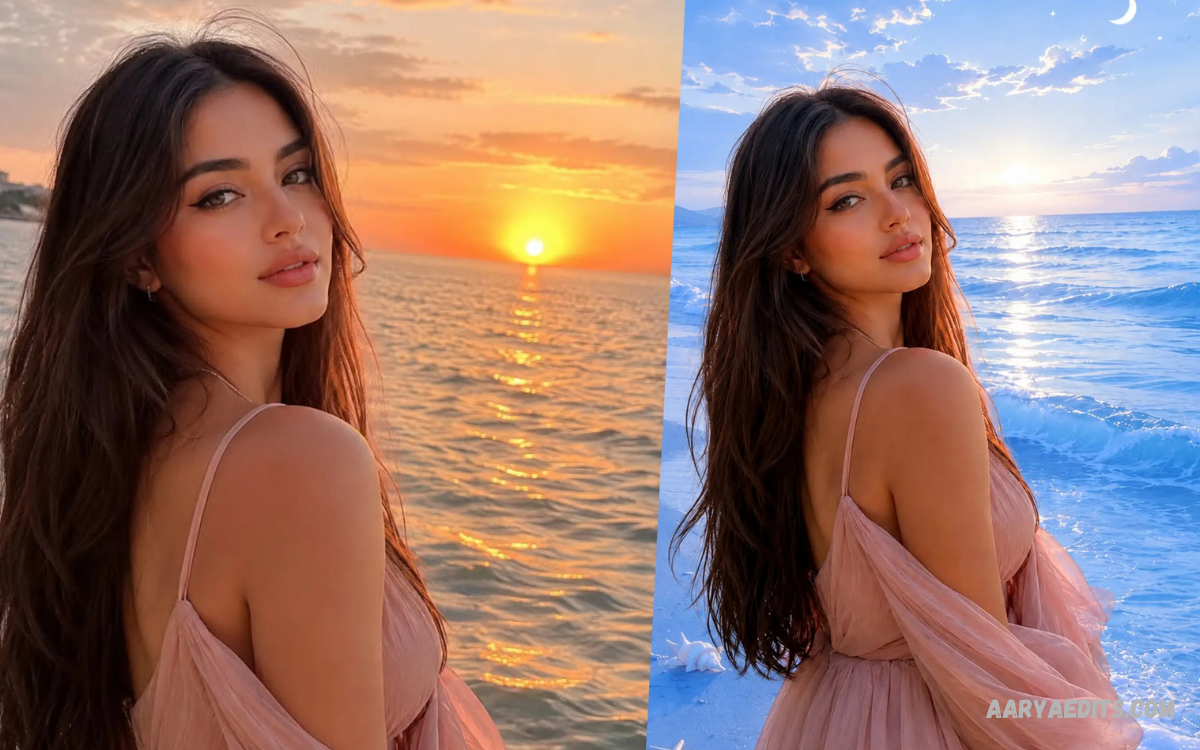
An online AI photo editor makes photo editing faster, simpler, and more accessible by using artificial intelligence to automate complex editing tasks. Instead of spending hours adjusting individual settings, users can upload an image, describe the desired change, and let AI handle many editing processes.
Modern AI photo editors can perform tasks such as removing unwanted objects, replacing backgrounds, improving image quality, adjusting colors, expanding images, and generating new elements. Adobe and Canva, for example, provide browser-based AI editing features that allow users to make sophisticated changes without requiring advanced design skills.
What Is an Online AI Photo Editor?
An online AI photo editor is a browser-based editing platform that uses artificial intelligence to analyze and modify images. Unlike traditional software that often requires extensive manual adjustments, AI-powered editors can understand image content and apply changes based on simple instructions.
These platforms are useful for beginners, creators, students, marketers, photographers, and businesses that need quick visual improvements. Many tools combine conventional editing controls with AI capabilities, creating a flexible workflow for both basic corrections and creative transformations.
How Does an Online AI Photo Editor Work?
An online AI photo editor generally begins by analyzing the uploaded image to identify subjects, backgrounds, objects, colors, and other visual elements. The AI then uses this information to determine how to apply the requested change while maintaining consistency with the original image.
Text prompts have become an important part of AI editing because users can describe changes naturally rather than manually selecting every pixel. Adobe Firefly, for instance, supports prompt-based editing for adding, removing, or replacing objects and backgrounds.
Key Features of an Online AI Photo Editor
AI Object Removal
Removing unwanted objects is one of the most useful applications of AI photo editing. Instead of carefully selecting an object and manually rebuilding the surrounding area, AI can analyze the nearby pixels and generate replacement content that fits the scene.
This feature can help clean photographs containing distracting objects, visual clutter, or unwanted background elements. The quality of the result depends on factors such as image resolution, object complexity, lighting, and the surrounding background.
Background Removal
AI background removal automatically separates the main subject from its surroundings. This can be especially useful for product images, profile graphics, presentations, online stores, and social media designs.
Modern tools can often identify people and objects automatically, reducing the need for detailed manual selections. Canva, for example, provides one-click background removal alongside other AI-powered image editing features.
AI Background Replacement
Replacing a background can completely change the appearance and purpose of a photograph. An AI editor can generate or insert a new environment while attempting to preserve the subject’s position, lighting, and overall composition.
Users can describe the desired environment through a text prompt, such as a studio setting, outdoor landscape, or simple professional backdrop. Adobe Firefly supports AI-powered background replacement and allows users to describe the desired scene with prompts.
Generative Fill
Generative Fill allows users to add, remove, or replace selected areas of an image using AI-generated content. The technology analyzes the existing composition and creates content designed to blend with the surrounding image.
This capability can be useful when extending a photograph, changing an object, or experimenting with different compositions. Photoshop’s Generative Fill uses Adobe Firefly and supports nondestructive editing workflows.
Image Upscaling
Low-resolution images can lose detail when enlarged, making them unsuitable for certain designs or displays. AI upscaling attempts to reconstruct additional detail while increasing the image’s resolution and clarity.
Generative Upscale is one example of this approach, with Adobe describing it as a tool for increasing image resolution and sharpening details.
AI Color Enhancement
Color correction can significantly improve the visual quality of a photograph. AI-powered tools can help adjust brightness, contrast, saturation, tones, and overall color balance while reducing the amount of manual work required.
Some online editors combine automatic enhancement with traditional controls, allowing users to make quick AI adjustments and then fine-tune the final result manually. This combination provides greater control over the finished image.
Benefits of Using an Online AI Photo Editor
No Complex Installation
A browser-based editor eliminates the need to install large editing applications before starting a project. Users can open a compatible browser, upload an image, and begin editing through an online interface.
This approach is particularly convenient when working across different computers or devices. Photoshop’s online experience, for example, allows users to edit images directly in a browser without installing the desktop application.
Faster Editing
AI automation can reduce the time required for repetitive editing tasks. Background removal, object cleanup, image expansion, and other processes that traditionally required detailed manual work can often be completed with fewer steps.
Speed becomes especially valuable for people managing multiple images for websites, social media, marketing campaigns, or digital projects. AI allows users to spend more time on creative decisions rather than repetitive technical adjustments.
Beginner-Friendly Editing
Traditional professional photo editing can have a steep learning curve because users need to understand selections, masks, layers, curves, color adjustments, and other concepts. An online AI photo editor can simplify many of these processes through automatic tools and natural-language prompts.
Users can describe what they want instead of learning every technical function immediately. This makes AI editing useful for beginners while still providing advanced capabilities for experienced creators.
Creative Experimentation
AI photo editing is not limited to correcting existing photographs. Generative tools can also help users experiment with new compositions, backgrounds, lighting effects, objects, and visual styles.
This makes an online AI photo editor useful during the early stages of creative projects. Users can generate variations quickly and select the version that best matches their intended concept.
Online AI Photo Editor for Social Media
Social media creators often need visually appealing images that fit different formats and platforms. AI editing tools can help resize images, remove distractions, adjust colors, replace backgrounds, and create variations for different types of content.
Generative Expand is particularly useful when an image needs to fit a different aspect ratio without simply cropping away important content. Adobe describes Generative Expand as a way to extend image boundaries while maintaining the existing style and context.
Online AI Photo Editor for Businesses
Businesses can use AI photo editing for product photography, promotional graphics, advertisements, presentations, and website content. Background replacement and object editing can help create consistent visual assets without requiring every image to be photographed in a different environment.
For ecommerce projects, clean backgrounds and consistent product presentation are especially important. AI tools can simplify the process of preparing multiple images while allowing designers to review and refine the final results.
Online AI Photo Editor for Photographers
Photographers can use AI tools to accelerate routine editing while maintaining creative control. Tasks such as removing distractions, improving image quality, expanding compositions, and adjusting visual elements can become faster parts of the workflow.
AI should be treated as an editing assistant rather than a replacement for creative judgment. Photographers should review generated results carefully because automated edits can sometimes produce unexpected details or inconsistencies.
How to Use an Online AI Photo Editor
Start by choosing a reputable browser-based AI photo editor and uploading an image in a supported format. Before uploading personal photographs, review the platform’s privacy policy and understand how uploaded content is handled.
Next, select the AI feature that matches your objective, such as background removal, object removal, enhancement, or generative editing. If the platform supports text prompts, provide a clear description of the change you want rather than using an overly vague instruction.
After generating the edit, inspect the image carefully for unwanted changes or artificial-looking details. Make additional adjustments when necessary, then export the finished image in an appropriate format and resolution.
Tips for Better AI Photo Editing Results
Use clear and specific prompts when working with generative AI editing tools. Descriptions that explain the desired object, environment, lighting, or visual style can provide better direction than extremely short instructions.
Always review important areas such as faces, hands, text, edges, and small objects after an AI-generated edit. Even powerful AI systems can make mistakes, so human review remains an important part of producing a professional final image.
Read Also: AI Photo Enhancement: Transform Your Images With Smarter Editing
Is an Online AI Photo Editor Free?
Some online AI photo editors offer free tools or limited free usage, while advanced features may require credits, subscriptions, or paid plans. Adobe Firefly currently provides free AI photo editing capabilities with limits for free users, while additional features and usage can depend on the selected plan.
The best option depends on how frequently you edit images and which features you require. Someone making occasional basic edits may find a free plan sufficient, while professional creators may need higher usage limits and advanced controls.
Choosing the Best Online AI Photo Editor
Consider the editor’s AI capabilities, ease of use, export options, image quality, privacy practices, and available editing controls before choosing a platform. A good tool should provide useful automation without preventing users from making manual refinements.
It is also important to consider whether the platform supports your workflow across devices. Browser-based tools can be particularly convenient when you want to edit images without being tied to a single computer or installation.
Future of Online AI Photo Editing
AI photo editing is continuing to move toward more natural, conversational workflows. Instead of navigating through numerous menus, users can increasingly describe the desired result and allow AI to perform the technical editing steps.
Current tools already demonstrate capabilities such as generative fill, background replacement, object removal, image expansion, and AI upscaling. As these technologies develop, online editing platforms are likely to become even more capable while remaining accessible to users with limited technical experience.
Frequently Asked Questions
What is an online AI photo editor?
An online AI photo editor is a browser-based image editing tool that uses artificial intelligence to modify, enhance, or transform photographs. It can automate tasks such as object removal, background editing, enhancement, and generative image changes.
Can I edit photos online without installing software?
Yes, many modern platforms provide browser-based editing environments that work without desktop installation. Adobe’s online Photoshop and Firefly experiences, for example, provide AI-powered editing directly through a web browser.
What can an online AI photo editor do?
An online AI photo editor can perform many tasks, including background removal, object removal, background replacement, image enhancement, generative fill, image expansion, and upscaling. Available features vary between platforms.
Is AI photo editing suitable for beginners?
Yes, AI editing can be beginner-friendly because many functions rely on automatic processing or natural-language prompts. Users can start with simple edits and gradually learn more advanced controls.
Can AI remove unwanted objects from photos?
Yes, many AI photo editors include object-removal capabilities. These tools analyze the surrounding image and generate replacement content designed to make the removed area appear natural.
Can AI replace a photo background?
Yes, background replacement is a common AI photo editing feature. Users can remove an existing background and generate or select a new environment based on the available tools.
Does an online AI photo editor improve image quality?
Many AI editors provide enhancement or upscaling tools designed to improve resolution, clarity, and detail. Results can vary depending on the original image quality and the technology used by the platform.
Is an online AI photo editor better than traditional editing?
Neither approach is universally better because they serve different purposes. AI is excellent for automation and rapid experimentation, while traditional editing provides detailed manual control over individual elements.
Conclusion
An online AI photo editor provides a convenient way to enhance, transform, and create images directly from a browser. Features such as AI object removal, background replacement, generative fill, image upscaling, and automatic enhancement can significantly simplify modern photo editing.
For beginners, creators, photographers, marketers, and businesses, AI editing can reduce repetitive work while opening new creative possibilities. The best results come from combining AI automation with careful human review, clear instructions, and thoughtful creative decisions.
