

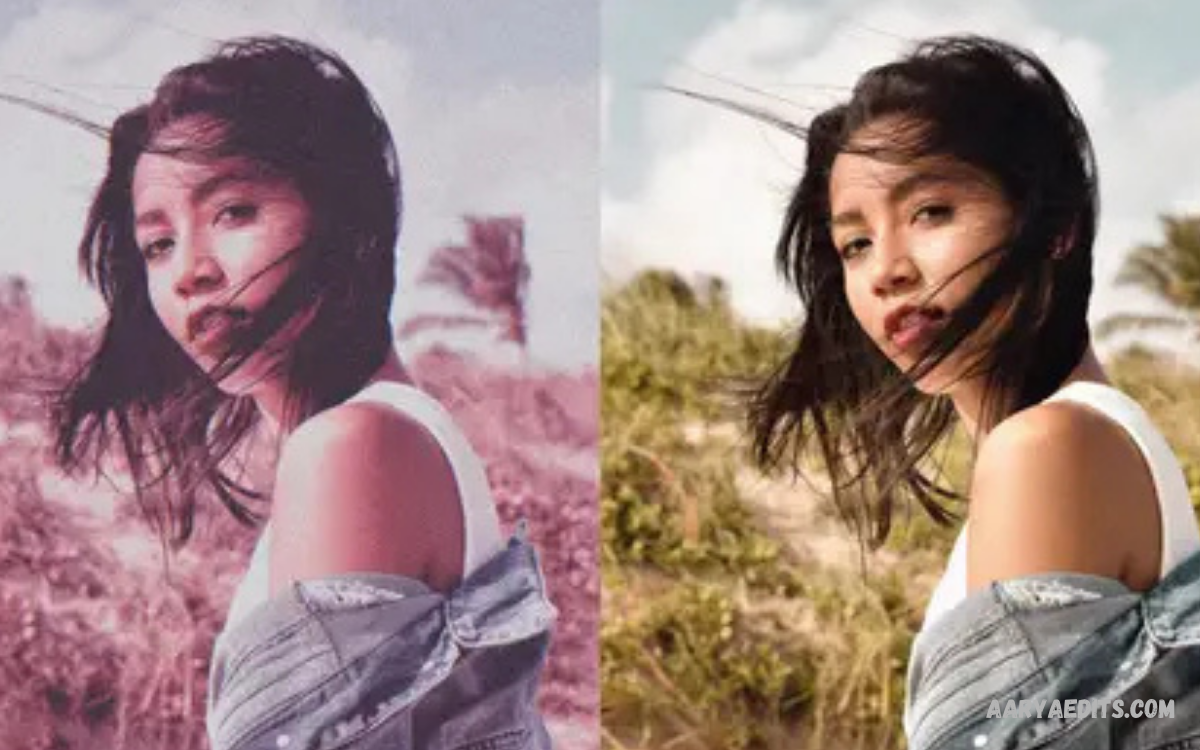
PicsArt Filters give photo editing a fast, creative way to transform ordinary images into visually engaging content. From subtle color corrections to bold artistic effects, filters can change the mood, tone, contrast, and overall appearance of a photograph within seconds.
Modern photo editing is not only about adding effects. Good editing requires understanding how colors, lighting, contrast, saturation, and composition work together.
What Are PicsArt Filters?
PicsArt Filters are preset visual effects designed to change the appearance of photos and other visual content. A filter can adjust multiple image properties at once, creating a particular color style, atmosphere, or artistic appearance without requiring users to manually modify every setting.
Filters can range from natural-looking adjustments to dramatic artistic transformations. Depending on the selected style, a photo may appear warmer, cooler, brighter, darker, softer, sharper, vintage-inspired, or more cinematic. The right choice depends on the image and the result an editor wants to achieve.
Why PicsArt Filters Are Popular
One major reason PicsArt Filters remain popular is simplicity. Instead of spending several minutes adjusting individual settings, users can preview different styles and apply a suitable effect quickly. This makes filters useful for social media posts, profile images, creative projects, and everyday photography.
Another advantage is creative variety. Different photos require different visual treatments, and a single editing style rarely works equally well for every image. PicsArt gives users the flexibility to experiment with multiple appearances until they find an effect that complements the subject, lighting, and composition.
How PicsArt Filters Transform Photos
A filter can influence several visual characteristics simultaneously. Color temperature can create a warmer or cooler appearance, while contrast can make details look stronger or softer. Saturation can increase color intensity, and brightness can change the overall exposure of an image.
The strongest results usually come from subtle adjustments rather than excessive effects. A filter should support the subject instead of distracting from it. Reducing filter intensity after application can often create a more balanced result while preserving the original character of the photograph.
How to Apply PicsArt Filters
Applying PicsArt Filters generally starts by opening a photo inside the PicsArt editor. After selecting the image, users can access the available filter options and preview different effects directly on the photograph. This preview process makes it easier to compare styles before making a final choice.
After selecting a filter, adjust its intensity when the editing controls provide that option. A lower intensity can produce a natural appearance, while stronger settings can create a more dramatic effect. Once the image looks balanced, users can continue with additional editing tools before saving the final version.
Choosing the Right Filter for Your Photo
The best filter depends on the characteristics of the original image. A bright outdoor photograph may work well with a clean, colorful style, while a portrait with soft lighting might benefit from a warmer or more subtle treatment. Landscape images can also respond differently depending on sky, vegetation, shadows, and natural colors.
Consider the purpose of the image before choosing a filter. A professional-looking photograph usually benefits from controlled colors and moderate contrast, while creative social content may support stronger effects. Matching the filter to the subject creates a more coherent visual result.
PicsArt Filters for Portrait Photography
Portrait editing requires particular care because skin tones can change quickly when strong color effects are applied. A filter that looks attractive on scenery may make a portrait appear unnatural if it significantly alters skin color or facial lighting.
For portraits, choose styles that preserve natural skin tones and facial details. After applying a filter, inspect highlights, shadows, and skin color carefully. Small reductions in intensity can make the final portrait appear cleaner and more realistic while still maintaining the desired creative mood.
PicsArt Filters for Landscape Photos
Landscape photography provides greater freedom because natural scenery contains a wide range of colors and textures. Filters can emphasize skies, greenery, architecture, mountains, beaches, or other environmental details by changing contrast and color relationships.
Warm effects can create a sunset-inspired mood, while cooler treatments can make an image feel calm and atmospheric. Strong saturation can make scenery more vibrant, but excessive color intensity may reduce realism. A balanced filter helps preserve detail while making the landscape visually stronger.
PicsArt Filters for Social Media Content
Social media images often need a recognizable visual style. Using related filter treatments across multiple photographs can create consistency within a profile or content collection. This can be particularly useful for creators who want their images to have a connected appearance.
Consistency does not mean applying the exact same intensity to every photograph. Different lighting conditions can require different adjustments. Keeping the overall color direction similar while adapting intensity to each image can produce a more professional and cohesive collection.
PicsArt Filters for Vintage Effects
Vintage-inspired editing can give modern photographs an older photographic character. Depending on the filter, this style may include muted colors, softer contrast, warmer tones, or a faded appearance. These characteristics can create a nostalgic atmosphere without requiring complicated manual editing.
Vintage effects work particularly well with street photography, old architecture, travel scenes, family memories, and creative portraits. The effect becomes more convincing when colors remain controlled rather than excessively faded. Combining a vintage filter with carefully adjusted contrast can create a more authentic visual style.
PicsArt Filters for Cinematic Looks
Cinematic editing often focuses on mood, contrast, controlled colors, and visual depth. A suitable filter can provide a foundation for this appearance, but the final result usually benefits from additional adjustments to brightness, highlights, shadows, and color balance.
A cinematic look should support the story represented by the image. Darker tones can create a dramatic atmosphere, while balanced highlights can preserve important details. Avoid applying extreme effects simply because they appear dramatic in the preview.
PicsArt Filters for Black and White Photos
Black-and-white filters remove color information and emphasize light, shadow, texture, shapes, and composition. This style can make ordinary scenes feel more artistic by directing attention toward structural details rather than color.
Portraits, architecture, street scenes, and emotional photography can work particularly well in monochrome. Before applying a black-and-white filter, consider whether the original image contains strong contrast or interesting textures. These characteristics often determine how effective the final monochrome image will appear.
Adjusting Filter Intensity
Filter intensity is one of the most important controls for maintaining image quality. A preset may look attractive at full strength but become overwhelming when applied to every part of an image. Reducing the intensity can help retain natural colors and details.
A useful approach is to begin with the selected filter at a moderate level and then compare the edited version with the original. Look for changes in skin tones, highlights, shadows, and important objects. If the filter dominates the photograph instead of enhancing it, lower the intensity.
Combining Filters With Manual Adjustments
Filters are most effective when used as a starting point rather than the entire editing process. After applying an effect, users can refine brightness, contrast, saturation, sharpness, highlights, shadows, and other available controls to better match the image.
This approach provides greater control than relying entirely on presets. A filter establishes the overall style, while manual adjustments correct specific visual problems. The combination can produce an image that feels customized instead of looking like an unchanged preset.
Using PicsArt Filters Without Overediting
Overediting can reduce image quality and make photographs look artificial. Excessive saturation may produce unrealistic colors, while very high contrast can remove detail from bright and dark areas. Strong effects can also make portraits lose natural appearance.
The goal should be enhancement rather than transformation unless a dramatic artistic effect is intentional. Compare the edited image with the original regularly during the process. If the edit improves the image while preserving its important characteristics, the filter is serving its purpose effectively.
PicsArt Filters and Color Harmony
Color harmony plays an important role in professional-looking photo editing. A filter can change the relationship between different colors, making some tones more prominent while reducing others. Understanding these relationships helps editors choose effects that complement the photograph.
For example, warm colors can create an energetic or nostalgic atmosphere, while cooler colors may create a calmer appearance. Neutral tones can help maintain a sophisticated visual style. The strongest results usually come from selecting a filter that supports the existing colors rather than fighting against them.
Creating a Consistent Editing Style
Creators who regularly publish photographs can develop a recognizable editing style by using similar color characteristics across their work. This does not require using one filter for every image. Instead, the goal is to maintain consistency in warmth, contrast, saturation, and overall mood.
Start by identifying the visual qualities you want your content to communicate. You might prefer bright and clean images, muted tones, warm colors, dramatic contrast, or soft highlights. Once a direction is established, select filters that support that visual identity and adjust each photograph individually.
PicsArt Filters for Creative Projects
Filters are useful beyond ordinary photography. They can enhance posters, digital artwork, thumbnails, promotional graphics, collages, wallpapers, and other visual projects. Applying a consistent visual treatment can help separate a project from unedited source material.
Creative projects often require more experimentation than conventional photography. Try several filter styles and examine how each one interacts with typography, backgrounds, illustrations, and other design elements. A filter should improve the overall composition rather than reduce readability or visual balance.
How to Compare Different PicsArt Filters
Comparing filters systematically can make the editing process faster. Instead of selecting the first attractive effect, preview several options and focus on how each changes important parts of the image. Pay particular attention to faces, skies, shadows, highlights, and dominant colors.
It can also help to compare filters according to the intended mood. Ask whether the image should feel natural, energetic, nostalgic, dramatic, soft, modern, or artistic. Once the desired mood is clear, filtering choices become easier because unnecessary options can be eliminated.
Read Also: PicsArt Editing: A Complete Guide to Professional Photo Editing
Common Mistakes When Using PicsArt Filters
One common mistake is applying a filter at maximum strength without checking the original image. High intensity can introduce excessive color changes and reduce natural detail. Another mistake is using the same filter on every photograph regardless of differences in lighting or subject matter.
Ignoring the final viewing environment can also create problems. An image may look different on various screens or under different brightness settings. Reviewing the complete composition at normal viewing size helps ensure the filter does not overpower important details.
Tips for Professional-Looking Filtered Photos
Professional-looking results generally depend more on balance than on dramatic effects. Start with a high-quality source image, select a filter that complements its lighting, and make small adjustments instead of relying entirely on presets.
Check the image at the end of the editing process. Examine colors, contrast, exposure, sharpness, and overall mood. If the photograph still looks natural while presenting a stronger visual identity, the editing process has achieved a good balance between enhancement and authenticity.
PicsArt Filters for Different Photography Styles
Different photography styles require different approaches. Travel photography may benefit from vibrant but controlled colors, while food photography often needs accurate color representation. Architecture can work with stronger contrast, and portraits usually require careful skin-tone management.
Experimentation is valuable because there is no universal filter that suits every photograph. Lighting, camera settings, subject matter, and personal creative direction all influence the final appearance. Treat filters as flexible editing tools rather than fixed solutions.
Improving Filtered Photos With Layers and Effects
Advanced editors can combine filters with other editing elements to create more customized results. Layers, overlays, masks, adjustments, and creative effects can be used selectively to control where certain visual changes appear.
For example, an editor may want a stronger effect on the background while keeping the subject relatively natural. Selective editing provides greater control and can prevent the entire image from receiving the same treatment. This technique is especially useful for complex compositions.
How Beginners Can Practice With PicsArt Filters
Beginners can improve quickly by editing the same photograph with several different filter styles. Rather than trying to memorize every option, focus on observing what changes after each application. Notice how color temperature, contrast, saturation, and brightness influence the mood.
Practice also becomes more effective when you compare the final edits with the original image. Identify which changes improved the photograph and which ones reduced quality.
Advanced Filter Editing Techniques
Experienced editors can move beyond simple filter application by treating presets as foundations for custom looks. After selecting a filter, adjust individual properties to correct areas where the preset does not match the photograph.
Selective editing can further improve control. Instead of applying one effect uniformly, different parts of an image can receive different treatments when the editing tools support that workflow. This makes it possible to emphasize the subject, control distracting backgrounds, and create stronger visual hierarchy.
Maintaining Image Quality
Image quality should remain a priority throughout the editing process. Excessive adjustments can introduce unwanted artifacts, destroy fine details, or create harsh transitions between colors. Starting with a high-resolution source image gives editors more flexibility.
When exporting a finished project, choose suitable quality settings for the intended platform. Social media, websites, printing, and personal storage can have different requirements.
PicsArt Filters for Content Creators
Content creators can use filters as part of a broader visual branding strategy. Consistent editing can make photographs, thumbnails, promotional graphics, and other content feel connected even when they were created at different times.
However, consistency should not eliminate creativity. A recognizable style can still include different filter strengths and treatments depending on the subject. The key is maintaining common visual characteristics while allowing each individual image to work on its own.
Finding Your Own PicsArt Filter Style
Developing a personal style takes experimentation and observation. Instead of copying a popular editing trend exactly, study the visual characteristics you naturally prefer. You may discover that you consistently choose warmer tones, softer contrast, muted colors, or vibrant highlights.
Once you identify those preferences, create a repeatable workflow around them. Use filters as starting points and refine them with manual adjustments. This approach makes your editing more recognizable and gives you greater control over the final appearance.
Frequently Asked Questions
What are PicsArt Filters?
PicsArt Filters are preset photo effects that change the colors, lighting, contrast, mood, and overall appearance of an image. They help users create different visual styles without making every adjustment manually.
How do I use PicsArt Filters?
Open a photo in the PicsArt editor, access the Filters section, and preview available styles. Select a suitable filter, adjust its intensity when available, then continue editing or save the finished image.
Are PicsArt Filters suitable for beginners?
Yes. PicsArt Filters are beginner-friendly because they provide ready-made visual adjustments. Beginners can experiment with different styles and gradually learn how brightness, contrast, saturation, and color affect an image.
Can I adjust PicsArt Filters?
Yes. Filter intensity can often be adjusted to create a subtle or stronger effect. Combining a filter with manual adjustments can provide greater control over the final appearance.
Which PicsArt Filters are best for portraits?
Portraits generally benefit from filters that preserve natural skin tones and facial details. Soft, warm, or balanced styles can work well, while excessive saturation or contrast may make the image appear unnatural.
Can PicsArt Filters create a vintage look?
Yes. Vintage-style filters can introduce muted colors, warmer tones, faded appearances, and softer contrast. These effects can create a nostalgic appearance suitable for portraits, travel photos, street photography, and creative projects.
Can PicsArt Filters improve social media photos?
Yes. Filters can help create a consistent visual style for social media content. Adjusting filter intensity according to each photograph can keep the images cohesive while preserving natural details.
Should I use a filter at maximum intensity?
Not necessarily. Maximum intensity can sometimes overpower colors and details. Starting with moderate intensity and comparing the edited image with the original can help produce a more balanced result.
Can I combine PicsArt Filters with other editing tools?
Yes. Filters can be combined with adjustments such as brightness, contrast, saturation, highlights, shadows, sharpness, and other available editing features. This allows more customized results.
How can I make PicsArt Filters look professional?
Choose a filter that matches the photograph, use moderate intensity, preserve important details, and make additional adjustments when necessary.
Conclusion
PicsArt Filters provide an accessible way to explore creative photo editing without requiring advanced technical knowledge.
The most effective approach is to use filters intentionally. Choose an effect based on the subject, lighting, purpose, and desired mood, then adjust its strength to maintain balance.
