

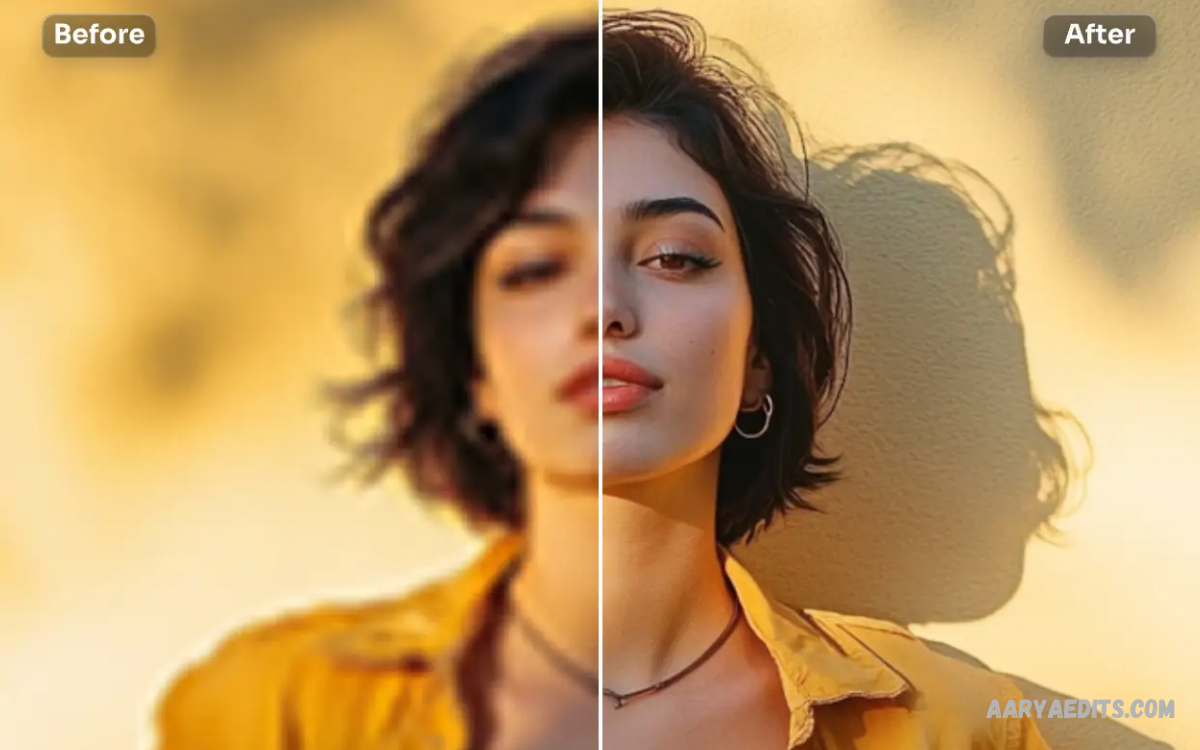
AI photo enhancement has transformed the way people improve digital images, making advanced editing accessible to beginners, creators, photographers, and businesses. Instead of spending hours adjusting brightness, contrast, sharpness, colors, and details manually, modern artificial intelligence can analyze an image and automatically apply suitable improvements.
The growing popularity of AI-powered editing comes from its ability to produce professional-looking results with minimal effort. Whether you want to restore an old photograph, improve a low-resolution image, correct lighting, or make social media content more attractive, AI photo enhancement can simplify the entire process.
What Is AI Photo Enhancement?
AI photo enhancement is a technology that uses artificial intelligence and machine learning to analyze photographs and improve their visual quality. The system examines different elements of an image, including details, colors, lighting, noise, sharpness, faces, and overall composition.
Traditional photo editing generally requires users to understand multiple adjustment tools and manually determine suitable settings. AI-powered enhancement can identify common image problems automatically and apply corrections designed to create a clearer, more balanced, and visually appealing result.
How AI Photo Enhancement Works
AI photo enhancement tools rely on trained models that have learned patterns from large collections of images. When a photograph is uploaded, the software analyzes its visual information and determines which areas may require improvement.
The technology can recognize characteristics such as faces, backgrounds, objects, shadows, highlights, and image noise. Based on this analysis, AI can adjust specific parts of the photograph instead of applying identical changes across the entire image.
Key Features of AI Photo Enhancement
One of the biggest advantages of AI photo enhancement is automatic image sharpening. AI can identify soft or unclear areas and increase perceived detail while attempting to avoid excessive artificial-looking edges.
Noise reduction is another important feature, especially for photographs captured in low-light conditions. AI algorithms can reduce unwanted grain and visual noise while preserving important details in subjects, faces, and backgrounds.
AI Image Upscaling
AI-powered upscaling allows users to increase an image’s resolution while attempting to preserve or recreate visual details. This feature can be useful when working with small photographs that need to be displayed on larger screens or included in digital projects.
Conventional resizing often makes an image appear blurry because additional pixels are created through basic mathematical interpolation. AI upscaling uses learned visual patterns to produce a more detailed-looking result, although it cannot always recover information that was never present in the original image.
Face Enhancement With AI
AI photo enhancement has become particularly effective for improving portraits and facial photographs. Advanced systems can identify facial features and apply adjustments to improve clarity, exposure, and overall image quality.
Face enhancement can be useful when a portrait contains mild blur, poor lighting, compression artifacts, or limited detail. Responsible editing should preserve the person’s recognizable characteristics rather than dramatically changing their appearance.
AI Photo Restoration
Old photographs often suffer from fading, scratches, discoloration, low resolution, and other forms of deterioration. AI restoration tools can analyze these imperfections and attempt to improve clarity while repairing certain visible problems.
Photo restoration can be valuable for preserving family memories, historical photographs, scanned documents, and older digital images. Results vary depending on the original photograph, so important images should always be preserved separately in their original form.
Improving Low-Quality Images
Low-quality photographs may contain compression artifacts, blur, noise, poor exposure, or insufficient resolution. AI photo enhancement can address several of these problems through automated processing.
The technology is especially useful when users have limited access to the original high-quality photograph. However, AI should not be expected to perfectly reconstruct every missing detail, particularly when an image is extremely blurred or heavily compressed.
Benefits of AI Photo Enhancement
The biggest benefit of AI photo enhancement is speed. A process that might take several manual editing steps can often be completed automatically within seconds or minutes.
Another advantage is accessibility because users do not necessarily need professional editing experience. AI can provide automatic recommendations and adjustments, allowing beginners to improve photographs without learning complex editing workflows.
AI enhancement can also improve productivity for photographers, content creators, marketers, online publishers, and businesses. When large numbers of images require basic corrections, automated processing can significantly reduce repetitive editing work.
AI Photo Enhancement for Social Media
Social media platforms rely heavily on visual content, making image quality an important part of online presentation. AI tools can help creators optimize photographs by improving brightness, sharpness, colors, and resolution before publication.
Enhanced photographs can appear clearer and more polished across smartphones, tablets, and computer screens. Creators can also use AI editing to prepare images for different content formats while maintaining consistent visual quality.
AI Photo Enhancement for E-Commerce
Online stores depend on product photographs to communicate information that customers cannot physically inspect. Clear lighting, accurate colors, sharp details, and clean backgrounds can make product images easier to understand.
AI enhancement can help businesses improve existing product photographs without completely recreating their image library. However, sellers should avoid enhancements that significantly change the real appearance of a product because misleading images can negatively affect customer trust.
AI Enhancement for Photography
Professional photographers can use AI as an additional editing assistant rather than treating it as a complete replacement for creative judgment. Automated enhancement can handle repetitive corrections while photographers focus on composition, storytelling, artistic direction, and final adjustments.
AI tools can also accelerate workflows involving large collections of photographs. Batch enhancement features allow users to process multiple images using similar settings, although important professional work should still receive individual review.
AI Photo Enhancement for Old Pictures
Old pictures often have sentimental value, even when their technical quality is poor. AI enhancement can make these photographs clearer and more suitable for modern displays, printing, or digital archives.
Users should keep the original scan or photograph before applying any AI restoration. This provides a reliable reference and prevents permanent dependence on an AI-generated version.
Choosing an AI Photo Enhancement Tool
When selecting an AI enhancement tool, consider the features that match your specific editing needs. Important capabilities may include image upscaling, noise reduction, sharpening, portrait enhancement, color correction, restoration, batch processing, and export quality.
Privacy should also be considered when uploading photographs to online services. Users should review how a platform handles uploaded images, particularly when working with personal, private, or sensitive photographs.
Free vs. Paid AI Photo Enhancement Tools
Free AI enhancement tools can be useful for casual editing and basic image improvements. They may provide features such as automatic enhancement, sharpening, resizing, or limited upscaling.
Paid platforms generally provide more advanced features, higher export limits, faster processing, batch editing, and additional customization options. The best choice depends on how frequently you edit photographs and whether you need professional-level workflow capabilities.
Limitations of AI Photo Enhancement
Despite its advantages, AI photo enhancement is not perfect. An AI system can sometimes create unnatural textures, overly sharp details, inaccurate facial features, or visual artifacts when processing difficult images.
Results can also vary between different tools and photographs. A high-quality original image usually provides better enhancement potential than an extremely small, damaged, or heavily compressed image.
Read Also: AI Image Editing: Transform Your Photos with Smart Editing Tools
Tips for Better AI Enhancement Results
Start with the highest-quality original photograph available. Avoid repeatedly editing and exporting the same image because repeated compression can reduce quality and introduce additional artifacts.
Use enhancement settings carefully rather than maximizing every available option. Excessive sharpening, noise reduction, or artificial detail can make photographs look unnatural.
Future of AI Photo Enhancement
AI photo enhancement is expected to become increasingly integrated into cameras, smartphones, editing applications, and online creative platforms. Future systems may provide more precise object recognition, better restoration, improved low-light processing, and greater control over individual image regions.
The technology will likely move toward intelligent editing that understands the context and purpose of a photograph. Instead of simply increasing sharpness or brightness, future tools may recommend complete editing workflows based on whether an image is intended for printing, social media, e-commerce, photography portfolios, or archival use.
Why Does AI Photo Enhancement Matter?
The importance of AI photo enhancement comes from its ability to combine automation with sophisticated image processing. It reduces the technical barrier associated with professional editing and allows more people to produce visually improved photographs.
For experienced editors, AI can function as a productivity tool that handles repetitive tasks. For beginners, it provides an easier entry point into digital photography and image editing without requiring extensive knowledge of traditional editing software.
Frequently Asked Questions
What is AI photo enhancement?
AI photo enhancement is a technology that uses artificial intelligence to analyze photographs and automatically improve elements such as sharpness, lighting, colors, noise, resolution, and visible details. It reduces the need for extensive manual editing.
Can AI improve a blurry photo?
AI can improve some blurry photographs by increasing perceived sharpness and reconstructing certain visual patterns. Extremely blurry images may still produce imperfect results because the original photograph does not contain enough information for completely accurate recovery.
Can AI increase photo resolution?
Yes, many AI enhancement tools support intelligent image upscaling. They can increase the dimensions of an image while generating additional detail based on learned visual patterns.
Is AI photo enhancement free?
Some AI photo enhancement services provide free features or limited processing options. Advanced capabilities such as high-resolution exports, batch processing, and extensive enhancement controls may require a paid plan.
Is AI enhancement good for old photos?
AI can be useful for improving old photographs affected by fading, low resolution, noise, or minor damage. The quality of the result depends heavily on the condition and resolution of the original photograph.
Does AI photo enhancement change the original image?
Most enhancement tools create a processed copy rather than permanently modifying the original file. Keeping the original photograph separately is recommended so you can compare versions or restore the original whenever necessary.
Can AI enhance dark photographs?
AI can improve many underexposed photographs by adjusting shadows, brightness, contrast, and other visual properties. However, extremely dark images may contain insufficient information to recover every hidden detail accurately.
Is AI photo enhancement suitable for professional photography?
Yes, AI enhancement can be a useful part of a professional photography workflow. Photographers can use it for repetitive corrections, upscaling, noise reduction, and initial adjustments before applying their own creative edits.
What images benefit most from AI enhancement?
Photographs with moderate noise, soft details, low resolution, poor lighting, or faded colors can benefit significantly from AI processing. The strongest results generally come from images that still contain enough original information for the AI system to analyze.
What should I consider before using an AI photo enhancer?
Consider output quality, supported formats, processing speed, privacy policies, available editing controls, export limitations, and pricing. Always preserve the original image and review the enhanced version carefully before using it publicly.
Conclusion
AI photo enhancement provides a practical way to improve image quality through intelligent processing, including sharpening, noise reduction, color correction, lighting adjustment, restoration, and upscaling. Its speed and accessibility make it useful for photographers, content creators, businesses, students, and everyday users.
The best results come from using AI as an enhancement assistant while maintaining human judgment during the final editing process. By choosing reliable tools, preserving original photographs, checking results carefully, and avoiding excessive adjustments, users can take advantage of AI while keeping their images natural and useful.
