

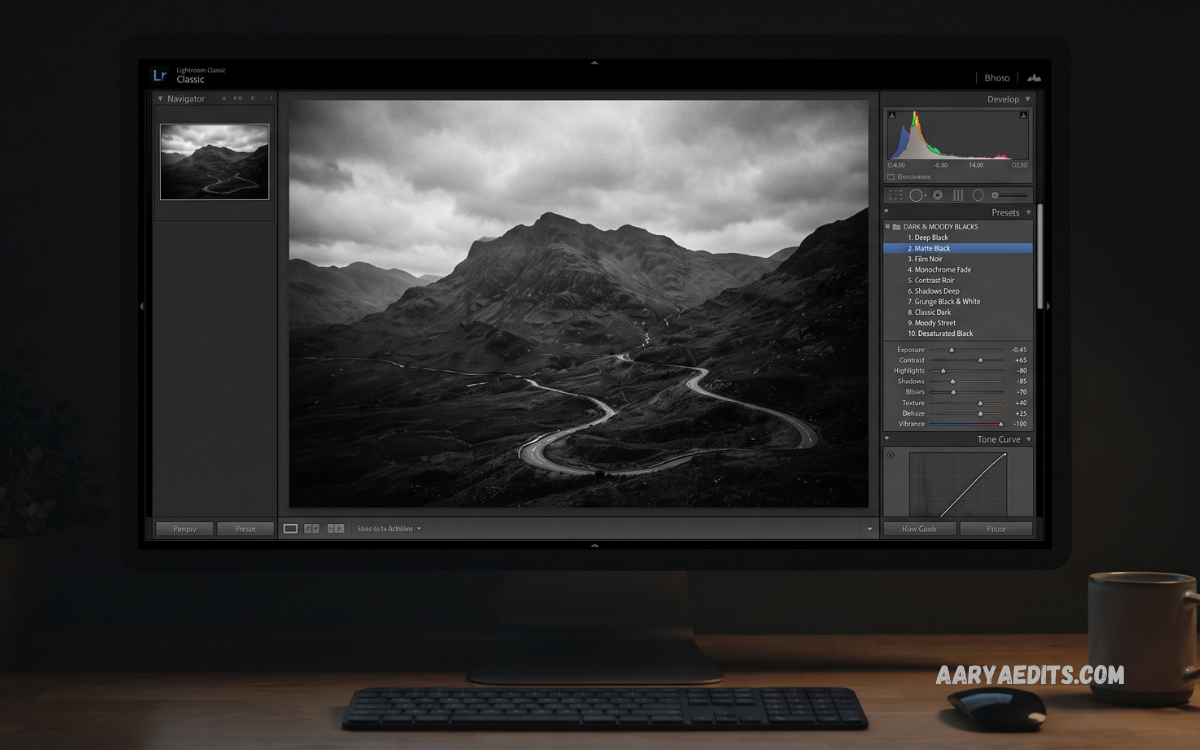
Lightroom Black Presets have become increasingly popular among photographers, content creators, influencers, and mobile editors seeking a dark, sophisticated visual style. These presets transform ordinary photographs through deeper blacks, enhanced contrast, controlled highlights, muted colors, and cinematic tonal adjustments.
Adobe Lightroom provides powerful editing controls, yet achieving a consistent black-themed aesthetic manually can require considerable time and experience. Lightroom Black Presets simplify the process by applying carefully designed adjustments that create dramatic results within seconds while allowing users to fine-tune every setting according to the photograph.
What Are Lightroom Black Presets?
Lightroom Black Presets are predefined editing settings designed to produce darker, moodier, and more dramatic photographs. A preset can modify exposure, contrast, highlights, shadows, whites, blacks, clarity, texture, saturation, color temperature, tone curves, and color grading simultaneously.
Instead of adjusting every Lightroom setting manually, users can apply a preset and receive an instant starting point. The final image can then be customized according to lighting conditions, subject characteristics, camera settings, and personal preferences.
Why Lightroom Black Presets Are Popular
Modern photography increasingly favors distinctive visual identities. Social media creators, photographers, brands, and digital publishers often use consistent editing styles to make their images recognizable across different platforms.
Lightroom Black Presets provide an efficient solution for achieving visual consistency. A creator can apply the same preset across an entire collection and make minor adjustments afterward, significantly reducing repetitive editing work.
Key Features of Lightroom Black Presets
A professionally designed black preset usually combines several Lightroom adjustments rather than relying on a single setting. The objective involves creating balance between shadows, highlights, colors, and overall exposure.
Deep Black Tones
Deep black tones form the foundation of this editing style. Lowering black levels can create stronger visual depth and make brighter elements appear more prominent.
However, excessive black adjustment can remove important details from shadows. High-quality presets therefore aim for rich blacks while preserving texture and recognizable subject details.
Enhanced Contrast
Contrast separates darker and brighter areas within a photograph. Increasing contrast can make images appear sharper, more powerful, and visually dramatic.
Black presets frequently use controlled contrast rather than extreme adjustments. This approach maintains a professional appearance without making photographs look unnecessarily harsh.
Controlled Highlights
Bright areas can become distracting when editing dark photographs. Lightroom Black Presets often reduce highlights to maintain detail within skies, windows, reflective surfaces, clothing, and illuminated backgrounds.
Highlight control also creates a smoother relationship between bright and dark areas, producing a more cinematic appearance.
Moody Shadows
Shadows contribute significantly to atmosphere. Carefully adjusted shadows can add depth while preserving enough information for viewers to understand the photograph.
For portraits and street photography, darker shadows can create a sophisticated editorial mood. For landscapes, controlled shadows can emphasize environmental depth.
Best Photography Styles for Black Presets
Lightroom Black Presets work across numerous photography genres. Selecting the correct preset depends on the lighting, subject, composition, and desired mood.
Portrait Photography
Portrait photographers can use black presets to create dramatic and sophisticated images. Dark backgrounds combined with controlled skin tones can direct attention toward the subject.
When editing portraits, skin tone preservation remains important. A preset should not make skin appear unnaturally gray, orange, or excessively desaturated.
Street Photography
Street photography often benefits from darker cinematic editing. Black presets can emphasize architecture, shadows, vehicles, clothing, and urban textures.
The resulting images can develop a gritty editorial appearance while maintaining the spontaneous character associated with street photography.
Car Photography
Automotive photography is another strong application. Dark presets can emphasize metallic surfaces, reflections, headlights, body contours, and environmental shadows.
For luxury vehicle photography, a black cinematic aesthetic can create a premium visual presentation suitable for portfolios and social media content.
Fashion Photography
Fashion images frequently depend on mood, contrast, and color control. Black presets can produce an editorial appearance that highlights clothing details while creating a sophisticated background.
Muted colors and deep shadows can also help establish a consistent visual identity across a fashion collection.
Travel Photography
Travel photographs can benefit from atmospheric editing, especially when the original lighting appears flat. Black presets can add depth to architecture, landscapes, streets, and nighttime scenes.
For daytime travel images, exposure adjustments may be necessary after applying the preset because strong sunlight can produce different results from the original preset design.
Lightroom Black Presets for Mobile Editing
Adobe Lightroom Mobile makes preset-based editing accessible on smartphones and tablets. Users can import compatible presets, apply them to photographs, and adjust individual settings directly from a mobile device.
Mobile editing works particularly well for creators who publish content frequently. A preset can provide a consistent starting point without requiring a computer-based workflow.
How to Use Lightroom Black Presets
Using a Lightroom Black Preset generally involves a straightforward workflow. First, import the photograph into Lightroom and open the editing interface.
Next, select the desired preset and apply it to the image. Examine the result carefully instead of immediately exporting the photograph.
Free vs Premium Lightroom Black Presets
Free Lightroom Black Presets can provide excellent starting points for beginners and casual editors. They are useful for testing different visual styles before investing in a larger preset collection.
Premium presets often provide greater consistency, multiple variations, detailed documentation, and specialized profiles for different photography conditions. Some collections include separate versions for portraits, landscapes, night photography, indoor photography, and mobile images.
How to Choose the Best Lightroom Black Preset
Selecting an appropriate preset requires examining the photograph before editing. Consider the lighting direction, subject, background, colors, exposure, and desired mood.
For bright outdoor photographs, choose a preset capable of controlling highlights without destroying detail. For low-light images, select a preset that enhances shadows while avoiding excessive noise.
Lightroom Black Presets for Cinematic Photography
Cinematic photography often combines deep shadows, controlled highlights, muted colors, and carefully balanced contrast. Black presets can provide a strong foundation for this visual approach.
Cinematic editing does not necessarily mean making every photograph extremely dark. The strongest results usually involve selective darkness, allowing important subjects and brighter elements to remain visually dominant.
Common Mistakes When Using Black Presets
One common mistake involves applying a preset without adjusting exposure. Every photograph has different lighting, so a preset designed for one scene may appear too dark or bright on another.
Another mistake involves crushing shadows excessively. When shadow areas lose all detail, photographs can appear flat despite having high contrast.
Read Also: Best Lightroom Presets for iPhone in 2026
How to Customize Lightroom Black Presets
Presets should be treated as starting points rather than permanent editing solutions. Lightroom provides extensive controls for customizing preset results.
Begin with exposure and white balance because these settings influence the entire image. Next, refine contrast, highlights, shadows, whites, and blacks.
Creating Your Own Lightroom Black Preset
Photographers can create personalized black presets by developing a consistent editing workflow. Start with a well-exposed photograph and establish the desired tonal structure.
Adjust contrast, highlights, shadows, whites, and blacks until the image develops the preferred dark aesthetic. Fine-tune colors through the Color Mixer and Color Grading tools.
Benefits for Content Creators
Content creators can use Lightroom Black Presets to establish recognizable visual branding. Consistent editing helps photographs appear more cohesive across social media feeds, portfolios, websites, and promotional materials.
Presets also improve editing efficiency. Instead of rebuilding the same visual style for every photograph, creators can apply a preset and focus their time on creative adjustments.
Lightroom Black Presets and Professional Photography
Professional photographers often use presets as part of a larger editing workflow. Presets accelerate repetitive adjustments but do not replace creative judgment.
Professional results depend on image selection, composition, lighting, exposure, color management, and final corrections. A preset simply provides a foundation for achieving a particular visual direction.
Frequently Asked Questions
What are Lightroom Black Presets?
Lightroom Black Presets are predefined editing settings designed to create dark, dramatic, cinematic, and sophisticated photography styles. They typically adjust contrast, blacks, shadows, highlights, colors, and tone curves.
Are Lightroom Black Presets free?
Some Lightroom Black Presets are available for free, while others are premium. Free presets can be useful for beginners, whereas premium collections may offer more variations and specialized editing styles.
Can I use Lightroom Black Presets on mobile?
Yes. Lightroom Black Presets can be used with Adobe Lightroom Mobile when the preset format is compatible with the application. Mobile users can apply presets and customize individual settings afterward.
Are Lightroom Black Presets suitable for portraits?
Yes. Black presets can create stylish and dramatic portrait photographs. However, skin tones should be checked after applying the preset to ensure they remain natural.
Can Lightroom Black Presets work with RAW photos?
Yes. Lightroom presets can be particularly useful with RAW photographs because RAW files provide extensive editing flexibility. Exposure, highlights, shadows, and colors can be adjusted after applying the preset.
Do Lightroom Black Presets make photos completely black?
No. A properly designed black preset creates deeper tones and stronger contrast without necessarily removing all shadow detail. The final appearance depends on the preset and the original photograph.
Can I customize Lightroom Black Presets?
Yes. Presets are starting points rather than fixed edits. You can modify exposure, contrast, highlights, shadows, whites, blacks, colors, clarity, texture, and other Lightroom settings.
Are Lightroom Black Presets good for Instagram photos?
Yes. Black presets can create a consistent and recognizable visual style for social media content. Adjusting exposure and colors after applying the preset can help maintain consistency across different photographs.
How do I choose the best Lightroom Black Preset?
Choose a preset based on your photography style, lighting conditions, subject, and desired mood. Portraits may require softer contrast, while cars, architecture, and street photography can often support stronger black tones.
Can I create my own Lightroom Black Preset?
Yes. You can manually edit a photograph in Lightroom, develop your preferred black-themed style, and save those adjustments as a custom preset for future projects.
Conclusion
Lightroom Black Presets offer an efficient way to create dark, elegant, cinematic, and dramatic photographs without rebuilding an editing workflow from scratch. Their combination of deep blacks, controlled highlights, enhanced contrast, and refined colors makes them suitable for portraits, fashion, cars, street photography, architecture, travel, and lifestyle content.
The best results come from using presets as creative foundations rather than one-click solutions. After applying a preset, adjust exposure, white balance, shadows, highlights, colors, and contrast according to each photograph.
