

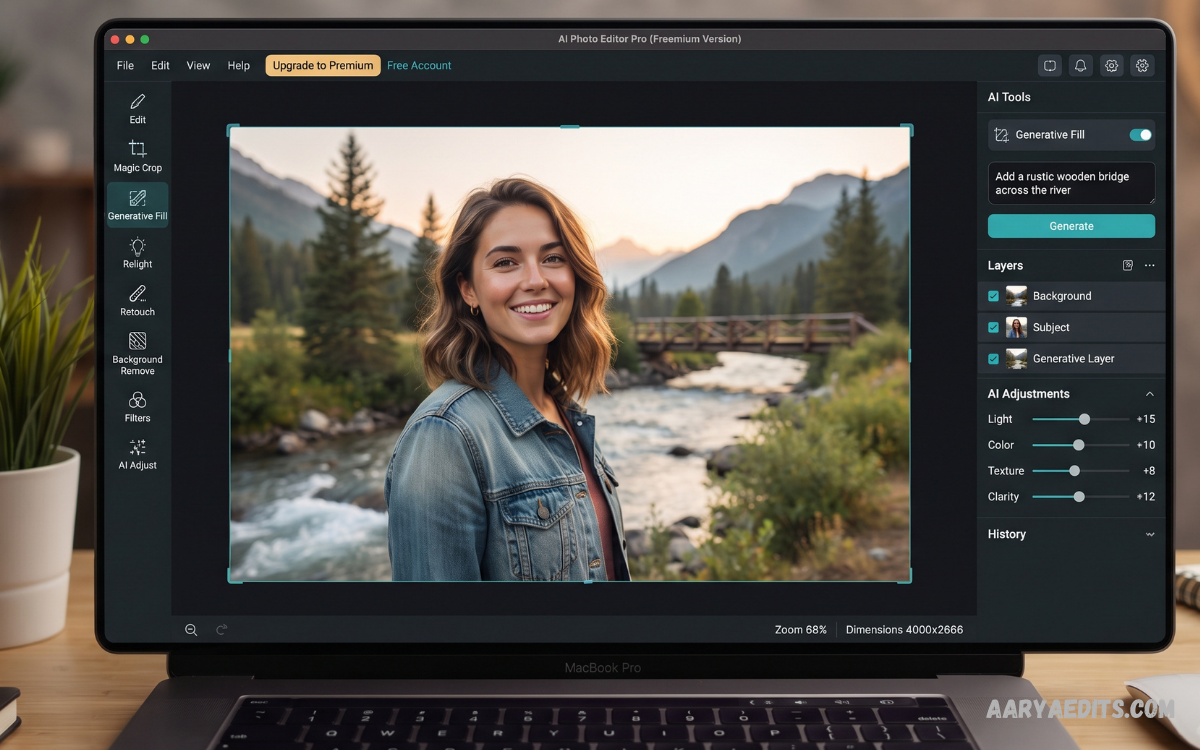
A free AI photo editor makes professional photo editing easier by using artificial intelligence to automate complex tasks. Instead of spending hours adjusting layers, removing objects, or correcting colors manually, users can complete many edits with simple tools or natural-language instructions.
AI-powered photo editing has become increasingly accessible in 2026, with free tools offering features such as background removal, object replacement, image enhancement, upscaling, retouching, and generative editing. Adobe Firefly, for example, provides free AI editing capabilities through its Firefly Free plan, although usage limits and credits apply.
What Is a Free AI Photo Editor?
A free AI photo editor is an application or online platform that uses artificial intelligence to modify, enhance, or transform existing photos without requiring an upfront payment. These editors can recognize objects, people, backgrounds, lighting conditions, and other visual elements to automate editing tasks.
Traditional photo editing often requires technical knowledge of selections, masks, layers, brushes, and adjustment settings. AI editors simplify these processes by allowing users to describe changes, select objects, or apply automated enhancements with significantly less manual work.
How Does AI Photo Editing Work?
AI photo editors analyze an uploaded image using machine-learning models trained to understand visual elements and patterns. Depending on the tool, the technology can identify subjects, separate backgrounds, reconstruct missing areas, improve resolution, adjust lighting, or generate new visual elements.
Generative AI has made editing even more flexible because users can sometimes describe an intended change using ordinary language. Adobe Firefly, for example, supports prompt-based editing alongside features such as Generative Fill, Generative Recolor, Generative Remove, and Generative Expand.
Key Features of a Free AI Photo Editor
Background Removal
Background removal is one of the most useful AI editing features for creators, students, online sellers, and social media users. AI can automatically identify the main subject and separate it from the surrounding background without requiring detailed manual selection.
Users can then place the subject against a solid color, transparent background, studio environment, landscape, or another customized setting. This feature is particularly useful for product images, profile pictures, thumbnails, presentations, and promotional graphics.
Object Removal
An AI photo editor can remove unwanted objects from an image and intelligently reconstruct the surrounding area. Instead of manually cloning pixels across a photo, users can often select an unwanted element and let AI generate a replacement background.
Object removal works well for distractions such as signs, small objects, background clutter, or unwanted elements in otherwise useful photographs. Results can vary when the selected area contains complicated textures, patterns, or important overlapping subjects.
Photo Enhancement
AI enhancement can automatically improve brightness, contrast, sharpness, colors, and overall image quality. This makes a free AI photo editor useful for quickly improving photographs that appear dull, dark, soft, or poorly balanced.
Automated enhancement can save time because users do not need to adjust every setting individually. However, professional results still benefit from reviewing the AI-generated adjustments and making manual corrections when necessary.
Image Upscaling
AI upscaling increases image resolution while attempting to preserve or reconstruct important visual details. It can be useful when an original photograph is too small for printing, website graphics, social media content, or other larger formats.
Some free AI editors provide limited upscaling, while dedicated tools may focus specifically on increasing resolution. Users should check output dimensions and free usage restrictions before processing large numbers of images.
Portrait Retouching
AI-powered portrait tools can detect facial areas and apply adjustments to improve the overall appearance of a photograph. Common functions include skin smoothing, lighting adjustments, sharpening, blemish reduction, and facial detail enhancement.
Moderate editing generally produces more natural results than excessive retouching. For professional photography, it is important to preserve realistic textures and avoid edits that make the subject appear artificial.
Generative Fill
Generative Fill allows users to extend or modify parts of an image by generating new content that fits the surrounding scene. This technology can help expand compositions, replace selected areas, or add visual elements without manually constructing them.
Modern AI editors increasingly combine generative tools with conventional editing controls. This combination gives users more flexibility because AI can handle repetitive work while manual controls remain available for precision.
Benefits of Using a Free AI Photo Editor
The biggest advantage of a free AI photo editor is accessibility. Beginners can perform sophisticated edits without first learning complicated professional software.
Speed is another major benefit because AI can automate repetitive tasks within seconds. Background removal, object cleanup, enhancement, and resizing can often be completed much faster than traditional manual workflows.
Free AI Photo Editor vs Traditional Photo Editor
Traditional photo editors provide detailed control over layers, selections, filters, masks, curves, brushes, and other professional settings. They are powerful but can require significant time and experience to use effectively.
AI photo editors focus more on automation and convenience. Instead of manually completing every stage, users can rely on intelligent tools to perform complicated tasks while they concentrate on the desired final result.
Best Uses for a Free AI Photo Editor
A free AI photo editor can support many creative and practical projects. Social media creators can improve photographs, create thumbnails, remove distractions, and prepare images for different platforms.
Bloggers can enhance featured images, resize photographs, remove backgrounds, and create visual assets for articles. Online sellers can also use AI tools to create cleaner product presentations by removing distracting backgrounds and improving image quality.
How to Choose the Right Free AI Photo Editor
Start by identifying the primary editing task. If background removal is your main requirement, choose a tool with strong subject detection, while users interested in generative editing should prioritize prompt-based editing and generative fill.
Next, examine the free plan carefully. Some platforms provide free credits, limited monthly generations, lower-resolution exports, advertisements, or restrictions on advanced features, meaning that “free” does not always mean unlimited usage.
Tips for Getting Better AI Editing Results
Use clear and specific instructions when an editor supports text-based editing. Instead of requesting a vague change, describe the object, location, lighting, color, and intended result as clearly as possible.
Keep the original image before applying AI modifications. Saving an untouched copy allows you to restart the editing process if an AI-generated result introduces unwanted changes.
Are Free AI Photo Editors Good Enough for Professional Work?
Free AI photo editors can be surprisingly capable for many everyday creative tasks. Modern platforms provide sophisticated features that previously required expensive software and advanced editing knowledge.
However, professional workflows may require higher export resolutions, batch processing, advanced color management, commercial-use permissions, extensive file formats, or larger AI usage limits. For these requirements, users should evaluate the specific licensing and feature limitations of each platform.
Free AI Photo Editor for Social Media
Social media creators need fast editing workflows because images often need to be prepared in multiple sizes and formats. AI tools can simplify background removal, enhancement, cropping, resizing, and creative modifications.
A good workflow starts with the highest-quality original image available. After completing AI edits, check the composition and export settings before uploading the final version to the chosen social platform.
Free AI Photo Editor for Product Images
Product photography benefits significantly from automated background and image-enhancement tools. AI can help isolate products, clean visual distractions, improve lighting, and prepare images for online listings.
Consistency is especially important for product catalogs. Using similar backgrounds, lighting adjustments, framing, and image dimensions can create a more professional appearance across multiple listings.
Read Also: Best Lightroom Presets: A Complete Guide for Better Photo Editing
Free AI Photo Editor for Old Photos
AI technology can help restore older photographs by improving clarity, reducing certain imperfections, increasing resolution, and sometimes adding color. These capabilities can make historical or family photographs easier to preserve and share digitally.
Restoration should always be performed carefully because AI may reconstruct missing details incorrectly. Keep the original scan or photograph so the enhanced version remains separate from the source.
Limitations of Free AI Photo Editors
Free AI editors commonly impose restrictions on advanced features, processing credits, export quality, or usage frequency. Some services provide a useful free tier while reserving their most powerful capabilities for paid subscriptions.
AI-generated edits can also contain imperfections. Complex hair, transparent objects, repetitive patterns, hands, text, reflections, and overlapping subjects may sometimes produce inaccurate results.
The Future of AI Photo Editing
AI photo editing is moving toward more conversational and context-aware workflows. Recent Photoshop developments, for example, have introduced AI-assisted editing features that allow users to describe changes and use tools such as background removal, generative editing, and image expansion from a dedicated interface.
This trend suggests that photo editing will increasingly combine traditional controls with natural-language instructions. Instead of replacing every professional editing feature, AI is becoming another layer of creative control that can accelerate repetitive tasks.
Frequently Asked Questions
What is a free AI photo editor?
A free AI photo editor is a photo editing tool that uses artificial intelligence to automate or simplify image modifications without requiring an upfront payment. Depending on the platform, free features can include enhancement, background removal, object removal, resizing, upscaling, and generative editing.
Is a free AI photo editor really free?
Some AI photo editors provide genuinely useful free plans, but many impose limits on credits, exports, resolution, or advanced features. Users should check the current free-plan terms before relying on a specific service.
Can I remove a background with AI for free?
Yes, many AI-powered editors provide free background-removal capabilities, although the available resolution or number of free operations may vary. Background removal is one of the most common AI photo-editing functions.
Can AI improve low-quality photos?
AI can improve certain low-resolution or blurry images by enhancing sharpness and increasing resolution. Results depend on the original image because AI enhancement cannot always accurately reconstruct information that was never captured.
Can AI remove unwanted objects from photos?
Yes, many modern AI editors provide object-removal or generative-removal tools. These features analyze the selected area and generate replacement content that attempts to match the surrounding scene.
Is AI photo editing suitable for beginners?
Yes, AI photo editing is particularly useful for beginners because many complicated tasks can be automated. Prompt-based editing can also allow users to describe desired changes without learning advanced editing techniques.
What should I check before uploading personal photos?
Review the platform’s privacy policy, storage practices, account requirements, and image-processing terms before uploading personal photographs. Avoid uploading sensitive images to services unless you understand how the platform handles them.
What is the best free AI photo editor?
There is no single editor that is best for every user because different platforms specialize in different tasks. Consider the features, free limits, output quality, privacy policies, and editing workflow that match your specific needs.
Can AI photo editors replace Photoshop?
AI editors can replace many basic and intermediate editing tasks, especially background removal, object cleanup, enhancement, and generative modifications. Professional users may still prefer advanced editors when they need precise layers, detailed color control, complex compositions, or specialized workflows.
Does a free AI photo editor require installation?
Many AI photo editors work directly through web browsers, so installation is not always necessary. Browser-based tools can be convenient for users who want to edit photos across different devices.
Conclusion
A free AI photo editor is an effective solution for anyone who wants faster and easier photo enhancement without immediately purchasing professional software. From background removal and object cleanup to upscaling, retouching, and generative editing, AI can handle many tasks that once required extensive manual effort.
The right tool depends on the user’s needs, image quality requirements, privacy expectations, and available free usage. By testing different features and checking free-plan limitations carefully, users can build an efficient editing workflow while maintaining control over their final images.
