

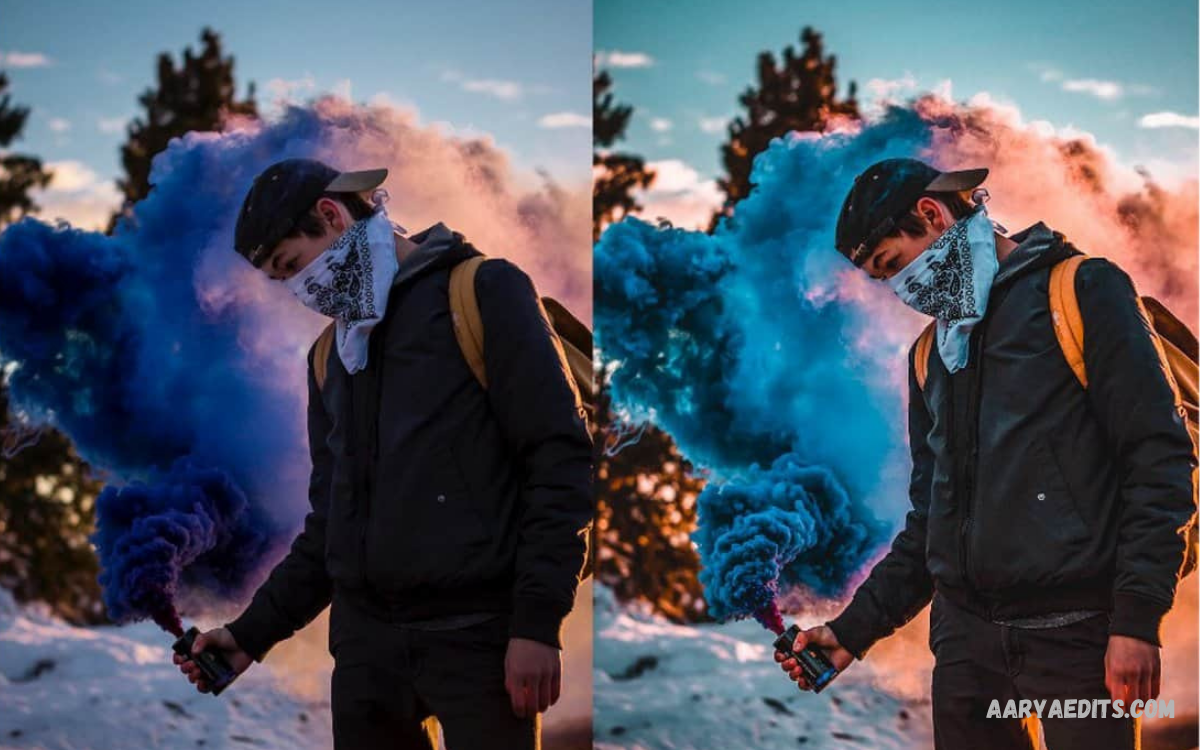
The Best Lightroom Presets can transform ordinary photos into polished, professional-looking images within seconds. Instead of adjusting exposure, contrast, colors, highlights, shadows, and other settings manually for every photograph, presets provide a ready-made editing style that can be applied with a single click.
Adobe Lightroom offers powerful editing tools for both beginners and experienced photographers. Presets make the editing process faster while helping users maintain a recognizable style across different photos. From cinematic tones and warm portraits to clean lifestyle edits and dramatic landscapes, the right preset can significantly improve the overall appearance of an image.
What Are Lightroom Presets?
Lightroom presets are saved editing settings designed for Adobe Lightroom. A preset can contain adjustments for exposure, contrast, highlights, shadows, temperature, tint, color grading, sharpness, and other editing controls. When a preset is applied, Lightroom automatically changes the selected settings according to the preset’s design.
Presets do not permanently replace the original photograph. Users can continue adjusting individual settings after applying a preset, making them flexible for different lighting conditions and camera types. This combination of automation and customization makes presets valuable for efficient photo editing.
Why Do You Use the Best Lightroom Presets?
The biggest advantage of using the Best Lightroom Presets is speed. Professional photographers often work with hundreds or thousands of images, making manual editing time-consuming. A suitable preset can establish a strong starting point and reduce repetitive adjustments.
Presets also help create consistency. If you are managing a photography portfolio, social media account, website, or personal brand, maintaining similar colors and tones can make your content look more organized. Consistent editing can also help viewers recognize your visual style.
Best Lightroom Presets for Portrait Photography
Portrait photography benefits from presets that produce natural skin tones, balanced contrast, and soft colors. A good portrait preset should enhance the subject without making skin appear unnatural or overly saturated.
Warm portrait presets are popular because they can create a comfortable and inviting appearance. Soft contrast presets can also work well for indoor portraits, lifestyle photography, and professional headshots. After applying a preset, photographers should check skin tones and adjust temperature, exposure, and highlights when necessary.
Best Lightroom Presets for Landscape Photography
Landscape images often require strong color and tonal control. The Best Lightroom Presets for landscapes can emphasize skies, mountains, forests, oceans, and natural textures while preserving realistic details.
Cinematic landscape presets can create deeper shadows and stronger color separation. Vibrant landscape presets can enhance greens and blues, while moody presets can provide a dramatic atmosphere. The ideal choice depends on lighting conditions and the desired creative style.
Best Lightroom Presets for Travel Photos
Travel photography includes a wide variety of environments, including cities, beaches, mountains, historical locations, and local streets. Travel presets are designed to provide attractive colors while maintaining a consistent look across different scenes.
Bright and warm presets are suitable for sunny destinations, while muted presets can work well for urban photography. A versatile travel preset collection should offer several styles so photographers can adapt their edits without creating completely different visual identities.
Best Lightroom Presets for Instagram
Social media photographers often use presets to create a consistent feed. The Best Lightroom Presets for Instagram typically focus on clean colors, balanced exposure, and recognizable visual themes.
Minimal presets can provide a modern appearance, while film-inspired presets can create a nostalgic look. Before publishing photos, it is important to check how colors appear on different screens because brightness and display settings can affect the final result.
Best Lightroom Presets for Mobile Editing
Lightroom Mobile provides many of the same editing concepts available on desktop. Mobile presets can be useful for creators who edit photographs directly from smartphones or tablets.
Mobile editing is particularly convenient for social media content. Users can import compatible presets, apply them to photographs, and make final adjustments from almost anywhere. A mobile preset should provide a flexible starting point rather than forcing every photograph into exactly the same settings.
Free vs Premium Lightroom Presets
Free Lightroom presets can be a useful starting point for beginners. Many free presets offer basic styles such as warm tones, black and white, cinematic colors, or vintage effects. They allow users to experiment without investing money.
Premium preset collections often provide more variety and specialized editing styles. Some collections are designed for particular photography genres, cameras, lighting conditions, or professional workflows. However, purchasing a preset does not automatically guarantee better results. The quality of the original photograph and the photographer’s editing decisions remain important.
How to Choose the Best Lightroom Presets
Choosing the right preset depends on your photography style and editing goals. Instead of selecting a preset only because it looks impressive in a preview, consider whether it works with your typical photographs.
Look for presets that preserve natural skin tones, maintain image details, and provide enough flexibility for further adjustments. It is also useful to test presets on several photographs with different lighting conditions. A preset that looks excellent on one image may require significant changes on another.
Lightroom Presets for Professional Photography
Professional photographers often use presets as part of a broader editing workflow. Presets can establish a consistent baseline before more detailed adjustments are performed.
For example, a photographer may apply a preset to an entire collection and then adjust exposure individually. This approach can save considerable time while maintaining consistency. Professional workflows usually combine presets with cropping, masking, color correction, retouching, and other Lightroom tools.
Cinematic Lightroom Presets
Cinematic presets are designed to produce a dramatic, film-inspired appearance. They commonly use controlled highlights, deeper shadows, muted colors, and carefully balanced tones.
These presets can work particularly well for street photography, travel images, portraits, and storytelling projects. However, excessive cinematic effects can reduce natural color accuracy. Subtle adjustments usually create a more professional result than applying an extreme effect.
Vintage Lightroom Presets
Vintage presets recreate visual characteristics associated with older film photography. They may introduce faded colors, softer contrast, warmer tones, or subtle grain.
Vintage styles are useful for lifestyle photography, portraits, travel content, and creative projects. Since vintage editing is highly stylistic, users should select presets that complement the subject instead of overwhelming it.
Black and White Lightroom Presets
Black and white presets remove color emphasis and shift attention toward composition, lighting, texture, and contrast. They can be particularly effective for portraits, architecture, street photography, and documentary images.
The strongest black and white edits usually maintain a broad range of tones. Adjusting blacks, whites, shadows, highlights, and contrast after applying a preset can help create more depth and visual separation.
How to Install Lightroom Presets
Installing Lightroom presets depends on the Lightroom version and preset format. Modern Lightroom workflows commonly support preset files that can be imported through the application’s preset management options.
After importing a preset, it normally appears within the Presets section. Users can then select a photograph, choose the desired preset, and make additional adjustments. Always use presets from legitimate sources and verify compatibility with your Lightroom version before installation.
How to Use Lightroom Presets Effectively
A preset should be considered a starting point rather than a complete editing solution. After applying one, check exposure, white balance, contrast, highlights, shadows, and color intensity.
Different photographs have different lighting conditions. A preset created for a bright outdoor image may appear too dark on an indoor photograph. Small manual adjustments can make a major difference while preserving the preset’s overall style.
Common Mistakes When Using Lightroom Presets
One common mistake is applying a preset without checking exposure. Presets are generally created using specific example images, so their settings may not perfectly match every photograph.
Another mistake is using excessive saturation or contrast. Strong colors may look attractive initially but can make photographs appear unnatural. Applying subtle corrections and comparing the edited image with the original can help maintain a balanced result.
Read Also: Lightroom Editing Tips: A Complete Guide to Better Photo Editing
Can Lightroom Presets Improve Photo Quality?
Presets can improve the appearance and consistency of photographs, but they cannot repair every technical problem. A low-resolution or poorly exposed photograph may still require substantial editing.
The quality of the original image remains important. Good lighting, accurate focus, proper composition, and suitable camera settings provide a stronger foundation for preset-based editing.
Best Lightroom Presets for Beginners
Beginners should start with versatile presets rather than highly specialized collections. Natural, clean, warm, and soft presets are generally easier to understand and adjust.
Learning how each preset changes exposure, contrast, color, and tone can also improve editing skills. Over time, users can create their own presets based on personal preferences and frequently used adjustments.
Creating Your Own Lightroom Presets
Lightroom allows users to save their preferred editing settings as custom presets. This is useful when you repeatedly use similar adjustments for a specific photography style.
To create a personal preset, edit a photograph until the desired result is achieved, save the relevant adjustments as a preset, and apply it to future images. Custom presets can eventually become an important part of a photographer’s workflow.
Frequently Asked Questions
What are the Best Lightroom Presets?
The best Lightroom presets are those that match your photography style, preserve natural colors, and provide enough flexibility for further adjustments. The ideal preset differs depending on the type of photography.
Are Lightroom Presets Free?
Some Lightroom presets are available for free, while others are sold as premium collections. Free presets can be useful for experimentation, while premium collections may provide more specialized styles.
Can I Use Lightroom Presets on Mobile?
Yes. Lightroom Mobile supports preset-based editing, allowing users to apply compatible presets to photographs directly from smartphones and tablets.
Are Lightroom Presets Good for Beginners?
Yes. Presets can help beginners achieve attractive starting results while learning how Lightroom’s editing controls affect photographs.
Can I Create My Own Lightroom Presets?
Yes. Lightroom allows users to save selected editing adjustments as custom presets. Creating personal presets is useful for maintaining a consistent style.
Do Lightroom Presets Work on Every Photo?
Not always. Lighting, exposure, camera settings, and subject matter vary between photographs. Most presets require minor adjustments after application.
Which Lightroom Presets Are Best for Portraits?
Portrait presets that maintain natural skin tones, balanced contrast, and controlled saturation are generally suitable. Warm and soft styles are popular choices.
Which Lightroom Presets Are Best for Instagram?
Clean, bright, minimal, film-inspired, and consistent presets can work well for Instagram. The best option depends on the visual identity of the account.
Do Lightroom Presets Make Photos Professional?
Presets can improve consistency and speed up editing, but they do not automatically make every photograph professional. Composition, lighting, image quality, and final adjustments remain important.
Conclusion
The Best Lightroom Presets can make photo editing faster, more consistent, and more creative. Whether you prefer natural portraits, cinematic landscapes, vintage photography, travel images, or social media content, the right preset can provide an effective editing foundation.
However, professional results depend on more than presets. Understanding Lightroom’s editing tools, evaluating lighting conditions, and making final manual adjustments are essential. Use presets as a starting point, experiment with different styles, and develop a consistent editing approach that matches your creative goals.
