


It’s a stranger walking into the background, distracting power lines, unwanted text, watermarks, or random clutter. Thanks to modern artificial intelligence, removing these distractions no longer requires advanced photo editing skills or expensive software. AI-powered object removal tools can automatically detect unwanted elements, intelligently fill the empty space, and produce natural-looking results within seconds.
You’re an online seller, marketer, or casual smartphone user; AI photo editing makes it simple to enhance images with just a few clicks. These smart tools use advanced machine learning algorithms to analyze surrounding pixels and seamlessly recreate the background, saving hours of manual editing.
What Does “Remove Objects from Photos with AI in Seconds” Mean?
AI object removal is the process of automatically erasing unwanted elements from an image using AI rather than manual editing.
Rather than selecting every pixel individually, AI analyzes:
- Image composition
- Background textures
- Lighting conditions
- Perspective
- Color consistency
- Neighboring pixels
The system intelligently fills the removed area so naturally that most viewers cannot identify where the object originally existed.
Examples include:
- Removing tourists from travel photos
- Erasing vehicles
- Deleting utility wires
- Removing trash
- Eliminating reflections
- Cleaning backgrounds
- Removing logos
- Erasing unwanted shadows
The entire process often requires less than ten seconds.
Why AI Photo Object Removal Has Become So Popular?
Artificial intelligence dramatically reduces editing time while improving accuracy.
Traditional editing required:
- Professional software
- Layer masks
- Clone Stamp tools
- Healing brushes
- Manual selections
- Years of experience
Modern AI simplifies everything.
Benefits include:
- One-click editing
- Professional-quality results
- No technical knowledge required
- Fast processing
- Mobile compatibility
- Cloud-based editing
- Automatic background reconstruction
This accessibility has made AI editing popular among beginners and professionals alike.
How AI Removes Objects from Images
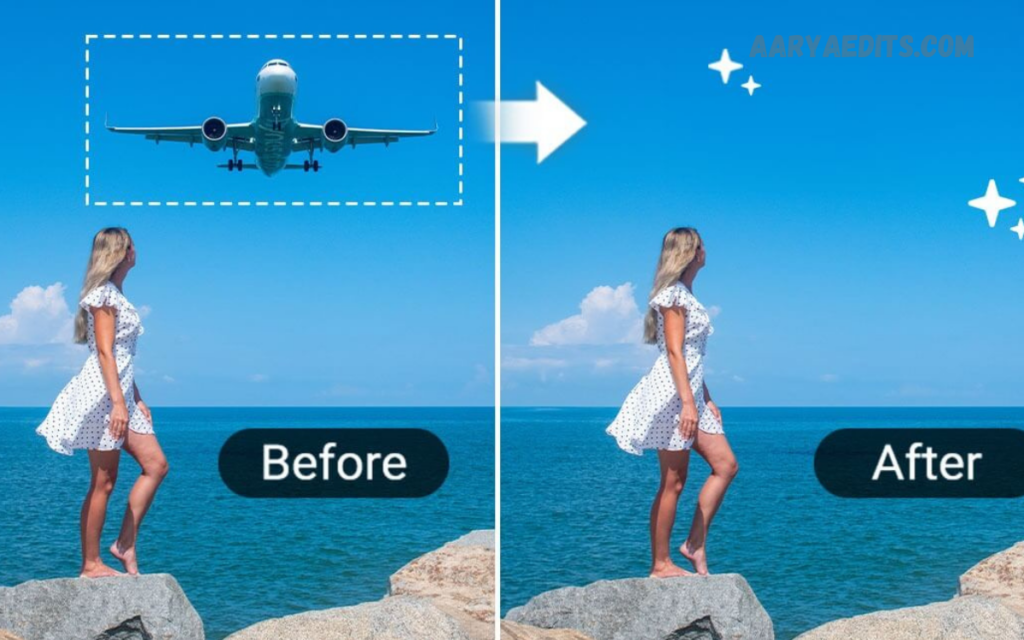
AI combines multiple technologies to intelligently understand and recreate images.
1. Object Detection
The AI first identifies unwanted elements.
Examples include:
- People
- Animals
- Cars
- Text
- Furniture
- Signs
2. Scene Understanding
The algorithm studies:
- Perspective
- Colors
- Shadows
- Texture
- Lighting
- Patterns
3. Background Prediction
Instead of copying nearby pixels repeatedly, AI predicts what should naturally exist behind the removed object.
This creates much more realistic edits.
4. Image Reconstruction
The software generates missing pixels while matching:
- Color gradients
- Surface texture
- Natural lighting
- Image depth
The final image appears untouched.
Objects You Can Remove
Modern AI handles nearly every common distraction.
Examples include:
People
Remove strangers from:
- Beaches
- Parks
- Tourist attractions
- Streets
Vehicles
Delete:
- Cars
- Bikes
- Trucks
- Buses
Power Lines
Landscape photographers frequently remove electrical wires for cleaner compositions.
Street Signs
Eliminate distracting road signs from travel photography.
Trash
Remove garbage bins, bottles, plastic waste, and litter.
Text
Erase:
- Captions
- Labels
- Logos
- Printed text
Watermarks
Many AI editors can remove simple watermarks from images you own or have permission to edit.
Shadows
Unwanted shadows often ruin portraits.
AI minimizes these distractions effectively.
Benefits of AI Object Removal
Saves Time
Editing that previously required one hour now takes seconds.
Beginner Friendly
No advanced Photoshop skills are necessary.
Professional Results
Modern AI produces clean, realistic edits.
Cost Effective
Many AI editors offer free plans or affordable subscriptions.
Mobile Editing
Most AI editors work directly on smartphones.
Batch Processing
Many platforms edit multiple photos simultaneously.
Read Also: Moody Lightroom Presets: The Ultimate Guide to Creating Stunning, Cinematic Photo Edits
Who Uses AI Object Removal?
AI photo editing benefits nearly every industry.
Photographers
Professional photographers quickly clean:
- Wedding photos
- Portraits
- Landscapes
- Event photography
Social Media Creators
Content creators remove distractions before posting on:
Bloggers
Blog images appear cleaner and more attractive.
Online Sellers
eCommerce businesses remove unwanted backgrounds and improve product images.
Real Estate Agents
Property photos become cleaner by removing:
- Trash bins
- Parked vehicles
- Garden equipment
- Construction materials
Travelers
Vacation memories become more beautiful when the crowds are removed.
AI vs Traditional Photo Editing
| AI Editing | Traditional Editing |
|---|---|
| Seconds | Hours |
| Beginner friendly | Advanced skills required |
| Automatic | Manual |
| Affordable | Expensive software |
| Cloud based | Desktop installation |
| Fast workflow | Slow workflow |
| Smart reconstruction | Manual cloning |
AI provides faster results for most everyday editing tasks.
Best Situations for AI Object Removal
AI performs exceptionally well with:
- Travel photography
- Portraits
- Landscapes
- Food photography
- Product images
- Real estate photography
- Social media posts
- Marketing campaigns
- Family pictures
- Event photography
Tips for Better AI Editing Results
Use High-Resolution Photos
Higher-quality images produce better edits.
Remove Small Objects First
Large removals may require multiple passes.
Zoom Before Editing
Accurate selections improve AI performance.
Check Background Patterns
Complex textures occasionally require minor touch-ups.
Compare Multiple Results
Many AI editors generate several reconstruction options.
Choose the most natural version.
Common Mistakes to Avoid
Removing Large Areas
Huge removals can sometimes create unrealistic backgrounds.
Ignoring Shadows
Removing an object without removing its shadow looks unnatural.
Overediting
Too much editing reduces authenticity.
Low-Quality Images
Compressed photos provide less information for AI reconstruction.
Cropping Too Early
Complete AI editing before cropping the image.
Popular Uses Across Industries
Marketing
Create cleaner advertisements.
Education
Improve presentation images.
Journalism
Remove camera dust or accidental distractions while maintaining ethical editing standards.
Architecture
Highlight buildings without visual clutter.
Tourism
Promote destinations using clean landscape photography.
Fashion
Remove unwanted background objects from clothing photos.
Restaurants
Produce attractive food photography.
Healthcare
Clean educational graphics and promotional images.
AI Object Removal on Mobile Devices
Modern smartphones include advanced AI editing features.
Users can:
- Tap unwanted objects
- Let AI detect boundaries
- Automatically erase distractions
- Save edited images instantly
Mobile editing allows creators to publish professional photos directly from their phones.
Privacy and Security
Choose AI platforms that:
- Encrypt uploaded files
- Delete temporary images
- Provide secure cloud storage
- Respect user privacy
- Clearly explain data usage policies
Businesses handling client images should prioritize trusted services with strong privacy standards.
Future of AI Photo Editing
Artificial intelligence continues to improve rapidly.
Future capabilities may include:
- Fully automatic scene cleanup
- Real-time camera editing
- 3D object reconstruction
- Intelligent lighting correction
- AI composition suggestions
- Instant background replacement
- Video object removal
- Multi-frame editing
AI will continue making professional editing accessible to everyone.
Why AI Is Better Than Manual Editing for Everyday Users?
Most people simply want beautiful photos without having to learn complex editing software.
AI delivers:
- Faster workflows
- Better consistency
- Lower costs
- Professional quality
- Minimal learning curve
Instead of spending hours learning advanced tools, users can achieve polished results almost instantly.
SEO Benefits of High-Quality Images
Clean, visually appealing images improve website performance by:
- Increasing user engagement
- Reducing bounce rates
- Improving social shares
- Enhancing brand credibility
- Supporting better user experience
- Encouraging longer page visits
Professional visuals contribute to stronger content performance and audience trust.
Frequently Asked Questions (FAQs)
Is AI object removal free?
Many AI photo editors offer free versions with basic features, while premium plans unlock higher resolution, batch editing, and advanced tools.
Can AI remove people from photos?
Yes. AI can accurately remove individuals from many photos while naturally reconstructing the background.
Does AI reduce image quality?
High-quality AI tools preserve image resolution and maintain excellent visual quality.
Can beginners use AI photo editors?
Yes. Most AI tools are designed for users with no editing experience and require only a few clicks.
Can AI remove text from images?
Yes. AI can erase text, labels, and simple logos while blending the surrounding area.
Does AI work on mobile phones?
Yes. Many AI object removal tools are available as mobile apps and web-based editors.
Can AI remove shadows?
Yes. Many advanced AI editors can reduce or remove unwanted shadows for a cleaner image.
Is AI editing faster than Photoshop?
For removing everyday objects, AI is significantly faster and easier than traditional manual editing.
Can AI edit landscape photos?
Yes. AI works exceptionally well for removing power lines, people, vehicles, and other distractions from landscapes.
Is AI photo editing the future?
Absolutely. AI continues to revolutionize photography by making professional-quality editing accessible to everyone.
Conclusion
The ability to remove objects from photos with AI in seconds has transformed digital image editing. Artificial intelligence eliminates complex workflows, making professional-quality edits available to photographers, businesses, creators, and everyday users alike. Whether removing tourists from travel photos, cleaning product images for online stores, enhancing real estate listings, or perfecting social media content, AI delivers fast, accurate, and natural-looking results with minimal effort.
Object removal will become even more intelligent, faster, and realistic. Investing time in learning AI-powered photo editing today ensures you stay ahead in an increasingly visual digital world.
