

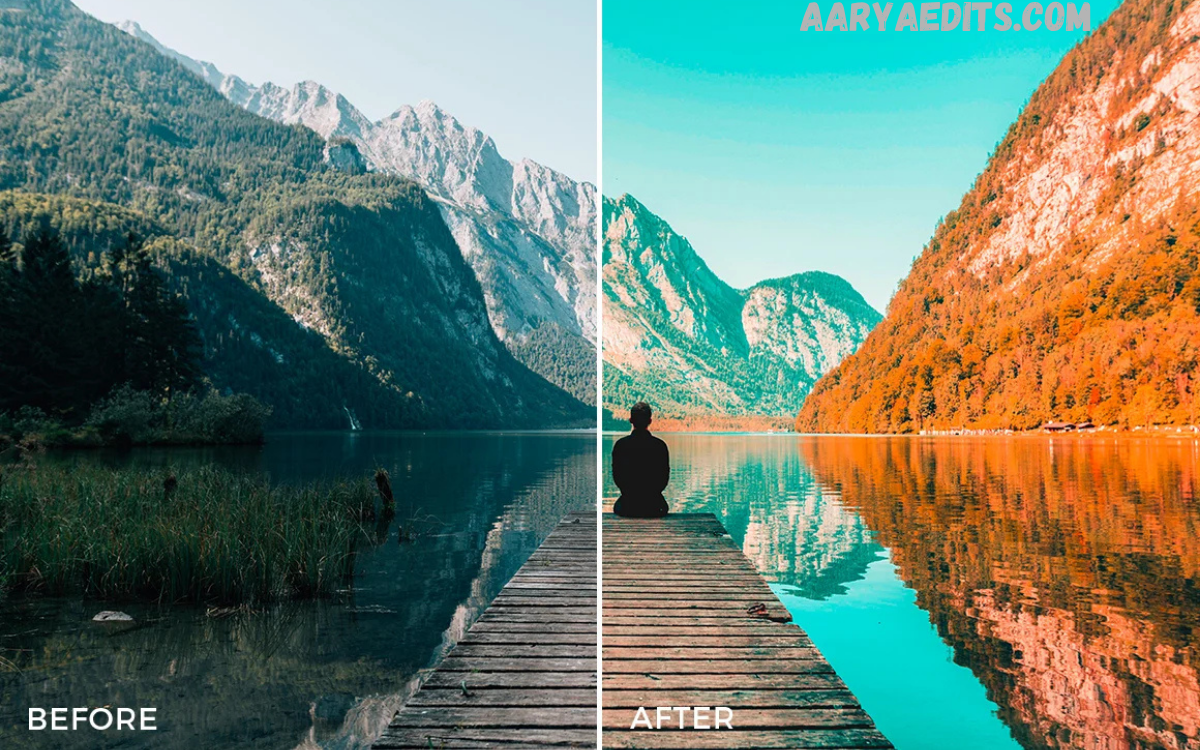
The Orange and Teal Lightroom Preset has become one of the most popular editing styles among photographers, content creators, travel bloggers, influencers, and professional editors. Known for its cinematic color grading, this preset transforms ordinary photographs into visually stunning masterpieces with warm orange highlights and cool teal shadows.
Whether you’re editing travel photography, portraits, landscapes, automotive shots, lifestyle content, or social media images, the Orange and Teal Lightroom Preset provides a professional look without requiring advanced editing skills.
What Is an Orange and Teal Lightroom Preset?
An Orange and Teal Lightroom Preset is a pre-configured editing profile designed for Adobe Lightroom. It automatically adjusts multiple editing parameters, such as:
- Color grading
- White balance
- Contrast
- Highlights
- Shadows
- Saturation
- Vibrance
- Tone curves
- HSL adjustments
- Split toning
- Calibration
The preset creates a distinctive cinematic appearance by emphasizing complementary colors. Orange tones enhance skin tones and warm areas, while teal tones enrich shadows and cooler regions. This combination produces vibrant yet balanced images that stand out across digital platforms.
Why Is the Orange and Teal Look So Popular?
The popularity of the Orange and Teal Lightroom Preset comes from basic color theory. Orange and teal sit opposite each other on the color wheel, making them complementary colors. This natural contrast creates visual harmony while drawing attention to the subject.
Many Hollywood films use this color grading technique because it enhances mood, creates depth, and makes characters stand out from the background.
Photographers appreciate this preset because it instantly delivers a polished, cinematic appearance without spending hours adjusting individual settings.
Key Features of Orange and Teal Lightroom Preset
The Orange and Teal Lightroom Preset offers several features that improve image quality and visual appeal.
Cinematic Color Grading
The preset mimics professional movie color grading by combining warm orange highlights with cool teal shadows.
Enhanced Skin Tones
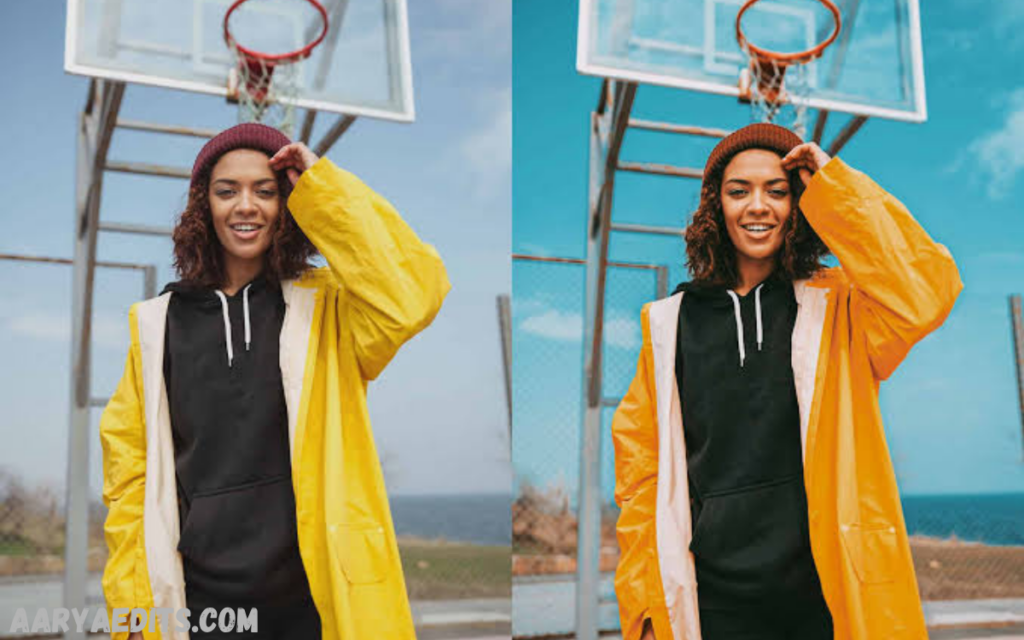
Unlike many aggressive presets, a quality Orange and Teal Lightroom Preset maintains natural-looking skin tones while adding warmth and vibrancy.
Rich Contrast
Improved contrast creates more depth between highlights and shadows, making images appear sharper and more dynamic.
Balanced Saturation
Colors become richer without appearing unrealistic or oversaturated.
Professional Consistency
Applying the same preset across multiple images creates a cohesive visual identity for portfolios, websites, Instagram feeds, and client galleries.
Read Also: AI Cinematic Photo Editing Guide for Professional Results
Benefits of Using Orange and Teal Lightroom Preset
Using a professionally designed Orange and Teal Lightroom Preset offers numerous advantages.
Saves Time
Manual editing can take several minutes per image. A preset dramatically reduces editing time, allowing photographers to edit hundreds of photos efficiently.
Easy to Use
Even beginners can achieve professional-quality edits with minimal experience.
Consistent Editing Style
Maintaining a consistent editing style helps photographers establish a recognizable brand.
Improves Visual Appeal
The cinematic color combination naturally attracts attention and increases engagement on social media platforms.
Customizable
Presets serve as starting points. Users can fine-tune exposure, white balance, shadows, or highlights to match each image.
Best Types of Photography for Orange and Teal Lightroom Preset
Although versatile, the Orange and Teal Lightroom Preset works exceptionally well for certain photography styles.
Portrait Photography
Warm orange tones enhance skin color, while teal backgrounds create striking separation between the subject and surroundings.
Travel Photography
Travel images gain vibrant skies, rich landscapes, and dramatic lighting.
Landscape Photography
Mountains, forests, oceans, and sunsets become more immersive through enhanced color contrast.
Street Photography
Urban environments benefit from dramatic shadows and colorful lighting.
Automotive Photography
Cars appear more polished with metallic highlights and cinematic surroundings.
Lifestyle Photography
Everyday moments gain a magazine-quality aesthetic perfect for blogs and social media.
Fashion Photography
Professional color grading enhances clothing textures, makeup, and studio lighting.
How Orange and Teal Color Grading Works
The Orange and Teal Lightroom Preset modifies multiple color channels simultaneously.
Warm colors such as reds, oranges, and yellows receive additional warmth and saturation.
Blue and cyan colors shift toward teal, giving skies, water, and shadows a modern cinematic appearance.
Contrast adjustments increase separation between warm and cool areas, producing greater depth and realism.
The result is a balanced image where subjects naturally become the center of attention.
How to Install Orange and Teal Lightroom Preset
Download Preset Now
Installing the preset is straightforward.
Lightroom Desktop
Open Adobe Lightroom.
Navigate to the Presets panel.
Click Import Presets.
Select the downloaded preset file.
The preset will appear in your library.
Lightroom Mobile
Download the preset file.
Import the preset into Lightroom Mobile.
Copy the preset settings.
Paste the settings onto new photos.
Alternatively, install DNG preset files directly.
Tips for Getting the Best Results
While presets provide an excellent starting point, a few adjustments can improve final results.
Use Properly Exposed Images
Presets perform best on images with balanced exposure.
Adjust White Balance
Minor temperature adjustments help maintain natural skin tones.
Fine-Tune Exposure
Increase or decrease exposure depending on lighting conditions.
Modify Contrast
Some images may require additional contrast or softer shadows.
Reduce Saturation if Necessary
Highly colorful scenes sometimes benefit from a slight reduction in saturation.
Sharpen Selectively
Apply sharpening carefully to maintain image quality.
Common Mistakes When Using Orange and Teal Lightroom Presets
Avoid these common editing mistakes.
Applying the preset to poorly exposed images without corrections.
Overusing clarity or sharpening.
Leaving skin tones excessively orange.
Using the preset on every image without customization.
Ignoring white balance adjustments.
Stacking multiple presets together.
Small refinements produce significantly better results.
Orange and Teal Lightroom Preset for Instagram
Instagram creators love the Orange and Teal Lightroom Preset for creating visually cohesive feeds.
Consistent editing increases profile professionalism while strengthening brand identity.
Images edited with cinematic color grading often receive higher engagement because they appear vibrant, polished, and visually appealing.
Many travel influencers, fashion creators, and lifestyle bloggers rely on this editing style to maintain a premium aesthetic.
Orange and Teal Lightroom Preset for Professional Photographers
Professional photographers frequently use this preset during wedding photography, engagement sessions, travel assignments, commercial campaigns, and portrait shoots.
Instead of editing every image individually, photographers can batch process hundreds of photographs while maintaining consistent quality.
This efficiency saves time and improves client satisfaction.
Can Beginners Use Orange and Teal Lightroom Preset?
Absolutely.
One of the biggest advantages of Lightroom presets is their simplicity.
Beginners only need to import the preset and apply it to an image.
Afterward, they can make small adjustments to exposure, temperature, and cropping if needed.
With practice, users learn how different images respond to the preset and can refine their editing style.
Choosing the Best Orange and Teal Lightroom Preset
Not every preset delivers the same quality.
Look for presets that offer:
- Natural skin tones
- Balanced contrast
- Professional color grading
- Mobile compatibility
- Desktop compatibility
- Easy installation
- High-resolution editing support
- Adjustable settings
Premium presets often include multiple variations for different lighting conditions.
Who Should Use Orange and Teal Lightroom Preset?
This editing style is suitable for:
- Professional photographers
- Wedding photographers
- Portrait photographers
- Travel photographers
- Landscape photographers
- Automotive photographers
- Fashion photographers
- Content creators
- Bloggers
- Influencers
- Social media managers
- Marketing agencies
- Small businesses
- Digital artists
Its versatility makes it one of the most valuable presets for nearly every photography niche.
Frequently Asked Questions
What is an Orange and Teal Lightroom Preset?
An Orange and Teal Lightroom Preset is a pre-designed editing filter for Adobe Lightroom that applies cinematic color grading with warm orange highlights and cool teal shadows, creating a professional and visually appealing look.
Is the Orange and Teal Lightroom Preset suitable for beginners?
Yes, the preset is beginner-friendly. It can be applied with a single click, and users can make additional adjustments to exposure, contrast, or white balance for the best results.
Can I use the Orange and Teal Lightroom Preset on Lightroom Mobile?
Yes, most Orange and Teal Lightroom Presets are compatible with both Lightroom Desktop and Lightroom Mobile, making photo editing convenient across different devices.
Which types of photos work best with this preset?
The preset works exceptionally well for portraits, travel photography, landscapes, lifestyle images, street photography, fashion shoots, and automotive photography.
Will the preset work on every photo?
While the preset enhances most images, the final result depends on factors such as lighting, exposure, and white balance. Minor adjustments may be needed to achieve the desired look.
Can I customize the preset after applying it?
Yes, Lightroom Presets are fully editable. You can adjust exposure, color temperature, contrast, saturation, highlights, shadows, and other settings to suit your specific image.
Does using a preset reduce image quality?
No. Applying an Orange and Teal Lightroom Preset does not reduce image quality. It only modifies editing parameters while preserving the original photo.
Why is the Orange and Teal Lightroom Preset so popular?
The preset is popular because it creates a cinematic, high-contrast aesthetic with complementary orange and teal tones. This professional color grading enhances depth, improves visual appeal, and gives photos a modern, polished finish.
Conclusion
The Orange and Teal Lightroom Preset remains one of the most powerful tools for creating cinematic, professional-quality photographs with minimal effort. Its signature blend of warm orange highlights and cool teal shadows enhances depth, improves color balance, and delivers.
Whether you’re a beginner looking to elevate your editing or an experienced photographer seeking consistency and efficiency, this preset offers an excellent foundation for producing visually compelling images.
