

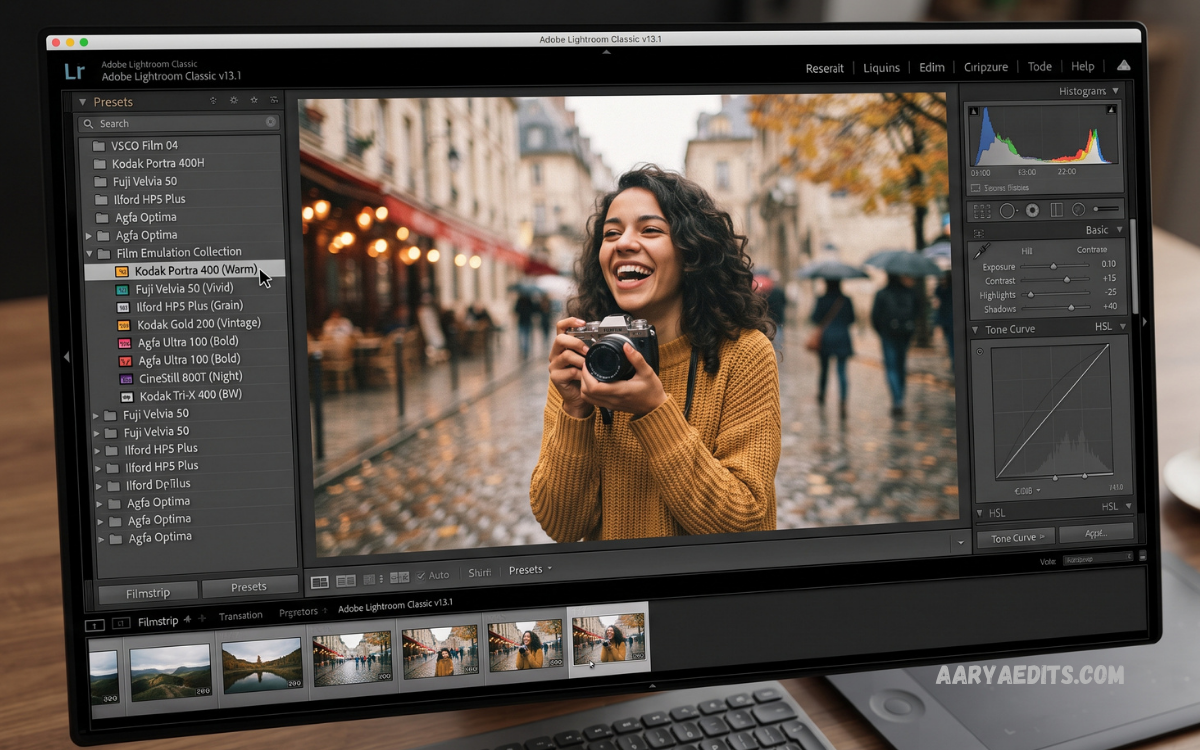
Lightroom Film Presets have become a popular choice among photographers, content creators, bloggers, and social media users seeking professional-looking photographs without spending hours adjusting individual settings. These presets apply carefully designed combinations of color, contrast, exposure, highlights, shadows, saturation, and other editing parameters to create distinctive film-inspired results.
Modern photography often focuses on creating a consistent visual identity, and Lightroom Film Presets make that process considerably easier. Whether you prefer classic analog colors, warm cinematic tones, faded vintage effects, muted portraits, or dramatic editorial styles, the right preset can help establish a recognizable appearance across an entire collection of photographs.
What Are Lightroom Film Presets?
Lightroom Film Presets are predefined editing profiles designed for Adobe Lightroom that modify multiple image settings simultaneously. Instead of manually adjusting every slider, photographers can apply a preset and then make small changes according to the lighting, camera, subject, and personal preference.
Film presets are generally inspired by the visual characteristics associated with traditional analog photography. They can recreate elements such as soft contrast, subtle grain, warm highlights, subdued colors, rich shadows, and distinctive color palettes while maintaining the flexibility of digital editing.
Why Are Lightroom Film Presets Popular?
The biggest advantage of Lightroom Film Presets is editing efficiency, especially when working with large collections of images. A photographer can apply the same starting look to dozens or hundreds of photographs before making individual corrections where necessary.
Consistency is another important benefit for professional photographers and content creators. Using a carefully selected preset collection can help photographs from different locations or shooting sessions maintain a similar visual style.
Film-Inspired Photography in the Digital Era
Digital cameras and smartphones provide exceptional image quality, but many photographers still appreciate the unique appearance associated with traditional film photography. Film-inspired editing offers a way to combine modern digital image quality with nostalgic visual characteristics.
Lightroom provides extensive control over color grading, tone curves, calibration, grain, and other settings that influence the final appearance. Film presets use these controls to create repeatable styles while allowing photographers to customize the result.
Key Features of Lightroom Film Presets
A quality Lightroom Film Preset can influence several aspects of an image at once, including exposure, contrast, white balance, highlights, shadows, blacks, whites, saturation, and color tones. Advanced presets may also use tone curves, HSL adjustments, color grading, calibration, and effects.
The best presets are designed as starting points rather than permanent replacements for manual editing. Photographers can adjust exposure, temperature, tint, contrast, and other settings after applying a preset to match the specific conditions of each photograph.
Vintage Lightroom Film Presets
Vintage Lightroom Film Presets are designed to create an older photographic appearance through faded colors, softer contrast, warm tones, and subtle texture. These presets work particularly well for lifestyle photography, travel images, street photography, and creative portraits.
A vintage appearance does not necessarily mean making an image look heavily aged. Professional vintage presets usually maintain natural skin tones and image detail while introducing carefully controlled characteristics associated with classic photography.
Cinematic Lightroom Film Presets
Cinematic Lightroom Film Presets are popular among photographers and creators who want dramatic colors and atmospheric images. They commonly emphasize controlled contrast, deeper shadows, complementary color relationships, and carefully balanced highlights.
These presets can be useful for travel photography, portraits, urban scenes, landscapes, and storytelling projects. However, the final effect should remain balanced so important details are not lost in excessively dark shadows or saturated colors.
Portrait Film Presets
Portrait photographers often choose film-inspired presets because subtle color adjustments can create a polished appearance while preserving natural skin tones. A well-designed portrait preset should enhance the overall atmosphere without making skin appear unnaturally orange, red, gray, or oversaturated.
Lighting conditions strongly affect portrait editing results. The same preset may look different under sunlight, indoor lighting, cloudy skies, or artificial lights, so photographers should always make minor adjustments after applying it.
Wedding Photography Film Presets
Wedding photographers frequently use presets to speed up editing and maintain consistency across large galleries. Film-inspired styles can provide elegant colors, soft contrast, natural skin tones, and a timeless appearance that suits wedding albums.
A professional wedding workflow usually involves applying a preset as a base and then correcting exposure, white balance, skin tones, and individual lighting differences. This approach provides efficiency without sacrificing image quality.
Travel Photography Presets
Travel photographs often contain different lighting conditions, landscapes, architecture, people, and environments within the same collection. Lightroom Film Presets can help create a cohesive visual style across these diverse photographs.
Warm film looks can work particularly well with sunsets, streets, architecture, and cultural scenes, while muted presets may complement cloudy landscapes and minimalist compositions. Choosing the right style depends on the mood and story the photographer wants to communicate.
How to Use Lightroom Film Presets
Using Lightroom Film Presets is relatively straightforward. After installing a compatible preset, open an image in Lightroom, locate the preset panel, select the desired style, and apply it to the photograph.
After applying the preset, inspect exposure, white balance, highlights, shadows, and skin tones before exporting the image. Presets are created using specific assumptions about an image, so minor adjustments often produce a more natural and professional result.
Adjusting Presets for Better Results
Applying a preset with one click does not guarantee a perfect photograph. Exposure differences, camera profiles, lenses, lighting conditions, and original image processing can significantly influence how a preset appears.
Start by correcting exposure and white balance before fine-tuning colors. If the image looks too strong, reduce the intensity of the effect by adjusting individual settings rather than accepting the original preset configuration.
Lightroom Film Presets for RAW Photos
RAW files provide extensive editing flexibility because they retain significantly more image information than compressed formats. This makes them particularly suitable for applying and customizing film-inspired presets.
When working with RAW photographs, photographers can adjust exposure, white balance, highlights, shadows, and colors with greater flexibility. This allows a film preset to serve as a foundation while preserving control over the final image.
Lightroom Film Presets for Mobile Photography
Mobile photography has become an important part of modern content creation, and Lightroom supports powerful editing workflows on smartphones. Lightroom Film Presets can help mobile photographers achieve consistent visual styles without relying entirely on complicated manual adjustments.
Creators can use presets for Instagram posts, travel content, personal photography, blogs, and short-form video thumbnails. Mobile editing also makes it possible to maintain a consistent aesthetic while working from almost anywhere.
Free Lightroom Film Presets
Free Lightroom Film Presets can be useful for photographers who want to experiment with different styles before investing in premium collections. Many free presets provide basic vintage, cinematic, portrait, and muted color effects.
However, quality can vary considerably between preset collections. Before using a free preset, check whether it is compatible with your Lightroom version and whether the creator provides clear installation and usage instructions.
Premium Lightroom Film Presets
Premium Lightroom Film Presets are often created by professional photographers and editing specialists with specific visual goals. High-quality collections may include multiple variations designed for different lighting conditions, camera systems, and photographic genres.
A premium preset can save considerable editing time when its style matches the photographer’s workflow. Before purchasing any collection, review examples, compatibility information, included formats, and licensing terms.
Choosing the Right Film Preset
Selecting the right preset begins with identifying the desired visual style. Consider whether your photographs require warm colors, muted tones, cinematic contrast, vintage fading, natural portraits, or a clean editorial appearance.
It is also important to consider the type of photography you create. A preset designed for bright outdoor portraits may not produce the same quality on dark indoor photographs, so a versatile collection with multiple styles can be more practical.
Film Presets and Color Grading
Color grading plays an important role in creating a film-inspired aesthetic. Lightroom provides dedicated controls that allow photographers to influence the color of shadows, midtones, and highlights.
Film presets often use carefully balanced color grading to create a particular mood. Photographers can further customize these colors to match a brand identity, project theme, or personal creative direction.
Film Grain and Texture
Film grain is another recognizable characteristic associated with analog photography. Lightroom’s grain controls allow users to introduce texture without physically using film cameras.
Subtle grain can add character to photographs, particularly portraits, street images, and cinematic compositions. Excessive grain, however, can reduce perceived clarity, so it should generally be applied with moderation.
Lightroom Film Presets for Social Media
Social media creators often need visually consistent images that can be edited quickly. Lightroom Film Presets can help establish a recognizable aesthetic across Instagram, Pinterest, websites, portfolios, and other visual platforms.
Consistency does not mean every photograph needs identical colors. Using several complementary presets can create variety while maintaining a unified visual identity throughout a social media feed.
Common Mistakes When Using Film Presets
One common mistake is applying a preset without checking exposure and white balance. A preset that looks excellent on one photograph may appear too dark, bright, warm, or cool on another.
Another mistake is relying on presets as a complete editing solution. Professional results usually require additional adjustments because photographs differ in lighting, composition, camera settings, subject matter, and environmental conditions.
Read Also: Lightroom Street Photography Presets: Presets for Professional Photo Editing
Presets vs Manual Editing
Manual editing provides maximum control because every adjustment is selected specifically for an individual photograph. However, it can require significant time, particularly when processing large collections.
Presets provide a faster starting point and can significantly improve workflow efficiency. The most effective approach combines both methods by using presets for consistency and manual adjustments for precision.
Creating Your Own Lightroom Film Presets
Experienced photographers can create custom Lightroom Film Presets based on their preferred editing style. Begin with a photograph that represents the desired look and carefully adjust exposure, contrast, tone curves, HSL settings, color grading, and effects.
Once the style is consistent and repeatable, save the settings as a preset. Creating custom presets allows photographers to develop a unique visual identity instead of relying exclusively on commonly used preset collections.
Organizing Lightroom Film Presets
A large preset library can become difficult to manage without proper organization. Create logical groups based on photography type, such as portraits, travel, weddings, cinematic, vintage, landscapes, or black-and-white.
Clear naming also makes presets easier to find. Instead of generic names, use descriptive labels that communicate the style or intended lighting condition.
Are Lightroom Film Presets Worth Using?
For photographers who regularly edit large numbers of images, Lightroom Film Presets can provide substantial workflow benefits. They reduce repetitive adjustments while creating a consistent foundation for further editing.
Their value ultimately depends on the quality of the presets and how effectively they fit the photographer’s style. A well-designed preset combined with thoughtful manual adjustments can produce polished results efficiently.
Frequently Asked Questions
What are the Best Display Phones 2026?
The Best Display Phones 2026 offer high-resolution OLED or AMOLED screens, smooth 120Hz refresh rates, excellent brightness, accurate colors, strong contrast, and advanced HDR support.
Which phone has the best display in 2026?
Premium flagship smartphones generally provide the best displays, combining high brightness, excellent color accuracy, adaptive refresh rates, sharp resolution, and strong HDR performance.
Is AMOLED better than LCD?
AMOLED usually delivers deeper blacks, higher contrast, vibrant colors, and better viewing quality. Modern LCD displays can still provide excellent performance at a lower price.
Is a 120Hz display worth it in 2026?
Yes. A 120Hz display provides smoother scrolling, animations, and supported gaming compared with 60Hz screens.
Which display is best for gaming?
A high-quality AMOLED or OLED display with a 120Hz or higher refresh rate is an excellent choice for gaming. Touch response and device performance also matter.
What is the ideal phone display size?
A screen between 6.3 and 6.8 inches offers a good balance between viewing space and comfortable handling for most users.
Does higher resolution mean better display quality?
Higher resolution improves sharpness and detail, but overall display quality also depends on brightness, contrast, color accuracy, refresh rate, and panel technology.
Why is peak brightness important?
Higher brightness improves outdoor visibility, especially under direct sunlight. Strong brightness also enhances the viewing experience when watching HDR content.
What is HDR display support?
HDR improves brightness range, contrast, and color depth when viewing compatible photos, videos, and streaming content.
What should I consider before buying a phone for its display?
Consider panel technology, resolution, refresh rate, brightness, HDR support, color accuracy, adaptive refresh rate, screen protection, and touch response before choosing a smartphone
Conclusion
Lightroom Film Presets offer a practical way to introduce professional, cinematic, vintage, and analog-inspired aesthetics into modern digital photography. They simplify repetitive editing tasks while giving photographers a flexible foundation that can be customized for individual images.
The best results come from treating presets as creative tools rather than automatic solutions. Whether you’re a professional photographer, beginner, content creator, or mobile photography enthusiast, experimenting with different Lightroom Film Presets can help you develop a consistent and distinctive editing style.
