

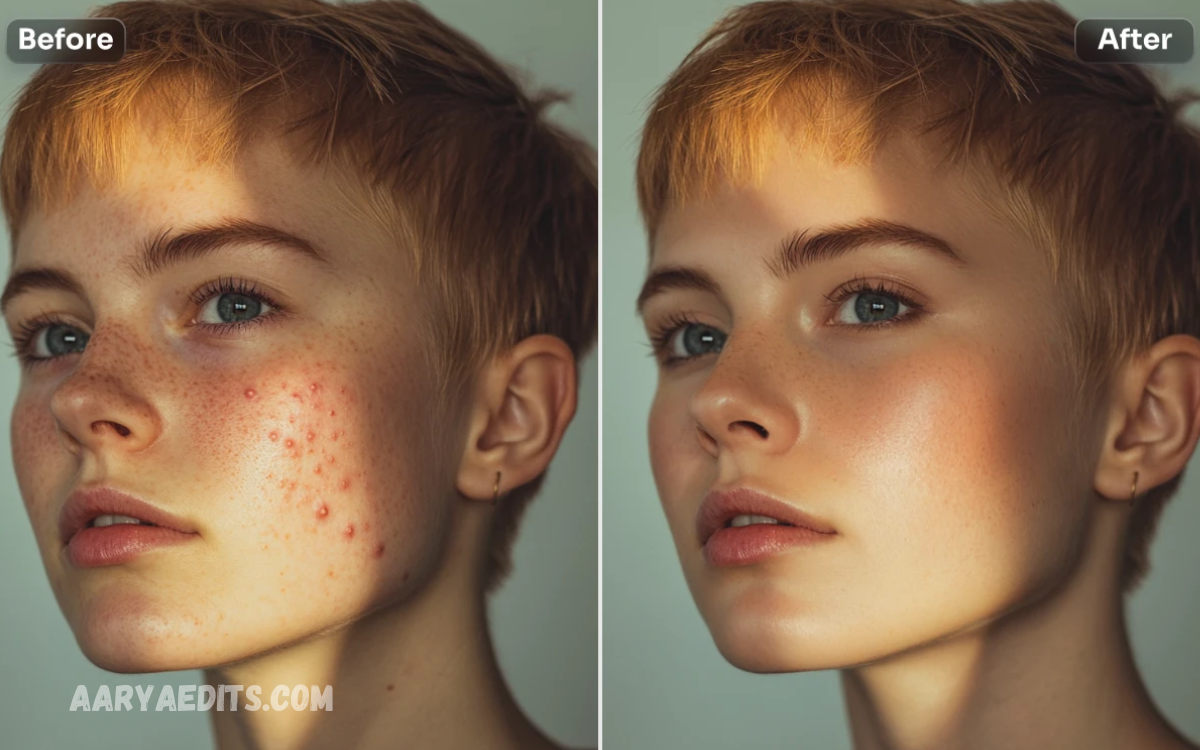
Free AI photo retouch tools have transformed the way people edit images by making professional-quality enhancements accessible to everyone. Whether you’re a photographer, content creator, student, online seller, or social media enthusiast, these intelligent tools can improve your photos within seconds without requiring advanced editing skills.
The growing popularity of free AI photo retouch tools comes from their speed, convenience, and accuracy. Most platforms work directly in your web browser or through mobile apps, allowing users to edit images anytime and anywhere.
What Are AI Photo Retouch Tools?
AI photo retouch tools are image editing applications powered by artificial intelligence. Unlike traditional editors that require manual adjustments, AI automatically detects areas needing improvement and applies intelligent corrections.
These tools can recognize:
- Human faces
- Skin texture
- Eyes
- Hair
- Backgrounds
- Lighting conditions
- Color balance
- Image noise
- Blurry details
- Objects that should be removed
Instead of editing each element individually, AI performs multiple enhancements within seconds.
Why Free AI Photo Retouch Tools Are Growing in Popularity?
Artificial intelligence has dramatically reduced the complexity of professional editing.
Major advantages include:
- One-click editing
- Automatic skin enhancement
- Portrait retouching
- Object removal
- Background replacement
- High-resolution image enhancement
- Fast processing
- Beginner-friendly interface
- Cloud-based accessibility
- No expensive software required
Even users with no editing experience can create high-quality images suitable for websites, online stores, social media platforms, portfolios, and marketing campaigns.
Key Features of Free AI Photo Retouch Tools
Modern AI editors provide a wide range of smart editing capabilities.
Automatic Skin Retouching
AI identifies facial imperfections and naturally smooths skin while preserving realistic textures.
Common improvements include:
- Acne removal
- Wrinkle reduction
- Dark circle correction
- Skin tone balancing
- Blemish removal
Background Removal
AI accurately separates the subject from the background.
This feature helps users create:
- Product photos
- Professional headshots
- Transparent PNG images
- Marketing graphics
- Social media content
Object Removal
AI removes unwanted objects, including:
- People
- Wires
- Trash
- Text
- Watermarks (only from images you own or have permission to edit)
- Shadows
- Background distractions
The edited area is intelligently reconstructed for a clean appearance.
AI Image Upscaling
Many free AI editors increase image resolution while maintaining sharpness.
Upscaling helps improve:
- Old photographs
- Low-resolution downloads
- Product images
- Portraits
- Website banners
Automatic Color Correction
Artificial intelligence adjusts:
- Brightness
- Contrast
- Saturation
- White balance
- Exposure
- Highlights
- Shadows
The result is a vibrant, balanced image without manual tweaking.
Face Enhancement
AI enhances facial details by improving:
- Eyes
- Smile
- Teeth
- Hair
- Facial lighting
- Sharpness
Portraits become clearer while maintaining a natural appearance.
Benefits of Using Free AI Photo Retouch Tools
Save Time
Traditional editing may take hours.
AI completes many edits in less than a minute.
Cost Effective
Many excellent AI editors offer free plans with powerful features.
Users can create professional-quality images without purchasing expensive editing software.
Easy to Learn
Most AI platforms use one-click editing.
There is no need for extensive training or advanced design skills.
Professional Results
AI algorithms continuously improve, producing high-quality images suitable for:
- Business websites
- Online stores
- Digital marketing
- Blogs
- Advertisements
- Portfolios
- Social media
Improved Productivity
Content creators handling large volumes of images can automate repetitive editing tasks.
This significantly speeds up workflow.
Best Free AI Photo Retouch Tools
Several platforms provide impressive AI-powered editing capabilities.
Popular options include:
- Canva AI Photo Editor
- Pixlr AI
- Fotor AI Editor
- PhotoRoom
- Adobe Express AI
- Picsart AI
- Remini
- insMind
- Cutout.pro
- Clipdrop
Each platform offers unique strengths, including portrait enhancement, object removal, background editing, and image upscaling.
Who Can Benefit from AI Photo Retouch Tools?
AI editing software serves a wide variety of users.
Photographers
Quickly edit client photos while maintaining professional quality.
Influencers
Create polished images for Instagram, TikTok, Facebook, Pinterest, and YouTube.
eCommerce Sellers
Produce clean product photos that increase customer confidence.
Bloggers
Enhance featured images that attract more readers.
Students
Improve presentation visuals and creative projects.
Marketing Teams
Design engaging promotional graphics faster.
Small Businesses
Create professional branding materials without hiring expensive designers.
Read Also: Free Online Photo Editing Course: Learn Professional Editing Skills
AI Photo Retouching for Social Media
Visual content plays a major role in online engagement.
AI editing tools help creators produce:
- Better profile pictures
- Attractive Instagram posts
- Professional LinkedIn headshots
- Facebook cover photos
- Pinterest graphics
- YouTube thumbnails
- TikTok content
High-quality visuals often receive greater attention and engagement.
AI Photo Editing for Online Businesses
Professional images improve customer trust and increase sales.
Online businesses use AI tools to:
- Remove product backgrounds
- Correct lighting
- Improve image clarity
- Resize images
- Standardize product photos
- Create promotional banners
This leads to a more consistent and appealing online presence.
Tips for Achieving the Best Results
Although AI performs most tasks automatically, following these practices helps maximize quality.
- Start with the highest-resolution image available.
- Avoid excessive retouching.
- Maintain natural skin texture.
- Use realistic color adjustments.
- Compare before-and-after results.
- Save the original image before editing.
- Export images in the appropriate format for their intended use.
Natural-looking edits generally appear more professional than heavily processed images.
Limitations of Free AI Photo Retouch Tools
Free versions often include certain restrictions.
These may include:
- Watermarks
- Limited exports
- Daily usage limits
- Fewer premium features
- Lower export resolution
- Limited cloud storage
Users with advanced requirements may eventually choose paid plans, but free tools remain sufficient for many everyday editing tasks.
AI and Ethical Photo Editing
AI editing should enhance images without creating misleading or deceptive content.
Responsible editing includes:
- Maintaining realistic appearances
- Respecting privacy
- Avoiding unauthorized image manipulation
- Being transparent when significant alterations are made in professional or journalistic contexts
Ethical editing helps maintain trust with audiences.
Future of AI Photo Retouch Tools
Artificial intelligence continues to evolve rapidly.
Future innovations may include:
- Real-time video retouching
- Fully automated editing workflows
- Advanced facial reconstruction
- Smarter image restoration
- AI-generated lighting effects
- Improved object replacement
- Personalized editing styles
- Faster cloud processing
These advancements will further simplify professional image editing for users of all skill levels.
How to Choose the Right AI Photo Retouch Tool
When selecting an AI editor, consider:
- Ease of use
- Editing speed
- Available free features
- Export quality
- Privacy practices
- Supported file formats
- Mobile compatibility
- Browser accessibility
- Batch editing options
The best tool depends on your specific needs, whether for portraits, products, marketing, or creative projects.
Frequently Asked Questions
Can AI retouch old or damaged photos?
Yes. Many AI photo retouch tools can restore old, faded, blurry, or damaged photos by improving image quality, removing scratches, enhancing colors, and increasing resolution.
Do I need photo-editing experience to use AI retouching tools?
No. Most AI photo editors are designed for beginners and offer one-click enhancements, making professional-quality photo editing easy without advanced skills.
Can AI remove backgrounds from images?
Yes. Many free AI photo retouch tools include automatic background removal, allowing users to create transparent images or replace backgrounds within seconds.
Which features are commonly available in free AI photo retouch tools?
Common features include skin smoothing, object removal, image upscaling, color correction, background removal, portrait enhancement, noise reduction, and automatic lighting adjustments.
Are free AI photo retouch tools suitable for business use?
Yes. Small businesses, eCommerce stores, marketers, and content creators use AI photo editors to create professional product images, promotional graphics, and social media content efficiently.
Can AI photo retouch tools improve low-resolution images?
Yes. Many AI-powered editors use image upscaling technology to increase resolution while preserving details and improving overall image clarity.
Do free AI photo retouch tools add watermarks?
Some free tools add watermarks or limit export quality, while others allow watermark-free downloads. The available features depend on the platform you choose.
What is the biggest advantage of using free AI photo retouch tools?
The biggest advantage is the ability to produce professional-looking images quickly and easily, without expensive software or advanced editing skills, saving time and effort.
Conclusion
Free AI Photo Retouch Tools: Enhance Your Images Instantly has transformed digital image editing by making professional-quality enhancements accessible to everyone. From automatic skin smoothing and object removal to background editing, color correction, and image upscaling, AI-powered tools save time while delivering impressive results.
