

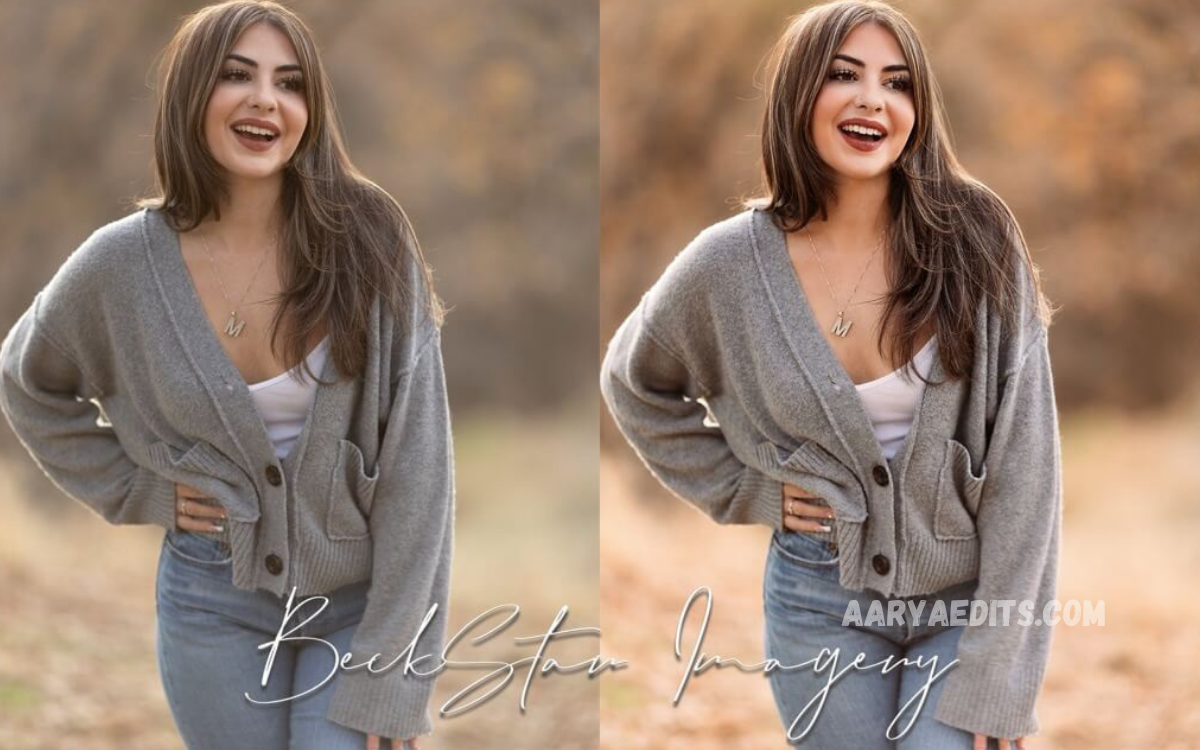
One-Click Lightroom Presets for Effortless Photo Editing are pre-designed editing settings that instantly change the appearance of a photograph. Instead of manually adjusting exposure, contrast, highlights, shadows, colors, and other settings, users can apply a preset with a single click.
Lightroom presets are especially useful for photographers, content creators, bloggers, influencers, and beginners who want consistent results without spending hours editing every image. They simplify the editing process while giving photos a polished and professional appearance.
Why Do One-Click Presets Make Photo Editing Easier?
Traditional photo editing often requires adjusting multiple settings individually, which can be time-consuming for users working with large collections of images. One-click presets provide a faster alternative by applying a complete editing style almost instantly.
This approach allows photographers to focus more on creativity rather than repetitive adjustments. Whether you are editing travel photographs, portraits, landscapes, or social media content, presets can significantly reduce the amount of time required to achieve an attractive result.
How One-Click Lightroom Presets Work
A Lightroom preset contains a collection of predetermined editing adjustments. These adjustments may include exposure, temperature, tint, contrast, clarity, texture, highlights, shadows, saturation, color grading, and other Lightroom settings.
When a preset is applied, Lightroom automatically transfers those settings to the selected photograph. The image may immediately appear brighter, warmer, cooler, more cinematic, softer, or more vibrant depending on the preset’s design.
Benefits of One-Click Lightroom Presets
One of the biggest benefits of One-Click Lightroom Presets for Effortless Photo Editing is speed. A preset can provide a strong starting point within seconds, making it much easier to edit multiple photographs efficiently.
Presets can also improve consistency across an entire collection. Maintaining a similar visual style is important for photographers and creators who publish images on websites, portfolios, social media platforms, and other digital channels.
Save Time With Faster Editing
Editing photographs individually can take considerable time, especially when working with hundreds of images. Applying a suitable preset allows users to establish a finished-looking style almost instantly.
After applying the preset, users can make small adjustments if necessary. This combination of one-click editing and personalized refinement offers a practical workflow for both casual photographers and professionals.
Create a Consistent Photography Style
A recognizable editing style can help photographers establish a strong visual identity. Using similar presets across a collection can create consistency in colors, brightness, contrast, and overall mood.
For content creators, consistency can also make social media feeds and online portfolios appear more organized. A cohesive visual style makes individual photographs feel like part of the same creative collection.
Improve Portrait Photography With Presets
Portrait photographs can benefit greatly from carefully designed Lightroom presets. Presets can enhance skin tones, improve contrast, balance lighting, and create a specific mood while preserving the subject’s natural appearance.
However, every portrait is different. Lighting conditions, skin tones, camera settings, and backgrounds can vary significantly, so users should fine-tune the preset after applying it to achieve the most natural result.
Enhance Landscape and Travel Photos
Landscape and travel photographs often contain vibrant skies, natural scenery, architecture, and diverse lighting conditions. One-click presets can help enhance these elements by improving color balance, contrast, and overall atmosphere.
A suitable preset can make a dull photograph appear more dynamic while maintaining realism. For outdoor images, adjustments to highlights, shadows, saturation, and temperature can be particularly useful.
Read Also: Best Nature Presets for Lightroom Mobile for Stunning Outdoor Photo Editing
One-Click Presets for Social Media Content
Social media creators often need to edit photographs quickly while maintaining a recognizable style. One-click Lightroom presets can help creators prepare images for posts, stories, campaigns, and other digital content without having to repeat the same editing process.
Presets are particularly valuable when several photographs need to look visually consistent. After applying a preset, creators can make minor corrections to exposure or color before publishing the final images.
Choosing the Right Lightroom Preset
Choosing the right preset depends on the type of photograph and the desired visual effect. A preset designed for bright outdoor photography may not produce the same quality on a dark indoor portrait.
It is useful to consider the lighting, colors, subject, and mood of the original image before selecting a preset. The best preset is not necessarily the strongest; it is the one that complements the photograph naturally.
Free and Premium Lightroom Presets
There are many different types of Lightroom presets available, including free and premium options. Free presets can be a useful way for beginners to experiment with different editing styles and understand how preset-based workflows operate.
Premium presets may provide more specialized styles, greater variety, and carefully optimized adjustments. Regardless of the option selected, users should focus on whether the preset produces a natural and useful result rather than simply choosing one because it is popular.
Adjusting Presets After One-Click Application
Although presets are designed to simplify editing, they should not always be treated as a final solution. Different photographs have different exposure levels, lighting conditions, colors, and compositions.
After applying a preset, users can adjust exposure, white balance, highlights, shadows, saturation, and other settings. These small refinements can transform a basic preset application into a customized professional edit.
Avoiding Overedited Photographs
One common mistake when using Lightroom presets is applying excessive adjustments. Very strong contrast, unrealistic saturation, extreme clarity, or unnatural skin tones can make an image appear artificial.
The goal of One-Click Lightroom Presets for Effortless Photo Editing is to simplify the workflow while preserving image quality. A good editing style should enhance the photograph rather than distract viewers from the subject.
One-Click Presets for Beginners
Beginners can use presets as an excellent learning tool because they offer a way to see how different Lightroom adjustments affect an image. Applying a preset allows users to study the resulting settings and gradually understand the editing process.
As their experience improves, beginners can start modifying individual settings rather than relying entirely on presets. Over time, this can help them develop their own editing techniques and personal photography style.
One-Click Presets for Professional Photographers
Professional photographers can also benefit from presets because efficiency is important when managing large photography projects. Wedding photographers, event photographers, commercial creators, and studio professionals may need to process hundreds or thousands of images.
Presets can provide a consistent foundation for batch editing while still allowing individual photographs to receive personalized adjustments. This can speed up professional workflows without eliminating creative control.
Using Presets for Batch Editing
Batch editing is one of the most practical uses of Lightroom presets. Instead of editing each photograph from scratch, photographers can apply a preset to multiple images and then make adjustments as needed.
This workflow is particularly useful for photos captured under similar lighting conditions. When images are taken in dramatically different environments, each photograph may require additional correction after the preset is applied.
Mobile and Desktop Lightroom Editing
Lightroom provides editing experiences across different devices, making presets useful for photographers who work on both mobile and desktop platforms. The exact features and workflow can vary depending on the Lightroom version and device.
Mobile editing is particularly convenient for creators who need to prepare images while traveling or away from a computer. Desktop editing can provide a larger workspace and greater convenience for managing extensive photography collections.
Developing Your Own Lightroom Presets
Experienced Lightroom users can create their own presets based on their preferred editing style. Creating custom presets allows photographers to save frequently used adjustments and reuse them across future projects.
A personal preset collection can become an important part of a photographer’s workflow. Instead of relying entirely on external styles, users can create presets tailored to portraits, landscapes, indoor photography, nighttime scenes, and other common situations.
Tips for Getting Better Results With Presets
For better results, always begin with a high-quality photograph that has reasonable exposure and focus. Presets cannot completely fix problems such as severe blur, major exposure errors, or poor composition.
After applying a preset, inspect the image carefully and adjust settings that do not match the original lighting. Small changes often produce better results than applying multiple presets or making extreme adjustments.
Common Mistakes to Avoid
Applying the wrong preset is one of the most common mistakes beginners make. A dramatic cinematic preset may look attractive in a preview but may not suit a bright portrait or colorful landscape.
Another mistake is stacking multiple strong adjustments without checking the final image. It is usually better to apply one suitable preset and refine it carefully than to combine several styles that create excessive contrast or unnatural colors.
The Future of Effortless Photo Editing
Modern photo editing continues to become faster and more accessible. Presets, automated adjustments, artificial intelligence, and intelligent editing tools are helping photographers spend less time on repetitive technical tasks.
One-Click Lightroom Presets for Effortless Photo Editing remain valuable because they combine speed with creative control. Users can start with a professionally designed look and then personalize the result to their preferences.
Frequently Asked Questions
What are One-Click Lightroom Presets?
One-click Lightroom presets are saved collections of editing adjustments that can be applied to photographs instantly. They help users create a consistent appearance without manually changing every setting.
Are Lightroom presets suitable for beginners?
Yes, Lightroom presets are suitable for beginners because they simplify the editing process. They can also help new users understand how different adjustments affect a photograph’s appearance.
Can one preset work for every photograph?
Not always. Different lighting conditions, camera settings, subjects, and colors can affect how a preset looks, so additional adjustments may be necessary after applying it.
Do Lightroom presets improve photo quality?
Presets can improve the visual appearance of photographs by enhancing color, contrast, exposure, and mood. However, they cannot replace good photography or completely correct serious technical problems.
Can I edit a preset after applying it?
Yes, Lightroom allows users to modify individual settings after applying a preset. Adjusting exposure, white balance, shadows, highlights, and colors can help achieve a more personalized result.
Are free Lightroom presets useful?
Free Lightroom presets can be useful for learning and experimenting with different editing styles. Their effectiveness depends on the quality of the preset and the type of photograph being edited.
Can professionals use one-click presets?
Yes, professional photographers can use presets to speed up repetitive editing tasks and maintain consistency. They can then make individual corrections to ensure each image meets professional standards.
Can Lightroom presets be used for batch editing?
Yes, presets can be applied to multiple photographs, making them useful for batch editing. This can save significant time when images were captured under similar lighting conditions.
Should I use a strong preset for dramatic photos?
A strong preset can work for creative photography, but it should be used carefully. Excessive contrast, saturation, or color effects can make photographs appear unnatural.
Can I create my own Lightroom presets?
Yes, Lightroom users can create and save their own presets. Custom presets are useful for developing a consistent personal editing style and speeding up future projects.
Conclusion
One-Click Lightroom Presets for Effortless Photo Editing offer a practical way to streamline photography workflows, making them faster, simpler, and more consistent. By applying carefully designed adjustments with minimal effort, users can achieve attractive results without manually editing every setting.
Presets are most effective when they are treated as a starting point rather than a complete editing solution.
