

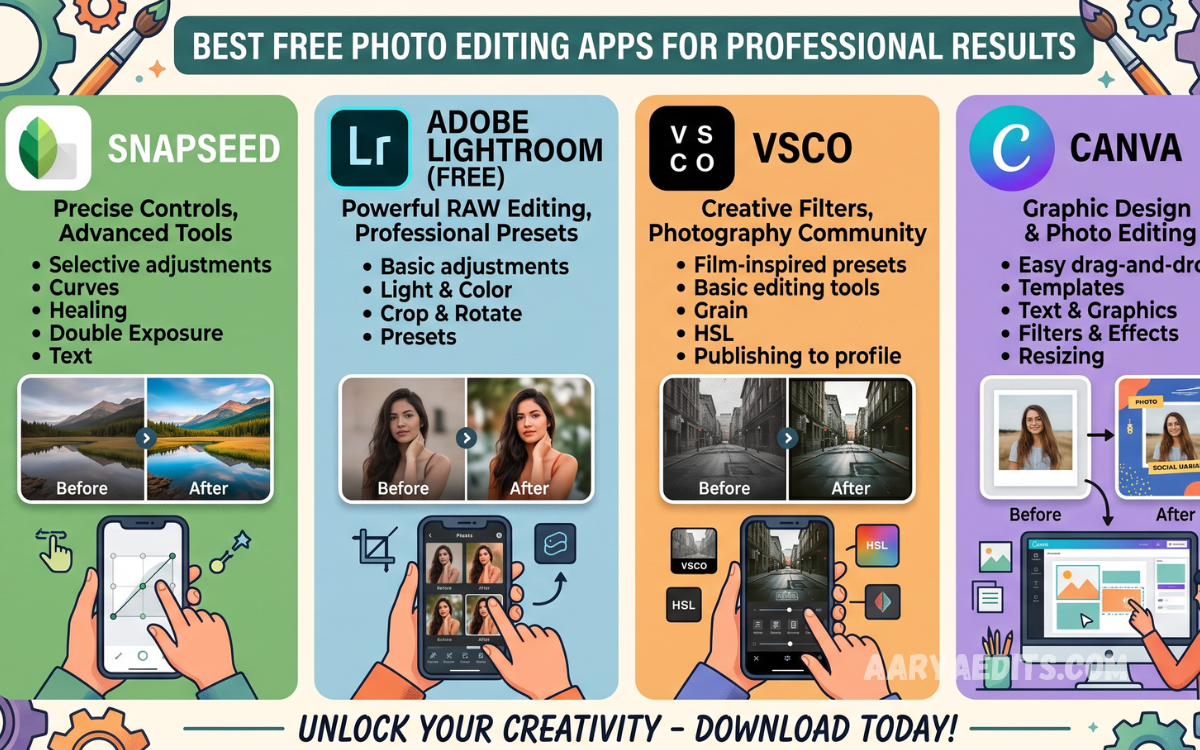
Photography has become more accessible than ever, thanks to powerful smartphones and free editing applications. A good photo editor can transform an ordinary image into a polished visual suitable for social media, websites, portfolios, marketing campaigns, and personal projects. You no longer need expensive desktop software to achieve impressive results.
The Best Free Photo Editing Apps for Professional Results provide essential tools such as exposure adjustment, color correction, cropping, sharpening, retouching, filters, and creative effects. Whether you are a beginner, content creator, blogger, photographer, or small business owner, choosing the right application can make your images look cleaner and more professional without requiring a large budget.
Why Free Photo Editing Apps Are Worth Using?
Free photo editing apps offer many of the features that were once available only through expensive professional software. Users can adjust brightness, contrast, highlights, shadows, saturation, temperature, and sharpness directly from a smartphone or tablet.
Another major advantage is convenience. Modern editing apps allow you to improve photographs anywhere without carrying a computer. With the right editing workflow, you can capture an image, edit it, save it, and publish it within minutes while maintaining a professional appearance.
Best Free Photo Editing Apps for Professional Results
Several free photo editing applications stand out because they combine powerful editing controls with user-friendly interfaces. Apps such as Snapseed, Adobe Lightroom Mobile, Pixlr, PhotoDirector, and Canva provide different combinations of professional tools and creative features.
The best choice depends on your editing requirements. Photographers may prefer detailed color and exposure controls, while social media creators may prioritize templates, effects, text tools, and quick adjustments. Understanding what each application offers helps you select the most suitable option.
Snapseed for Detailed Photo Editing
Snapseed is one of the strongest free choices for users who want detailed control over their photographs. It offers tools for exposure, color, curves, white balance, perspective, healing, selective adjustments, and sharpening without making the editing process unnecessarily complicated.
Its selective editing capabilities are particularly useful when only a specific part of an image needs improvement. You can enhance a subject, correct brightness in one area, or make targeted adjustments while keeping the rest of the photograph unchanged.
Adobe Lightroom Mobile for Color Control
Adobe Lightroom Mobile is an excellent option for photographers who want professional-looking color correction and exposure adjustments. The application provides controls for highlights, shadows, whites, blacks, temperature, tint, texture, clarity, and other important image properties.
Lightroom is especially useful when you want consistent results across multiple photographs. Presets and repeatable editing settings can help maintain a recognizable visual style for photography portfolios, social media pages, websites, and professional projects.
Pixlr for Quick Creative Editing
Pixlr is designed for users who want to combine traditional photo adjustments with creative editing features. It provides tools for cropping, resizing, filters, overlays, effects, text, and other visual enhancements that can quickly change the appearance of an image.
The application can be particularly useful for bloggers, social media users, and small businesses that need attractive graphics without spending significant time learning complicated editing software. Its straightforward approach makes creative editing accessible to a broad audience.
Canva for Photos and Social Media Graphics
Canva is widely recognized for graphic design, but it also includes useful photo editing capabilities. Users can enhance images, remove backgrounds where supported, apply filters, adjust visual elements, and combine photographs with text and design layouts.
It is especially valuable when a photograph needs to become part of a larger marketing graphic. Social media posts, promotional banners, thumbnails, advertisements, and blog graphics can be created using photographs alongside professional design elements.
PhotoDirector for Creative Enhancements
PhotoDirector offers a combination of conventional photo adjustments and creative editing tools. Users can work with color, lighting, effects, cropping, retouching, and various visual enhancements depending on the version and available features.
This type of application is useful for people who want more than basic brightness and contrast adjustments. Creative effects can help produce distinctive images, while standard correction tools allow users to maintain a polished and natural appearance.
Important Features to Look For
When selecting one of the Best Free Photo Editing Apps for Professional Results, look for essential adjustment tools before focusing on decorative effects. Exposure, white balance, contrast, highlights, shadows, curves, sharpening, cropping, and perspective correction are valuable features for serious editing.
File quality is equally important. An application should allow you to export photographs at an appropriate resolution and avoid unnecessary compression whenever possible. A beautiful edit can lose its professional appearance if the final exported image is excessively compressed or reduced in quality.
Read Also: Lightroom Reels Editing Guide: Enhance Your Videos with Professional Color Grading
Color Correction for Professional Photos
Color correction is one of the most important parts of professional photo editing. Incorrect white balance can make an image appear too warm, too cool, green, or unnatural, while excessive saturation can make colors look artificial.
A professional workflow usually starts with correcting exposure and white balance before making creative adjustments. Once the basic colors look balanced, you can make controlled changes to saturation, contrast, and individual tones to achieve the desired visual style.
Retouching Without Making Photos Look Artificial
Retouching can improve portraits and product photographs, but excessive editing often makes an image look unrealistic. Free editing applications often provide healing, cloning, blemish removal, and selective adjustment tools for subtle corrections.
The goal should be to improve the photograph while preserving natural details. Removing temporary distractions or small imperfections can enhance an image, but excessive smoothing and aggressive skin editing may reduce texture and make the final result appear artificial.
Using Filters Professionally
Filters can provide a quick way to establish a visual mood, but professional editing requires moderation. Applying a strong filter at full intensity can change skin tones, distort colors, and remove important details from the original photograph.
Instead, use filters as a starting point and reduce their strength when necessary. Combining a subtle filter with manual exposure, contrast, and color adjustments often produces a more refined result than relying on a preset alone.
Editing Photos for Social Media
Social media platforms require images that are visually clear, attractive, and appropriately sized. Free editing apps make it easier to crop photographs for different formats, improve brightness, add branding, and create consistent visual styles across posts.
Before publishing, check the final image on a smartphone screen because an image can appear different after export. Maintaining consistent colors, spacing, composition, and image quality can also help create a more professional-looking social media presence.
Photo Editing Tips for Beginners
Beginners should avoid making too many adjustments at once. Start with cropping and composition, then correct exposure and white balance before moving toward contrast, color, sharpening, and creative effects.
It is also helpful to compare the edited photograph with the original version regularly. This prevents excessive adjustments and helps you recognize whether each change genuinely improves the image or simply makes it different.
How to Get Professional Results for Free
Professional results do not always depend on expensive software. A strong understanding of lighting, composition, color, contrast, and visual balance can make a bigger difference than the number of tools available inside an application.
Choose one capable free editor and learn its main features instead of constantly switching between applications. Practicing with different photographs will gradually improve your editing skills and help you develop a consistent workflow.
Choosing the Right App for Your Needs
The best application depends on the type of photography you edit. Snapseed is a strong choice for detailed manual adjustments, while Lightroom Mobile is suitable for photographers who prioritize color management and consistent editing.
Canva is useful for combining photos with graphic designs, Pixlr works well for quick creative projects, and PhotoDirector provides a broader collection of enhancement tools. Comparing their features can help you find an application that matches your specific workflow.
Common Photo Editing Mistakes to Avoid
One of the most common mistakes is excessive editing. Too much saturation, sharpening, contrast, or smoothing can make photographs look unnatural and reduce their professional quality.
Another mistake is ignoring the original composition. Editing cannot completely fix poor framing, distracting backgrounds, or unsuitable lighting. Whenever possible, capture the best photograph first and use editing to refine it rather than trying to completely rebuild it afterward.
FAQs About Free Photo Editing Apps
What is the best free photo editing app?
The best option depends on your needs, but Snapseed and Lightroom Mobile are strong choices for users who want detailed editing controls. Both can produce polished results when used carefully.
Can free photo editing apps create professional photos?
Yes, free applications can produce professional-looking results when the original photograph is good and the editing is performed carefully. Technique often matters more than the price of the software.
Which free app is best for color correction?
Lightroom Mobile is particularly useful for color correction because it provides extensive controls for exposure, white balance, highlights, shadows, and color adjustments.
Is Snapseed completely free?
Snapseed has traditionally been available as a free photo editing application with a broad selection of editing tools. Availability and features can vary by platform and may change over time.
Can I edit RAW photos with free apps?
Some free photo editing applications support RAW files, although available capabilities may vary by device and application. RAW support is particularly useful for photographers who want greater control over exposure and color.
Are free photo editors good for Instagram?
Yes, free editors can be excellent for Instagram. Cropping, color correction, sharpening, filters, and other adjustments can help create attractive images that look consistent across a profile.
How can I make my photos look professional?
Start with good lighting and composition, then correct exposure and white balance before adjusting contrast and colors. Keep filters and retouching subtle to preserve a natural appearance.
Which app is easiest for beginners?
Snapseed and Canva are relatively approachable for beginners. Their interfaces provide accessible tools while still offering enough features for creating polished photographs and graphics.
Do free editing apps reduce photo quality?
Some applications may compress exported images depending on the selected settings. Always check export options and choose the highest suitable quality when saving important photographs.
Can free photo editors replace professional software?
For many everyday photography tasks, free applications can provide everything a user needs. Professional desktop software may still be preferable for advanced workflows, extensive file management, complex retouching, and specialized production requirements.
Conclusion
The Best Free Photo Editing Apps for Professional Results can give photographers, creators, businesses, and everyday users powerful tools without requiring expensive editing subscriptions. Applications such as Snapseed, Lightroom Mobile, Pixlr, Canva, and PhotoDirector each offer different advantages for improving photographs.
The most important factor is not simply choosing an application but learning how to use its tools effectively.
