

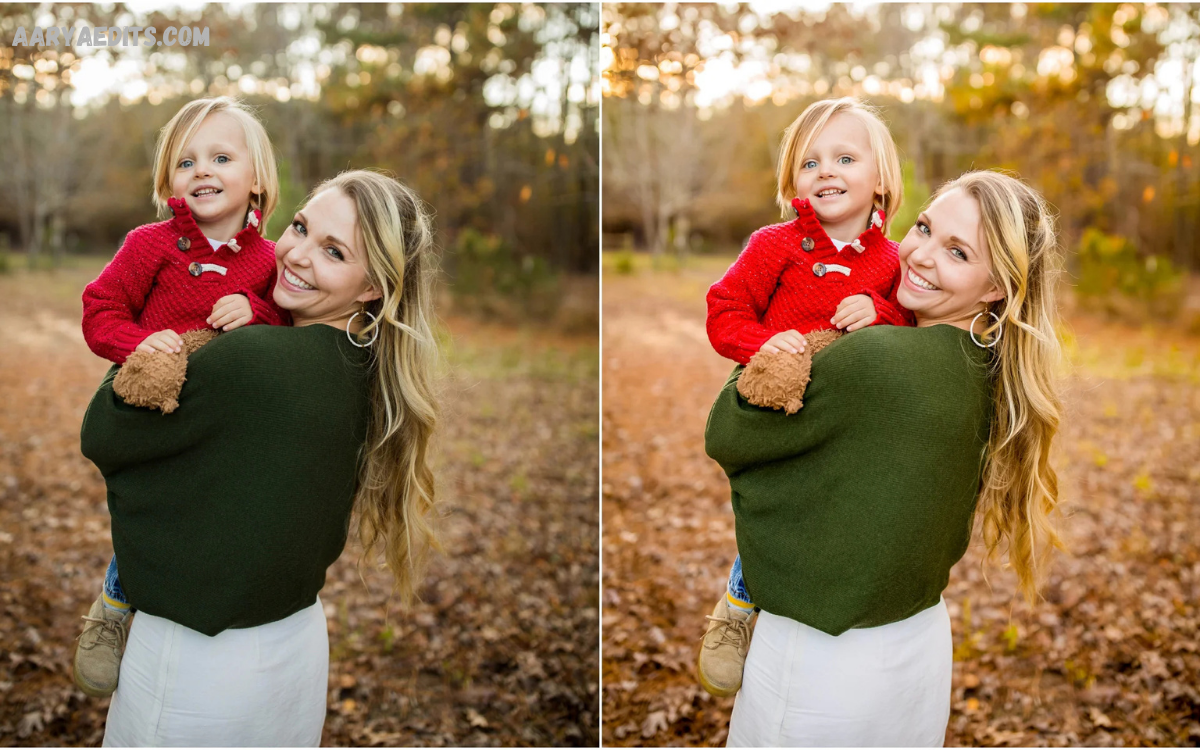
Lightroom Portrait Presets have transformed portrait photography by making professional editing faster, easier, and more consistent. Whether you capture portraits with a DSLR, mirrorless camera, or smartphone, the right preset helps produce polished images with balanced colors, natural skin tones, improved lighting, and a professional finish in just a few clicks.
Portrait photography demands attention to detail. Every image should highlight facial features, preserve realistic skin texture, and create an attractive mood without making edits appear artificial. Lightroom Portrait Presets simplify this process by applying carefully designed editing adjustments that enhance exposure, contrast, highlights, shadows, color balance, sharpness, and overall aesthetics.
What Are Lightroom Portrait Presets?
Lightroom Portrait Presets are pre-configured editing settings designed specifically for portrait photography. These settings automatically adjust image parameters such as
- Exposure
- Contrast
- Highlights
- Shadows
- Whites
- Blacks
- White Balance
- Vibrance
- Saturation
- Tone Curve
- Color Grading
- Texture
- Clarity
- Sharpening
- Noise Reduction
Instead of editing every setting manually, photographers apply a preset that instantly creates a professional foundation for further refinement.
Why Do Lightroom Portrait Presets Matter?
Portrait photography focuses on people. Every adjustment influences skin tone, eye brightness, facial details, and overall appearance.
Professional Lightroom Portrait Presets help achieve:
- Natural-looking skin
- Balanced exposure
- Soft highlights
- Rich colors
- Better dynamic range
- Consistent editing style
- Faster workflow
- Improved productivity
- Professional presentation
- Social media-ready images
These advantages make presets valuable for beginners and experienced editors alike.
Popular Types of Lightroom Portrait Presets
Natural Portrait Presets
Natural presets preserve realistic colors while improving brightness, skin tone, and contrast. These presets suit family photography, lifestyle sessions, professional headshots, and everyday portraits.
Warm Portrait Presets
Warm editing styles introduce golden tones that create inviting, comfortable, and vibrant portraits. These presets perform exceptionally well during sunrise and sunset photography.
Bright and Airy Portrait Presets
Bright presets increase exposure while maintaining soft highlights and clean whites. Wedding photographers frequently use this style because it creates elegant and timeless images.
Moody Portrait Presets
Moody presets reduce brightness slightly while emphasizing deep shadows and cinematic colors. Lifestyle photographers often choose this style for artistic storytelling.
Dark Portrait Presets
Dark presets increase contrast and emphasize dramatic lighting. Fashion photographers frequently use this style for editorial portraits.
Matte Portrait Presets
Matte editing softens black tones and creates a film-inspired appearance with smooth transitions between highlights and shadows.
Studio Portrait Presets
Studio presets optimize indoor lighting conditions while preserving accurate skin tones and controlled contrast.
Outdoor Portrait Presets
Outdoor presets compensate for changing natural light while enhancing greenery, sky colors, and subject separation.
Features of Professional Lightroom Portrait Presets
High-quality Lightroom Portrait Presets usually include:
- Balanced white balance
- Smooth skin tones
- Controlled saturation
- Soft highlight recovery
- Enhanced facial details
- Natural contrast
- Professional tone curves
- Refined color grading
- Lens corrections
- Noise reduction
- Sharpening optimization
- Flexible adjustment capability
These elements create polished images suitable for portfolios, client delivery, websites, and social media platforms.
Benefits of Using Lightroom Portrait Presets
Faster Editing
Large portrait sessions may contain hundreds of photographs. Presets significantly reduce editing time.
Consistent Style
Professional photographers build recognizable brands through consistent editing styles. Presets maintain visual consistency across every project.
Beginner Friendly
New editors often struggle with Lightroom adjustments. Presets provide excellent starting points while teaching effective editing techniques.
Professional Results
Carefully designed presets replicate professional editing workflows that improve image quality.
Flexible Editing
Applying a preset never limits creativity. Every setting remains fully editable after installation.
Read Also: Lightroom Dark Tone Presets: Complete Guide to Cinematic Photo Editing
How to Install Lightroom Portrait Presets
Installing presets requires only a few steps.
Open Adobe Lightroom.
Navigate to the Presets panel.
Select Import Presets.
Locate the downloaded XMP or DNG preset files.
Import the files.
Choose a portrait image.
Apply the desired preset.
Fine-tune exposure, white balance, and cropping if necessary.
The process takes only a few minutes.
Tips for Better Portrait Editing
Successful portrait editing combines presets with careful manual adjustments.
Maintain natural skin tones throughout editing.
Avoid excessive saturation.
Protect highlight details.
Recover shadow information carefully.
Adjust white balance according to lighting conditions.
Crop compositions thoughtfully.
Sharpen facial features without exaggeration.
Reduce digital noise in low-light photographs.
Keep colors realistic.
Compare edited images with the original before exporting.
Common Mistakes to Avoid
Many beginners make similar editing mistakes.
Applying excessive clarity creates rough skin textures.
Oversaturated colors reduce realism.
Extreme sharpening introduces unwanted artifacts.
Ignoring white balance creates unnatural skin tones.
Heavy filters remove authentic facial details.
Excessive skin smoothing creates unrealistic portraits.
Using incorrect presets for lighting conditions produces inconsistent results.
Careful editing delivers significantly better results.
Choosing the Best Lightroom Portrait Presets
Several factors determine preset quality.
Look for presets designed specifically for portrait photography.
Choose presets compatible with current Lightroom versions.
Select presets supporting RAW image editing.
Evaluate before-and-after examples.
Purchase from reputable creators.
Read customer reviews.
Ensure presets allow easy customization.
Professional-quality presets provide cleaner colors and better skin rendering than generic alternatives.
Lightroom Portrait Presets for Different Photography Styles
Portrait presets adapt to numerous photography genres.
Wedding photography benefits from soft romantic colors.
Fashion photography often requires dramatic contrast.
Corporate headshots demand accurate skin tones.
Lifestyle photography works well with natural editing.
Beauty photography emphasizes facial detail.
Graduation portraits benefit from balanced colors.
Travel portraits combine vibrant scenery with realistic subjects.
Family photography favors warm and welcoming tones.
Every genre benefits from carefully selected presets.
Mobile Lightroom Portrait Presets
Adobe Lightroom Mobile supports portrait presets for smartphone photographers.
Mobile presets provide:
- Fast editing
- Cloud synchronization
- Professional color grading
- Easy sharing
- Simple adjustments
- Cross-device compatibility
Creators producing Instagram, Facebook, Pinterest, TikTok, and YouTube content frequently rely on mobile portrait presets for efficient editing.
Export Settings for High-Quality Portraits
After editing, export settings influence final image quality.
Use JPEG for online sharing.
Select high image quality.
Resize according to platform requirements.
Apply output sharpening for screen viewing.
Use the sRGB color space for web publishing.
Maintain full resolution for printing.
Proper export settings preserve editing quality across devices.
Future of Lightroom Portrait Presets
Artificial intelligence continues improving Lightroom editing workflows. Modern portrait presets increasingly combine AI-powered masking with traditional color grading, making portrait enhancement faster and more accurate.
Future preset collections will likely include adaptive adjustments that automatically recognize skin, clothing, backgrounds, hair, and lighting conditions while preserving natural image quality.
Professional photographers will continue using Lightroom Portrait Presets because they combine efficiency with creative flexibility.
Frequently Asked Questions
What are Lightroom Portrait Presets?
Lightroom Portrait Presets are saved editing settings that instantly enhance portrait photographs with professional color, lighting, and tonal adjustments.
Do Lightroom Portrait Presets work with Lightroom Mobile?
Yes. Many preset collections support both Lightroom Desktop and Lightroom Mobile.
Can beginners use portrait presets?
Yes. Presets simplify editing and provide an excellent starting point for learning professional photo editing.
Are portrait presets customizable?
Yes. Every adjustment remains editable after applying a preset.
Do portrait presets work with RAW images?
Yes. RAW files usually produce the best editing results because they contain more image information.
Which portrait preset creates natural skin tones?
Natural portrait presets designed for realistic color grading usually produce the most authentic skin tones.
Can portrait presets improve smartphone photos?
Yes. High-quality Lightroom Portrait Presets significantly enhance smartphone portraits captured in good lighting.
Do professional photographers use Lightroom Portrait Presets?
Yes. Many professionals use presets to speed up editing while maintaining consistent image quality.
How do I choose the right portrait preset?
Select presets based on lighting conditions, photography style, skin tone accuracy, compatibility, and customization options.
Are Lightroom Portrait Presets worth using?
Yes. They save time, improve consistency, simplify editing, and help create professional-looking portraits efficiently.
Conclusion
Lightroom Portrait Presets remain essential tools for photographers seeking efficient, professional-quality editing. They reduce editing time, improve consistency, enhance skin tones, and simplify complex workflows without sacrificing creative control.
Whether editing portraits for weddings, fashion, social media, commercial projects, family sessions, or personal photography, the right Lightroom Portrait Presets provide an excellent foundation for beautiful, polished images.
