

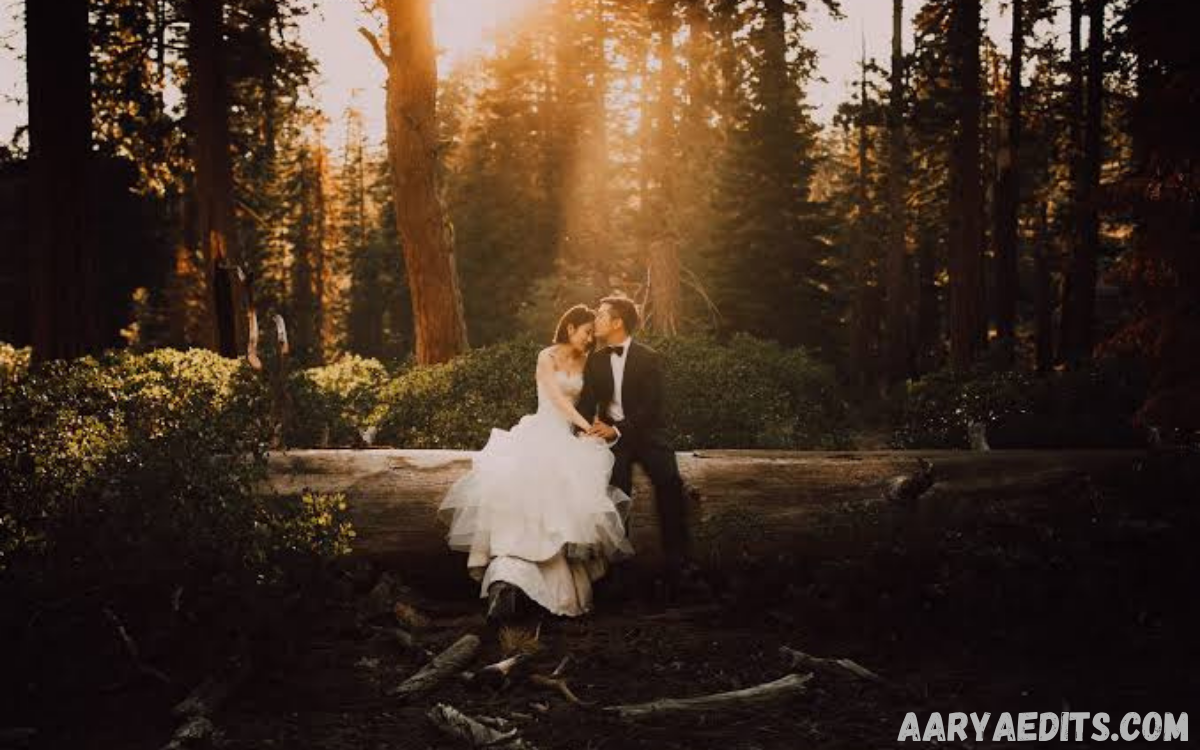
Wedding photography demands consistency, creativity, and efficiency. Every ceremony, reception, engagement session, and bridal portrait tells a unique story that deserves flawless editing. Professional photographers often work with thousands of images after a single event, making a streamlined editing workflow essential.
Instead of spending countless hours adjusting exposure, white balance, contrast, and color grading for every image, photographers can apply professionally designed presets that create a consistent visual style while significantly reducing editing time.
What Are Wedding Lightroom Presets?
Wedding Lightroom Presets are pre-configured editing settings created specifically for wedding photography. These settings adjust multiple image parameters simultaneously, including exposure, highlights, shadows, contrast, vibrance, saturation, tone curves, sharpening, color grading, and more.
Instead of manually editing every photograph from scratch, photographers can apply a preset with one click and make minor adjustments based on lighting conditions or individual creative preferences.
Why Do Professional Photographers Use Wedding Lightroom Presets?
Professional wedding photographers often capture between 2,000 and 8,000 images during a wedding day. Editing each photograph individually requires an enormous investment of time.
Wedding Lightroom Presets simplify the editing process by establishing a repeatable workflow that efficiently produces high-quality results.
Major advantages include:
- Faster editing workflow
- Consistent color grading
- Uniform skin tones
- Professional image quality
- Easier batch editing
- Improved client satisfaction
- Better brand identity
- Reduced editing fatigue
Consistency is especially important because clients expect every image in their gallery to share the same artistic style regardless of changing lighting conditions throughout the day.
Essential Features of High-Quality Wedding Lightroom Presets
Not every preset collection delivers professional-quality results. Premium Wedding Lightroom Presets typically include advanced adjustments that complement a wide variety of wedding environments.
Important features include:
Natural Skin Tone Enhancement
Wedding portraits rely heavily on accurate skin tones. Professional presets enhance natural complexion without introducing unwanted color casts or excessive saturation.
Balanced skin tones help create timeless photographs that remain visually appealing for decades.
Soft and Romantic Color Palette
Many wedding photographers prefer soft whites, creamy highlights, pastel colors, and elegant contrast.
Wedding Lightroom Presets often emphasize:
- Warm highlights
- Soft shadows
- Creamy whites
- Gentle contrast
- Natural greens
- Elegant blues
- Balanced reds
These adjustments contribute to romantic imagery that complements the emotional atmosphere of weddings.
Highlight Recovery
Wedding dresses contain bright white fabrics that can easily lose detail.
Professional presets prioritize highlight recovery while maintaining brightness, ensuring intricate lace, embroidery, and fabric textures remain visible.
Shadow Detail
Wedding venues frequently include mixed lighting, dark interiors, and dramatic reception scenes.
Quality presets preserve shadow detail without introducing excessive digital noise, resulting in clean and balanced images.
Lens Correction Support
Many preset collections incorporate lens corrections that reduce distortion and improve image clarity.
Combined with sharpening adjustments, these corrections produce polished professional results.
Read Also: Best AI Tools for Photo Enhancement
Types of Wedding Lightroom Presets
Professional photographers often maintain multiple preset collections for different wedding styles and lighting situations.
Bright and Airy Presets
Bright and airy presets remain among the most popular editing styles.
Characteristics include:
- Soft highlights
- Warm whites
- Low contrast
- Pastel colors
- Clean backgrounds
- Romantic atmosphere
These presets work exceptionally well for outdoor ceremonies and natural-light portraits.
Dark and Moody Presets
Dark and moody editing creates dramatic storytelling with richer shadows and cinematic tones.
Ideal situations include:
- Indoor receptions
- Evening ceremonies
- Luxury venues
- Historic churches
- Fine art weddings
Film-Inspired Presets
Film-inspired Wedding Lightroom Presets recreate the timeless appearance of classic analog photography.
Features often include:
- Soft grain
- Muted colors
- Organic contrast
- Smooth highlights
- Vintage tones
Many luxury wedding photographers prefer this elegant aesthetic.
Editorial Presets
Editorial editing delivers a magazine-inspired appearance with refined colors and sophisticated contrast.
These presets emphasize:
- Luxury details
- Bridal fashion
- Jewelry
- Floral arrangements
- Venue architecture
Editorial styles create images suitable for publication in wedding magazines and luxury blogs.
How Wedding Lightroom Presets Improve Workflow
Efficiency directly affects profitability in wedding photography.
Instead of spending several weeks editing a wedding, photographers who use optimized Wedding Lightroom Presets often reduce editing time significantly.
A professional workflow typically includes:
- Import RAW files.
- Apply lens corrections.
- Select the preferred wedding preset.
- Synchronize settings across similar images.
- Fine-tune exposure.
- Adjust white balance.
- Export high-resolution photographs.
This workflow minimizes repetitive editing while preserving creative control.
Batch Editing with Wedding Lightroom Presets
Batch editing remains one of Lightroom’s strongest features.
Once photographers identify images captured under similar lighting conditions, they can synchronize preset adjustments across hundreds of photographs simultaneously.
Batch editing provides several advantages:
- Faster project completion
- Consistent color balance
- Uniform exposure
- Reduced repetitive work
- Improved editing accuracy
This approach allows photographers to spend more time refining standout portraits rather than repeating identical adjustments.
Customizing Wedding Lightroom Presets
Professional photographers rarely use presets without modification.
Instead, presets serve as a starting point that can be customized according to:
- Camera model
- Lens characteristics
- Lighting conditions
- Venue colors
- Personal editing style
- Client preferences
Small adjustments to exposure, white balance, and contrast often produce perfectly tailored results while preserving the preset’s overall aesthetic.
Wedding Lightroom Presets for Different Lighting Conditions
Wedding days involve rapidly changing environments.
Professional photographers encounter:
Outdoor Ceremonies
Natural sunlight requires balanced highlights and accurate skin tones.
Soft, bright presets usually perform exceptionally well.
Indoor Churches
Church interiors often contain mixed lighting with warm tungsten illumination.
Professional presets compensate for orange color casts while maintaining natural skin tones.
Golden Hour Portraits
Golden hour creates warm, directional light that enhances romantic portraits.
Wedding Lightroom Presets designed for sunset photography preserve glowing highlights without oversaturating warm colors.
Reception Lighting
Reception venues frequently combine DJ lights, candles, chandeliers, and flash photography.
Professional presets help balance varying color temperatures while preserving atmosphere.
Building a Signature Wedding Photography Style
A recognizable editing style helps photographers differentiate themselves in a competitive industry.
Wedding Lightroom Presets contribute to branding by ensuring every delivered gallery reflects the photographer’s creative identity.
Clients often book photographers specifically because they admire:
- Consistent colors
- Elegant editing
- Romantic atmosphere
- Timeless appearance
- Professional presentation
Developing a signature editing style strengthens brand recognition and encourages referrals.
Choosing the Best Wedding Lightroom Presets
Selecting the ideal preset collection requires evaluating several factors.
Professional photographers should consider:
- Compatibility with RAW files
- Lightroom version support
- Mobile compatibility
- Editing flexibility
- Natural skin tone rendering
- Color consistency
- Highlight control
- Shadow recovery
- Customer reviews
- Regular updates
Testing presets with several wedding galleries ensures reliable performance across different venues and lighting situations.
Common Mistakes When Using Wedding Lightroom Presets
Although presets simplify editing, improper use can reduce image quality.
Common mistakes include:
Applying one preset to every lighting condition without adjustments.
Ignoring white balance corrections.
Over-saturating skin tones.
Increasing clarity excessively.
Using outdated presets designed for older Lightroom versions.
Neglecting exposure adjustments before exporting.
Avoiding these issues results in cleaner, more professional wedding galleries.
Tips for Maximizing Wedding Lightroom Presets
Professional photographers can achieve exceptional results by following several best practices.
Always shoot in RAW format for maximum editing flexibility.
Organize photographs by lighting conditions before applying presets.
Adjust exposure before modifying color settings.
Synchronize edits only between images captured under similar lighting.
Create customized versions of favorite presets for different venues.
Maintain backup copies of preset collections.
Regularly update Lightroom to ensure compatibility with new camera profiles.
These practices improve editing efficiency while maintaining consistent quality.
The Future of Wedding Lightroom Presets
Photography editing continues to evolve with advancements in artificial intelligence, cloud synchronization, and adaptive masking.
Modern Wedding Lightroom Presets increasingly incorporate AI-powered masking, automatic subject detection, and intelligent color balancing. These innovations allow photographers to achieve professional results even faster while retaining complete creative control.
As wedding photography styles continue changing, preset developers regularly release updated collections that reflect contemporary trends, seasonal color palettes, and luxury editorial aesthetics.
Frequently Asked Questions
What are Wedding Lightroom Presets?
Wedding Lightroom Presets are pre-designed editing settings that automatically adjust exposure, colors, contrast, white balance, and other image parameters to create a consistent and professional look for wedding photographs.
Can Wedding Lightroom Presets be used on RAW images?
Yes. Wedding Lightroom Presets work exceptionally well with RAW files because RAW images contain more editing data, allowing photographers to achieve higher-quality results while maintaining image detail.
Are Wedding Lightroom Presets compatible with Lightroom Mobile?
Many Wedding Lightroom Presets are compatible with both Adobe Lightroom Desktop and Lightroom Mobile. Compatibility depends on the preset format and the version of Lightroom being used.
Do Wedding Lightroom Presets work with every camera brand?
Yes. Most professional Wedding Lightroom Presets support RAW and JPEG files from major camera brands, including Canon, Nikon, Sony, Fujifilm, Panasonic, and others. Minor adjustments may still be needed for different camera profiles.
Can I customize Wedding Lightroom Presets after applying them?
Absolutely. Presets serve as a starting point, and you can modify exposure, white balance, color grading, contrast, highlights, shadows, and other settings to suit each individual image.
Will Wedding Lightroom Presets speed up my editing workflow?
Yes. Wedding Lightroom Presets significantly reduce editing time by applying multiple adjustments with a single click, enabling faster batch editing and helping photographers deliver galleries more efficiently.
Are Wedding Lightroom Presets suitable for beginners?
Yes. Beginners can use Wedding Lightroom Presets to achieve professional-looking edits while learning Lightroom’s editing tools. They also provide an excellent foundation for developing personal editing skills.
Which editing style is most popular for wedding photography?
Bright and airy, film-inspired, and soft romantic styles are among the most popular choices. The ideal style depends on the photographer’s creative vision, lighting conditions, and client preferences.
Can Wedding Lightroom Presets maintain consistent colors across an entire wedding gallery?
Yes. One of the primary benefits of Wedding Lightroom Presets is maintaining consistent color grading, skin tones, and overall visual style throughout every image in a wedding collection.
How do I choose the best Wedding Lightroom Presets?
Look for presets that offer natural skin tones, balanced colors, excellent highlight recovery, shadow detail, RAW file compatibility, regular updates, and flexibility for different lighting conditions. High-quality presets should complement your photography style while allowing easy customization.
Conclusion
Wedding Lightroom presets have become an essential component of the professional wedding photography workflow. They provide consistency, reduce editing time, enhance creative expression, and help photographers deliver visually cohesive galleries that reflect their unique artistic vision.
Rather than replacing creativity, wedding Lightroom presets strengthen it by eliminating repetitive editing tasks and allowing photographers to focus on storytelling, composition, and client satisfaction. Investing in high-quality presets and learning how to customize them effectively leads to faster workflows, stronger branding, and consistently stunning wedding galleries that leave lasting impressions on every couple.
