

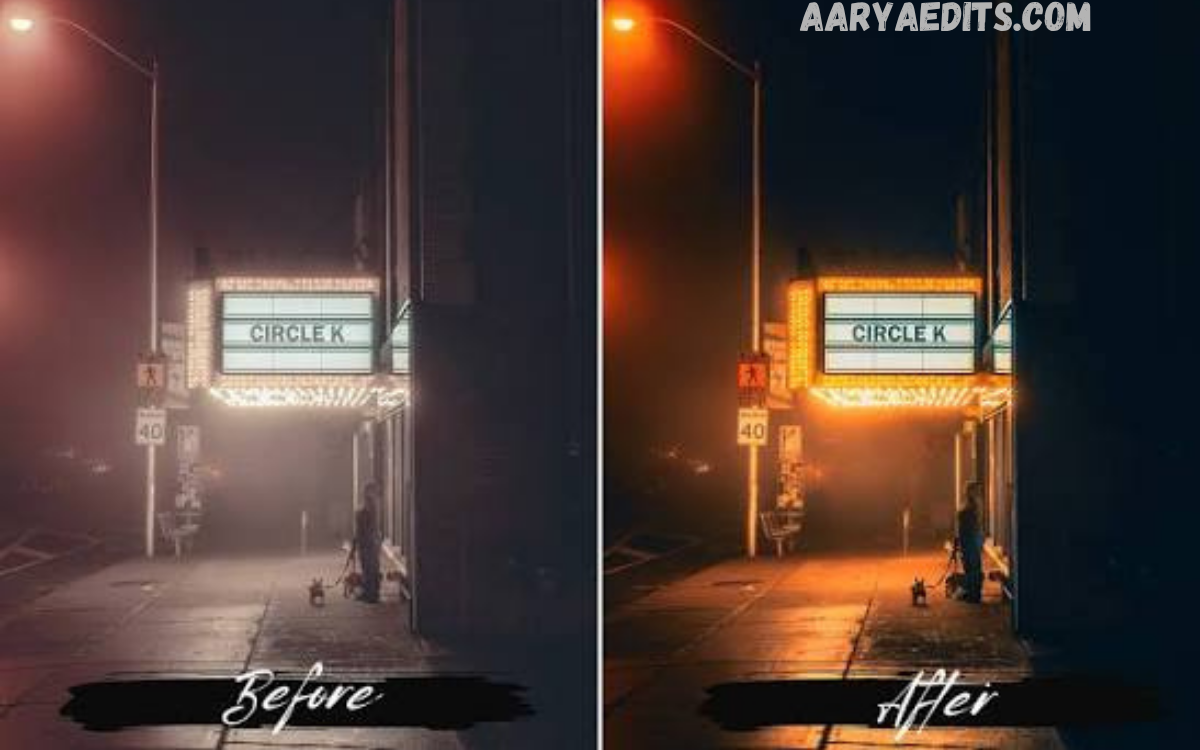
Night photography has a unique ability to capture the beauty of illuminated cityscapes, star-filled skies, glowing streets, and atmospheric landscapes. Shooting in low-light conditions often results in images with noise, dull colors, underexposure, and reduced sharpness.
Night Lightroom Presets are professionally designed editing settings that instantly enhance night images with a single click. Instead of manually adjusting exposure, contrast, highlights, shadows, white balance, and color grading for every photo, photographers can apply a preset to achieve a polished, consistent look in seconds.
What Are Night Lightroom Presets?
Night Lightroom Presets are pre-configured editing profiles created specifically for low-light photography. They contain optimized adjustments for multiple Lightroom editing tools, including:
- Exposure
- Contrast
- Highlights
- Shadows
- Whites
- Blacks
- Tone Curve
- White Balance
- Vibrance
- Saturation
- Clarity
- Texture
- Dehaze
- Noise Reduction
- Color Grading
- Sharpening
Instead of making these adjustments manually, photographers simply apply a preset, allowing Lightroom to instantly transform the image according to professional editing standards.
Why Use Night Lightroom Presets?
Editing night photos can be challenging because lighting conditions vary significantly between scenes. Artificial lights, neon signs, moonlight, and street lamps all produce different color temperatures that require careful correction.
Night Lightroom Presets simplify this process by providing balanced adjustments specifically designed for low-light environments.
Some key benefits include:
Save Time
Professional editing often takes several minutes per image. Night Lightroom Presets reduce editing time dramatically by applying optimized settings instantly.
Consistent Editing Style
Maintaining a cohesive look across multiple photos is essential for photographers, influencers, travel bloggers, and businesses. Presets ensure every image follows the same editing style.
Beginner Friendly
Users with little editing experience can produce professional-quality results without understanding every Lightroom adjustment.
Professional Quality
Many Night Lightroom Presets are created by experienced photographers who understand exposure correction, color grading, and nighttime aesthetics.
Key Features of Night Lightroom Presets
Professional Night Lightroom Presets typically include features designed specifically for nighttime photography.
Improved Exposure
Night images often appear too dark. Presets intelligently brighten the image while preserving natural lighting.
Enhanced Contrast
Contrast creates depth and separates subjects from dark backgrounds, producing more dramatic photos.
Better Color Balance
Artificial lighting often creates unwanted yellow, green, or blue color casts. Night Lightroom Presets balance these tones for natural-looking colors.
Noise Reduction
High ISO settings introduce digital noise into nighttime images. Many presets include optimized noise reduction settings for cleaner photos.
Sharper Details
Buildings, stars, vehicles, and city lights appear more defined through enhanced sharpening.
Rich Black Tones
Deep blacks improve mood and create cinematic nighttime images.
Vibrant Colors
Neon lights, city signs, sunsets, and reflections become more vivid without appearing oversaturated.
Atmospheric Effects
Some presets introduce subtle cinematic tones, cooler blues, warm highlights, or moody shadows that elevate the visual impact.
Read Also: Creative AI Instagram Photo Editing Styles
Types of Night Lightroom Presets
There are many styles of Night Lightroom Presets designed for different genres of photography.
City Night Presets
Ideal for urban photography featuring:
- Street lights
- Skyscrapers
- Traffic
- Bridges
- Downtown skylines
These presets emphasize vibrant lights while maintaining realistic shadows.
Neon Night Presets
Perfect for:
- Neon signs
- Night markets
- City streets
- Entertainment districts
They enhance colorful lighting while reducing unwanted color casts.
Astrophotography Presets
Designed for:
- Milky Way
- Stars
- Moon photography
- Night skies
These presets improve clarity, reduce noise, and enhance celestial details.
Landscape Night Presets
Suitable for:
- Mountains
- Forests
- Lakes
- Camping
- Moonlit scenery
These presets preserve natural colors while increasing visibility.
Moody Night Presets
These create dramatic cinematic images featuring:
- Dark shadows
- Cool blue tones
- Soft highlights
- High contrast
Ideal for storytelling photography.
Best Photography Styles for Night Lightroom Presets
Night Lightroom Presets work exceptionally well across multiple genres of photography.
Street Photography
Night streets filled with traffic, reflections, and illuminated buildings become more dynamic.
Travel Photography
Travel photographers frequently shoot famous landmarks after sunset, making these presets an excellent editing solution.
Portrait Photography
Night portraits benefit from improved skin tones while maintaining atmospheric lighting.
Automotive Photography
Cars photographed under city lights gain enhanced reflections and stronger contrast.
Event Photography
Concerts, festivals, weddings, and nightlife events often require significant low-light editing, making presets highly valuable.
How to Install Night Lightroom Presets
Installing presets is straightforward.
Lightroom Desktop
- Open Lightroom.
- Navigate to the Develop Module.
- Open the Presets panel.
- Click Import Presets.
- Select the preset files.
- Apply them to your images.
Lightroom Mobile
- Download preset files.
- Import them into Lightroom Mobile.
- Save the settings as presets.
- Apply them with one tap.
Tips for Using Night Lightroom Presets
Although presets provide an excellent starting point, every image is unique.
For the best results:
Adjust Exposure
Increase or decrease exposure depending on the original image brightness.
Fine-Tune White Balance
Correct overly warm or cool lighting when necessary.
Reduce Noise
Apply additional noise reduction to extremely high-ISO images.
Crop Strategically
Improve composition after applying the preset.
Use Lens Corrections
Enable lens corrections to remove distortion and vignetting.
Adjust Local Areas
Use Lightroom masking tools to brighten subjects while maintaining darker backgrounds.
Common Editing Mistakes
Avoid these common mistakes when editing nighttime images.
Overexposure
Brightening the entire image too much removes the nighttime atmosphere.
Oversaturation
Excessive color saturation can make neon lights appear unrealistic.
Excessive Clarity
Too much clarity introduces harsh textures and unwanted artifacts.
Ignoring Highlights
Street lights and illuminated signs can lose detail if highlights aren’t controlled.
Too Much Noise Reduction
Excessive smoothing removes important textures and fine details.
Advantages of Professional Night Lightroom Presets
Professional presets offer several advantages over free alternatives.
Better Color Science
Premium presets are carefully calibrated for realistic color grading.
Optimized Workflow
Professionally tested settings significantly reduce editing time.
Higher Compatibility
Most premium presets support multiple camera brands and Lightroom versions.
Regular Updates
Many premium creators update their presets to match Lightroom improvements.
Who Should Use Night Lightroom Presets?
These presets benefit various users.
- Professional photographers
- Wedding photographers
- Travel bloggers
- Social media creators
- Influencers
- Content creators
- Digital marketers
- Real estate photographers
- Automotive photographers
- Hobby photographers
Anyone editing nighttime photos can improve efficiency and image quality using Night Lightroom Presets.
How Night Lightroom Presets Improve Social Media Content
Visual consistency is essential for Instagram, Pinterest, Facebook, and other social platforms.
Night Lightroom Presets help create:
- Professional-looking feeds
- Consistent branding
- Higher engagement
- Better storytelling
- Attractive travel content
- Eye-catching city photography
Well-edited nighttime images naturally capture more attention and encourage audience interaction.
Choosing the Right Night Lightroom Presets
When selecting a preset collection, consider:
- Camera compatibility
- Mobile and desktop support
- Editing style
- Natural color grading
- Noise reduction capability
- Customer reviews
- Before-and-after examples
- Update availability
A quality preset should enhance your images without making them look artificial.
Frequently Asked Questions
What are Night Lightroom Presets?
Night Lightroom Presets are pre-designed editing settings that enhance low-light and nighttime photos by improving exposure, color balance, contrast, sharpness, and overall image quality with a single click.
Can beginners use Night Lightroom Presets?
Yes, Night Lightroom Presets are beginner-friendly and require no advanced editing skills. They provide professional-looking results instantly while allowing users to make additional adjustments if needed.
Do Night Lightroom Presets work on Lightroom Mobile?
Yes, most Night Lightroom Presets are compatible with both Lightroom Desktop and Lightroom Mobile, making it easy to edit photos on any device.
Will Night Lightroom Presets reduce image noise?
Many Night Lightroom Presets include built-in noise reduction settings that help minimize grain caused by high ISO settings, though additional manual adjustments may sometimes be necessary.
Can I customize a Night Lightroom Preset after applying it?
Absolutely. After applying a preset, you can modify exposure, white balance, contrast, shadows, highlights, and other settings to better match your specific photo.
Are Night Lightroom Presets suitable for RAW images?
Yes, they work exceptionally well with RAW files because RAW images contain more editing information, allowing the presets to produce higher-quality results.
Which types of photography benefit the most from Night Lightroom Presets?
They are ideal for cityscapes, street photography, astrophotography, travel photography, night portraits, automotive photography, and any other low-light photography.
Do Night Lightroom Presets affect the original photo?
No. Lightroom uses non-destructive editing, so applying a preset never changes or damages the original image file.
Why do some photos need additional adjustments after applying a preset?
Every night scene has different lighting conditions, camera settings, and color temperatures. Minor adjustments help optimize the preset for each individual image.
Are premium Night Lightroom Presets worth buying?
Premium Night Lightroom Presets often provide better color grading, cleaner edits, improved consistency, and ongoing updates, making them a worthwhile investment for photographers who regularly edit night images.
Conclusion
Night Lightroom Presets are an essential tool for photographers seeking professional-quality nighttime edits with minimal effort. By enhancing exposure, reducing noise, improving color balance, sharpening details, and creating cinematic moods, these presets make low-light editing faster and more effective.
Whether you’re capturing bustling city streets, breathtaking skylines, glowing neon lights, peaceful landscapes, or dramatic portraits after sunset, the right Night Lightroom Presets can elevate your photography to a new level.
