

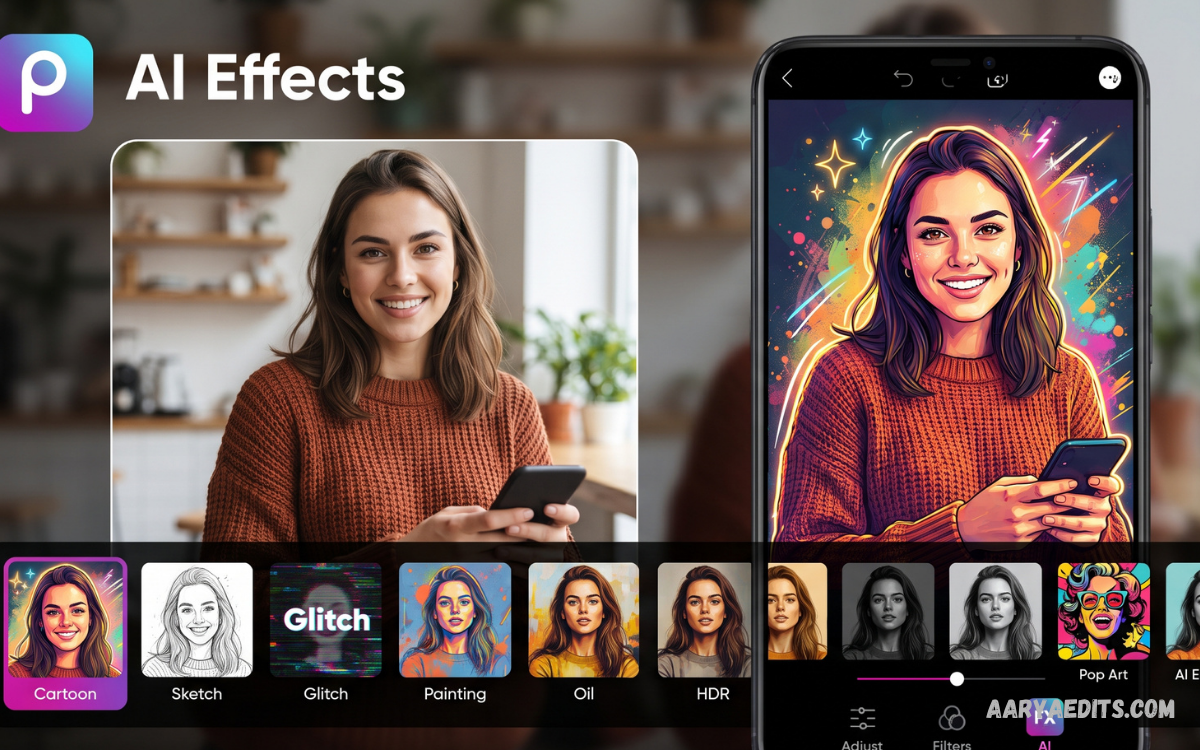
PicsArt AI effects have changed the way creators approach digital photo editing. These intelligent effects can transform ordinary images into creative visuals while reducing the need for complex editing skills.
The growing use of artificial intelligence has made photo editing faster and more accessible. PicsArt AI effects combine traditional editing controls with AI-powered features, allowing users to create polished visuals with less manual work.
What Are PicsArt AI Effects?
PicsArt AI effects are intelligent editing features that modify images using artificial intelligence. Instead of adjusting every visual element manually, users can apply AI-powered transformations that analyze an image and generate changes based on the selected effect or editing instruction.
These effects can change an image’s artistic appearance, atmosphere, background, colors, and overall visual style. The technology makes advanced editing concepts easier to explore, especially for users who want creative results without spending extensive time on complicated editing processes.
How PicsArt AI Effects Work
PicsArt AI effects rely on artificial intelligence models to understand visual information within an image. Depending on the selected feature, the system can identify elements, process visual patterns, and apply a generated effect while attempting to maintain important details.
The process generally begins when a user uploads an image and selects an AI-powered feature. The app then processes the image based on the chosen effect or prompt and produces an edited version. Users can review the result and continue refining the design with additional editing tools.
Why PicsArt AI Effects Are Popular
One major reason PicsArt AI effects are popular is their convenience. Traditional photo editing can require detailed knowledge of layers, masks, selections, filters, and adjustments. AI-powered tools simplify many of these tasks and allow creators to experiment with visual changes more quickly.
Another advantage is creative flexibility. A single photograph can become several different visual concepts by applying different effects. This makes AI editing useful for social media posts, profile graphics, digital artwork, thumbnails, creative projects, and other visual content.
Key Features of PicsArt AI Effects
PicsArt AI effects offer a range of creative editing options in a single platform. Depending on the available version and feature set, users may find AI-powered image generation, artistic transformations, background tools, enhancement features, and other intelligent editing capabilities.
These features can work alongside conventional editing controls. Users can combine AI effects with adjustments such as brightness, contrast, saturation, cropping, text, stickers, and other design elements. This combination gives creators greater control over the final appearance.
AI-Powered Artistic Transformations
Artistic transformations are among the most recognizable uses of PicsArt AI effects. These features can give photographs a different visual character by applying styles inspired by illustration, digital art, painting, or other creative formats.
Experimenting with artistic styles can help users develop unique visual concepts. Instead of creating an artwork from scratch, a creator can start with an existing photograph and explore different AI-assisted interpretations while keeping the original creative direction.
AI Background Editing
Background editing can be time-consuming when performed manually, particularly when an image contains complex subjects or detailed edges. AI-powered background tools can simplify this process by helping identify the primary subject and separating it from the surrounding environment.
After changing a background, users can continue editing the image with additional effects and adjustments. This makes background replacement useful for portraits, product visuals, social media graphics, and creative compositions where the surrounding environment needs a different appearance.
AI Image Enhancement
Image enhancement is another area where artificial intelligence can support photo editing. An AI-based enhancement feature may analyze image characteristics and apply adjustments intended to improve clarity, detail, or overall presentation.
Enhancement can be especially useful when an original image looks soft, lacks detail, or needs visual refinement. However, the quality of an AI-enhanced result depends on the original image, the selected tool, and the processing technology available within the application.
PicsArt AI Effects for Social Media
Social media creators frequently require visually engaging content that can be produced efficiently. PicsArt AI effects can help transform standard photographs into distinctive graphics suitable for different social platforms and content styles.
Creators can combine AI effects with text, layouts, stickers, frames, and other design elements to produce customized posts. This approach can save editing time while creating a consistent visual identity across different pieces of content.
Using PicsArt AI Effects for Portraits
Portrait photography can benefit from AI-assisted editing because subjects often require careful adjustments. AI effects can introduce artistic changes, modify visual environments, or create alternative interpretations of a portrait without manually editing every element.
Creators should still review AI-generated results carefully. Automated processing can sometimes change facial features, hair, clothing, lighting, and background details. Reviewing the final image helps ensure that the result matches the intended creative direction.
AI Effects for Creative Photography
Creative photography often depends on experimentation, and PicsArt AI effects can provide additional ways to explore an image. A normal photograph can become the starting point for multiple artistic concepts through different AI transformations.
This workflow encourages creators to test different styles rather than relying on a single editing approach. Combining AI effects with manual adjustments can produce more personalized results because the creator remains involved in the final composition.
PicsArt AI Effects for Beginners
Beginners can use PicsArt AI effects to get started with modern digital editing. AI-powered features reduce the number of technical steps required for certain transformations, making experimentation more approachable for new users.
A useful approach is to begin with a high-quality image and apply one effect at a time. Reviewing each result helps beginners understand how different AI tools influence colors, composition, subjects, and backgrounds without making the editing process unnecessarily complicated.
How to Use PicsArt AI Effects
Start by opening PicsArt and selecting an image that you want to edit. Explore the available AI-powered tools and choose an effect that matches the desired visual style. Depending on the feature, you may be able to adjust settings or provide additional instructions.
After generating or applying the effect, examine the result carefully. If necessary, make additional adjustments using standard editing tools. Saving different versions during the creative process can also help you compare results and select the version that best matches your intended design.
Choosing the Right Image
The quality of an AI-assisted edit can depend heavily on the original image. Clear photographs with suitable lighting and visible subjects generally provide a stronger starting point for many editing workflows.
Before applying PicsArt AI effects, consider the image’s purpose and your desired result. A portrait may work well with artistic transformations, while a product image may benefit more from background editing or enhancement. Matching the tool to the image can improve the overall workflow.
Combining AI Effects With Manual Editing
AI does not have to replace traditional editing. Combining PicsArt AI effects with manual adjustments can provide greater creative control. After applying an AI transformation, users can refine brightness, contrast, color, cropping, sharpness, and other visual elements.
This hybrid workflow can produce more polished results because AI handles certain complex transformations while manual tools allow precise finishing. Creators can therefore use artificial intelligence as part of the editing process rather than depending entirely on automated results.
Creating Unique Visual Styles
Developing a recognizable visual style requires consistency and experimentation. PicsArt AI effects can provide a starting point for exploring different artistic directions, from subtle enhancements to more dramatic transformations.
Creators can test several effects and identify visual elements that fit their content. Repeated use of compatible colors, compositions, typography, and editing techniques can help establish a consistent appearance across a collection of images.
Common Mistakes When Using AI Effects
Applying too many effects can make an image appear visually inconsistent. When several strong transformations are combined without a clear purpose, important details can become less recognizable and the composition may lose its original focus.
Another common mistake is accepting the first AI-generated result without reviewing it. AI editing can occasionally produce unexpected details or changes. Taking time to inspect the final image allows users to correct unwanted elements and improve the overall presentation.
Read Also: PicsArt Trending Editing Trends and Creative Styles in 2026
How to Get Better Results
Using a high-quality source image is one of the simplest ways to improve an AI editing workflow. Clear subjects, balanced lighting, and strong composition give the editing system more visual information to work with.
It is also useful to experiment with different effects rather than repeatedly applying the same transformation. Comparing several results can reveal which approach works best for a particular image. Small manual adjustments after AI processing can further improve the final design.
PicsArt AI Effects and Content Creation
Digital content creators can use AI effects to develop visual assets for articles, social media posts, promotional graphics, and creative campaigns. The technology can reduce repetitive editing tasks and offer new ideas when a project needs a fresh visual direction.
However, content quality still depends on creative planning. AI tools can assist with visual production, but the creator determines the message, composition, audience, and overall purpose. Thoughtful editing remains important even when automated features are involved.
AI Effects for Digital Artwork
Digital artists can use PicsArt AI effects as an experimental tool for developing concepts. An existing image can be transformed into a different artistic direction, inspiring additional manual editing or design work.
AI-assisted artwork can also support concept development by helping creators visualize possibilities quickly. Instead of spending significant time creating every variation manually, artists can explore multiple directions and then refine the most suitable concept.
Privacy and Image Considerations
Users should consider privacy when uploading personal photographs to any digital editing platform. Images may contain personal information, identifiable individuals, locations, or other details that users may not want to share with online services.
Before using AI editing features, review the application’s current privacy information and terms to understand how it handles uploaded content and generated images. Avoiding unnecessary uploads of sensitive images is also a sensible practice.
Future of PicsArt AI Effects
Artificial intelligence continues to influence the development of digital creativity tools. Future AI effects may provide more detailed transformations, improved editing precision, stronger subject recognition, and greater control over generated visual elements.
As these technologies develop, the distinction between traditional editing and AI-assisted editing may become less significant. Creators will likely continue combining automated tools with personal artistic decisions to produce customized visual content.
Are PicsArt AI Effects Useful for Professional Creators?
PicsArt AI effects can support professional creators when used as part of a broader editing workflow. They can assist with experimentation, concept development, visual variations, and certain repetitive editing tasks.
Professional users may still need traditional design software or advanced editing techniques for projects requiring precise control. AI effects are most useful when they complement professional judgment rather than replace the entire creative process.
Frequently Asked Questions
What are PicsArt AI effects?
PicsArt AI effects are artificial intelligence-powered editing features that can transform images through automated visual processing. They can support artistic changes, enhancements, background edits, and other creative transformations.
Are PicsArt AI effects suitable for beginners?
Yes, PicsArt AI effects can help beginners because many AI-powered tools simplify the editing process. New users can experiment with effects without needing advanced knowledge of traditional photo-editing techniques.
Can PicsArt AI effects edit backgrounds?
AI-powered background features can help users modify or replace image backgrounds. The exact capabilities can vary depending on the feature and current version of the application.
Can PicsArt AI effects improve photo quality?
Certain AI-powered enhancement tools can help improve aspects of an image such as clarity or detail. Results depend on the original photograph and the specific enhancement technology being used.
Can AI effects be combined with normal editing tools?
Yes. You can combine AI effects with conventional editing features such as cropping, brightness, contrast, color adjustments, text, and other design elements to create a more customized result.
Are PicsArt AI effects free?
Availability can vary by feature, account type, platform, and current PicsArt offerings. Users should check the current application interface and official pricing information to determine which AI features are available to their account.
How can creators get better AI editing results?
Creators can start with clear, well-composed images and select an effect that matches the intended result. Reviewing AI-generated output and applying manual refinements can also improve the final appearance.
Do PicsArt AI effects replace professional photo editing?
AI effects can simplify many editing tasks, but they do not necessarily replace professional editing workflows. Advanced projects may still require detailed manual adjustments and specialized creative software.
Conclusion
PicsArt AI effects provide a convenient way to explore modern image editing through artificial intelligence. From artistic transformations and background changes to image enhancement and creative experimentation, these features can help users produce visually engaging results with less manual effort.
The strongest results usually come from combining AI assistance with thoughtful editing. Choosing suitable source images, reviewing generated results, and applying manual refinements can help creators develop polished visuals while maintaining their own creative direction.
