

AI photo editing has transformed the way beginners and professionals enhance images. What once required advanced Photoshop skills can now be done in seconds using intelligent automation. From one-click background removal to automatic image enhancement, AI tools are making photo editing faster, easier, and more accessible than ever.
For beginners, choosing the right tool is essential. The best AI photo editors combine simplicity with powerful features, allowing users to edit photos without a steep learning curve. In this guide, we explore the Top 10 Free AI Photo Editors for Beginners that deliver high-quality results without requiring advanced design knowledge.
Canva AI Photo Editor
Canva is one of the most popular design platforms for beginners, offering a powerful AI-driven photo editing experience. Its tools include background remover, AI image enhancement, Magic Edit, and auto-adjust features that simplify complex editing tasks.
What makes Canva especially useful is its drag-and-drop interface combined with AI automation. Beginners can create social media graphics, marketing visuals, and personal projects without needing technical editing skills. The free version includes enough features to get started effectively.
Pixlr AI Photo Editor
Pixlr is a browser-based AI photo editor that offers both simplicity and advanced editing options. It includes AI cutout tools, object removal, and automatic enhancement features that help beginners achieve professional-quality results quickly.
One of Pixlr’s biggest advantages is that it works directly in your web browser, eliminating the need for installation. Its intuitive interface and AI-powered tools make it ideal for users who want quick edits without complexity.
Fotor AI Photo Editor
Fotor provides a strong set of AI tools, such as one-tap enhancement, AI retouching, and background removal. It is widely used for improving portrait photos, product images, and social media content.
The platform is beginner-friendly and offers both web and mobile versions. Its AI enhancement engine automatically adjusts brightness, contrast, and sharpness, making it a great choice for users who want quick improvements without manual editing.
Adobe Express AI Photo Editor
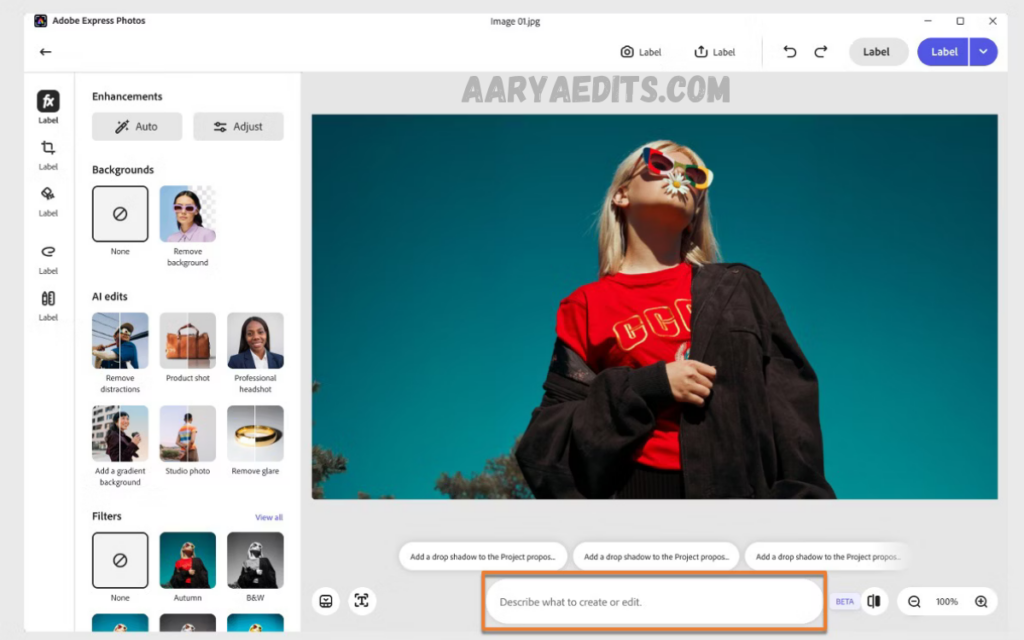
Adobe Express
Adobe Express brings Adobe’s powerful AI capabilities into a simplified platform designed for beginners. It includes AI-based photo enhancement, background removal, and template-driven design tools.
The platform is especially useful for users who want professional-looking results without having to learn complex software like Photoshop. Adobe Express integrates seamlessly with Adobe’s ecosystem, making it a reliable choice for long-term use.
Picsart AI Photo Editor
Picsart is a feature-rich AI photo-editing app that includes tools such as an AI background changer, object removal, and artistic filters. It is particularly popular among social media creators and influencers.
The app combines creative editing tools with AI automation, allowing beginners to produce eye-catching visuals quickly. Its mobile-first design makes editing on the go convenient.
PhotoRoom AI Photo Editor
PhotoRoom specializes in AI-powered background removal and product photo editing. It is widely used by e-commerce sellers and content creators who need clean, professional visuals.
The AI automatically detects subjects and removes backgrounds with high accuracy. Beginners can easily replace backgrounds, add shadows, or create product mockups without any design experience.
Clipdrop AI Photo Editor
Clipdrop is an AI-powered tool designed for fast image editing and content creation. It offers features like background removal, image upscaling, and object cleanup using advanced AI models.
Developed with simplicity in mind, Clipdrop allows users to edit images in seconds. Its real-time processing makes it ideal for beginners who want quick, high-quality results without manual adjustments.
Read Also: PicsArt Trending Editing Styles 2026
Best AI Image Generator Online Tools for High-Quality Image Creation in 2026
Remini AI Photo Enhancer
Remini is known for its powerful AI enhancement technology that improves image clarity, sharpness, and detail. It is especially effective for restoring old or low-quality photos.
The app uses deep learning algorithms to upscale images and enhance facial details. Beginners can use it with just one tap, making it one of the simplest yet most powerful AI photo enhancers available.
Photopea AI Photo Editor
Photopea is a free browser-based alternative to Photoshop that supports advanced editing and AI-assisted features. It works with PSD files and provides layer-based editing for more control.
Although it is more advanced than typical beginner tools, its interface is familiar to Photoshop users. AI-powered plugins and features make it a flexible option for users who want both simplicity and depth.
BeFunky AI Photo Editor
BeFunky offers a wide range of AI-powered editing tools, including photo enhancement, background removal, and portrait retouching. It is designed for users who want quick edits without complexity.
The platform is especially popular for creating social media graphics and artistic edits. Its AI tools help beginners achieve polished results with minimal effort.
How to Choose the Best AI Photo Editor
Choosing the right AI photo editor depends on your goals and experience level. Beginners should prioritize tools with simple interfaces, one-click editing, and strong automation features.
If you focus on social media content, tools like Canva or Picsart are ideal. For product photography, PhotoRoom or Clipdrop may be better suited. Understanding your needs helps you select the most efficient tool.
Benefits of Using AI Photo Editors
AI photo editors save time by automating complex editing tasks such as background removal, color correction, and image enhancement. This allows beginners to achieve professional results without technical skills.
They also improve accessibility by eliminating the need for expensive software or training. Most tools offer free versions, making them perfect for beginners exploring digital editing.
Common Mistakes Beginners Should Avoid
One common mistake is overusing AI filters, which can make images look unnatural. Beginners should aim for balance rather than excessive enhancement.
Another mistake is relying on a single tool for all tasks. Different AI editors specialize in different features, so combining tools often produces better results.
Future of AI Photo Editing
AI photo editing is rapidly evolving, with new features like generative fill, real-time enhancement, and automated design becoming standard. These advancements will continue to simplify creative workflows.
For beginners, this means even easier access to professional-quality editing tools. As AI improves, the gap between amateur and professional editing will continue to shrink.
Frequently Asked Questions
What is the best free AI photo editor for beginners?
Canva and Pixlr are among the best options due to their ease of use and powerful AI features.
Are AI photo editors really free?
Many AI photo editors offer free versions, but some advanced features may require a paid upgrade.
Can I use AI photo editors on mobile?
Yes, most tools like Picsart, Fotor, and Remini are available on mobile devices.
Do AI photo editors reduce image quality?
No, most modern AI tools enhance or maintain image quality, especially when upscaling or retouching.
Which AI tool is best for background removal?
PhotoRoom and Clipdrop are highly effective for accurate background removal.
Do I need editing experience to use AI photo editors?
No, these tools are designed specifically for beginners with no prior experience.
Are AI photo editors safe to use?
Yes, reputable platforms like Canva, Adobe Express, and Pixlr are safe and widely used.
Conclusion
AI photo editing has made professional-quality image enhancement accessible to everyone, especially beginners. With tools like Canva, Pixlr, Fotor, and others, users can now edit images quickly without needing to learn complex software.
The Top 10 Free AI Photo Editors for Beginners listed in this guide offer a mix of simplicity, automation, and creative flexibility. Editing photos for social media, business, or personal use, these tools provide a strong starting point for your creative journey.
