

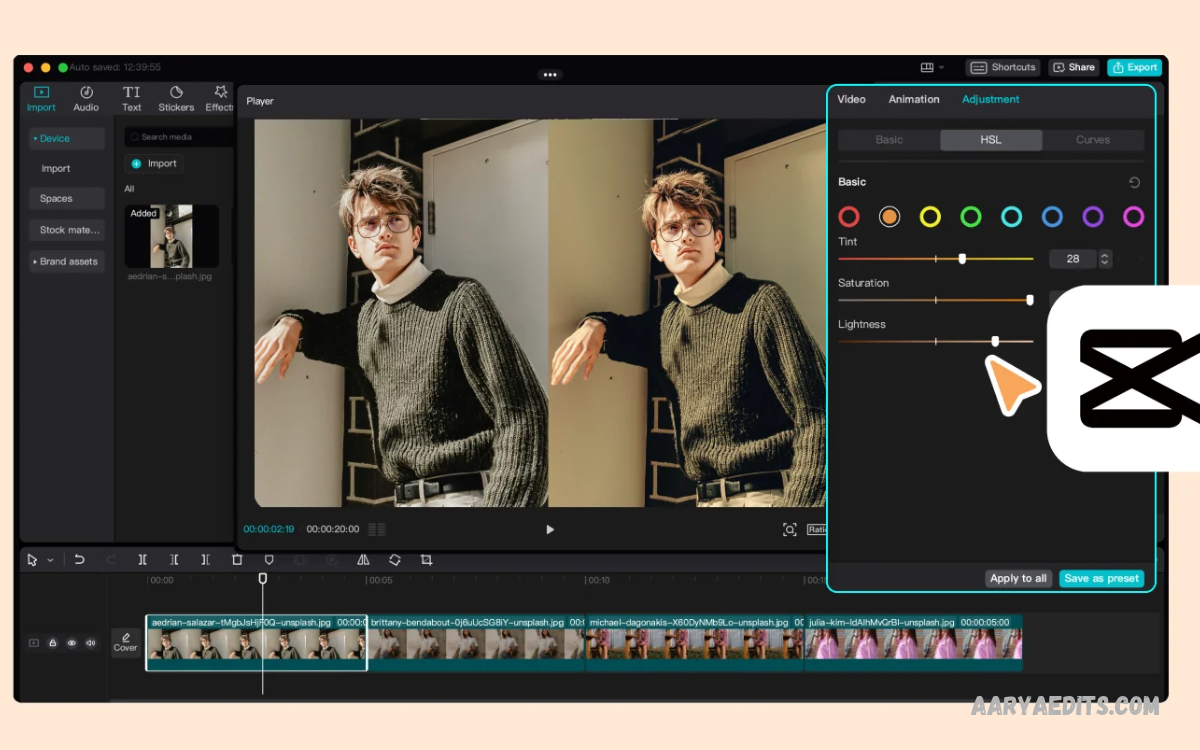
A professional Video Color Grading Guide helps creators transform ordinary footage into visually appealing videos. Color grading improves visual storytelling, creates consistent scenes, and establishes a recognizable cinematic atmosphere.
Video color grading involves adjusting colors, contrast, saturation, shadows, and highlights to achieve a specific visual style. Professional editors use these techniques to create emotional depth and visual consistency.
What Is Video Color Grading?
Video color grading is the creative process of adjusting footage colors to create a specific visual look. Editors modify brightness, contrast, saturation, temperature, and individual color tones to achieve a desired result.
Color grading also creates visual consistency across different clips. Footage recorded under changing lighting conditions may contain noticeable color differences.
Color Correction vs. Color Grading
Color correction and color grading are related editing processes, but they serve different purposes. Color correction focuses on fixing technical problems, including incorrect white balance, exposure differences, unwanted color casts, and inconsistent brightness.
Color grading focuses on creative enhancement after technical corrections. Editors introduce cinematic tones, adjust color relationships, and create specific visual moods.
Why Video Color Grading Matters
Color grading improves the overall appearance of video content by creating visual harmony and stronger storytelling. Proper color adjustments make subjects stand out, improve scene transitions, and establish a consistent atmosphere.
Another important benefit involves audience engagement. Different color combinations communicate different emotions and visual experiences. Warm tones may suggest comfort, while cooler tones can create a calm or mysterious atmosphere.
Understanding Basic Color Theory
Color theory explains how different colors interact and influence visual perception. Understanding primary, secondary, complementary, and analogous colors helps editors create balanced images.
Complementary colors sit opposite each other on the color wheel, creating strong visual contrast. Blue and orange represent a popular combination in cinematic editing. Analogous colors sit close together and create smoother visual relationships.
Understanding Exposure and Brightness
Exposure determines how much light appears in recorded footage. Proper exposure preserves important image details and creates a balanced starting point for color grading. Underexposed footage appears too dark, while overexposed footage may lose highlight information.
Editors adjust exposure through brightness controls, exposure sliders, and tonal adjustments. The goal is to maintain visible detail across shadows, midtones, and highlights. Avoid extreme adjustments because excessive brightness changes can introduce noise, washed-out colors, or unnatural visual effects.
Understanding Contrast in Video Editing
Contrast describes the difference between darker and brighter areas within an image. Increasing contrast creates stronger separation between shadows and highlights, producing a bold appearance.
Professional editors adjust contrast according to the footage and creative direction. Too much contrast can remove shadow detail and make bright areas look harsh. Balanced contrast preserves important information while giving footage sufficient depth, helping subjects remain clear and visually interesting.
Understanding Saturation and Vibrance
Saturation controls color intensity throughout an image. Increasing saturation makes colors appear stronger, while reducing saturation creates a muted appearance.
Vibrance offers a more selective approach to color enhancement. It generally increases weaker colors while protecting already strong colors and certain skin tones. Using vibrance carefully can create lively footage without producing exaggerated colors.
Understanding White Balance and Color Temperature
White balance controls how warm or cool footage appears. Incorrect white balance can introduce unwanted blue, orange, or yellow color casts. Adjusting temperature and tint helps restore natural-looking colors, making white objects appear neutral and skin tones look more realistic.
Color temperature also supports creative storytelling. Warm footage can create a comfortable, nostalgic atmosphere, while cooler footage may suggest nighttime, isolation, or a modern environment. Editors should first correct unwanted color casts before introducing creative temperature adjustments.
Essential Video Color Grading Tools
Professional color grading software offers several tools to control image appearance. Common options include color wheels, curves, waveform monitors, vectorscopes, histogram displays, and selective color adjustments.
Beginners should understand each tool’s basic function before experimenting with advanced settings. Color wheels provide direct tonal adjustments, while curves offer greater control over specific brightness and color ranges.
Best Software for Video Color Grading
Choosing suitable editing software makes color grading more accessible and efficient. Popular programs include DaVinci Resolve, Adobe Premiere Pro, Final Cut Pro, and CapCut.
DaVinci Resolve is particularly recognized for its dedicated color grading workspace and advanced correction tools. Adobe Premiere Pro offers integrated editing and color adjustment features, while Final Cut Pro provides an efficient workflow for compatible Apple devices.
How to Start Video Color Grading
Start by importing footage into your preferred editing application and organizing clips by scene. Review each clip carefully to identify exposure problems, incorrect white balance, inconsistent colors, and lighting differences.
Next, perform basic color correction before applying creative effects. Adjust exposure, white balance, contrast, and saturation gradually. Compare multiple clips to maintain consistency, then introduce a suitable creative look.
Using Color Wheels for Professional Results
Color wheels provide an effective way to control shadows, midtones, and highlights independently. Editors can introduce specific colors into different tonal ranges without changing the entire image equally. This technique adds depth and gives greater creative control over the final look.
For example, subtle cooler shadows and warmer highlights can produce an attractive cinematic style. However, color wheel adjustments should remain balanced with the original lighting conditions.
Understanding Curves in Color Grading
Curves provide advanced control over brightness and color information. A standard RGB curve allows editors to adjust shadows, midtones, and highlights by changing specific points along the curve. A gentle S-shaped curve can increase contrast while maintaining control over the overall tonal appearance.
Individual red, green, and blue curves provide additional creative flexibility. Adjusting these channels changes color relationships within different brightness ranges. Beginners should adjust gradually and monitor the image carefully, because aggressive curve changes can introduce unwanted color shifts.
Creating a Cinematic Color Grading Look
Cinematic color grading focuses on creating a consistent visual atmosphere rather than simply increasing color intensity. Editors consider lighting, contrast, skin tones, environmental colors, and each scene’s emotional direction. A successful cinematic look should support the story without distracting viewers.
Popular cinematic styles include warm highlights, cool shadows, muted colors, and controlled contrast. Some projects benefit from darker shadows and richer colors, while others require softer tones and gentle transitions. Choosing a consistent direction helps maintain a recognizable look across the entire video.
Skin Tone Correction Techniques
Natural skin tones are essential for professional-looking videos, particularly interviews, portraits, advertisements, and lifestyle content. Incorrect color adjustments can make faces appear excessively orange, red, green, or pale.
Selective color controls and secondary corrections help isolate skin tones from surrounding colors. Vectorscopes can also provide useful visual information when evaluating skin tone consistency.
Using LUTs for Video Color Grading
LUT stands for Look-Up Table. It is a color transformation file that changes footage appearance based on predefined color values. Editors frequently use LUTs to apply creative styles, establish consistent looks, or transform certain camera profiles into more familiar display colors.
LUTs can save editing time, but they should not replace proper color correction. Applying a LUT to footage with incorrect exposure or white balance may create unwanted results. Adjust the original footage first, then apply a suitable LUT and modify its intensity to achieve a balanced appearance.
Log Footage and Color Grading
Log footage is recorded using a specialized picture profile designed to preserve a wider range of tonal information. It often looks flat, low-contrast, and less saturated than standard footage.
Editors usually transform log footage into a suitable display color space before applying creative grading. Correct exposure, white balance, and proper color management matter throughout this process.
Matching Colors Across Multiple Clips
Color matching ensures that different shots maintain a consistent appearance throughout a project. Changes in lighting, camera settings, locations, and recording devices can create noticeable differences between clips.
Start by selecting a reference clip with balanced exposure and natural colors. Compare other shots using scopes, exposure controls, and white balance adjustments. Match brightness and color temperature before applying creative grading.
Read Also: Editing Skills for Instagram Growth: A Complete Guide
Common Video Color Grading Mistakes
One common mistake involves excessive saturation. Strong colors may look attractive at first, but exaggerated adjustments can reduce image quality and create unnatural skin tones.
Another mistake involves grading without checking the complete sequence. Individual clips may look attractive on their own but feel inconsistent when played together.
Video Color Grading Tips for Beginners
Beginners should start with simple adjustments instead of immediately experimenting with complicated cinematic effects. Understanding exposure, contrast, white balance, and saturation creates a strong foundation for more advanced techniques.
Use reference images to understand different visual styles and compare your results against the original footage. Make small adjustments, review changes regularly, and avoid unnecessary filters.
Video Color Grading for YouTube Content
YouTube creators can use color grading to establish a recognizable visual identity. Consistent colors help videos look more polished and create a familiar look across uploads. Educational videos, product reviews, tutorials, travel content, and entertainment projects can all benefit from balanced color adjustments.
Different YouTube categories may require different grading approaches. Travel videos often benefit from vibrant environmental colors, while educational content usually requires natural skin tones and comfortable contrast.
Video Color Grading for Social Media
Social media videos often require attractive visuals that communicate their message quickly. Platforms such as Instagram, TikTok, and YouTube Shorts feature short-form content where strong visual presentation can help capture attention.
Creators should consider platform requirements, video dimensions, and display conditions before exporting their projects. Avoid excessive color effects that reduce detail on smaller screens.
Advanced Color Grading Techniques
Advanced color grading involves selective adjustments, secondary corrections, tracking masks, film emulation, and detailed tonal control. These techniques allow editors to modify specific image areas without changing the entire frame.
Professional workflows also involve color management and scene-referred grading. These approaches help keep image interpretation consistent across cameras, editing applications, and display devices.
Export Settings for Color-Graded Videos
Export settings influence how the final video appears after editing. Important options include resolution, frame rate, codec, bitrate, and color space. Choosing appropriate settings helps preserve image quality while keeping file sizes manageable for online publishing and personal storage.
H.264 and H.265 are commonly used video codecs for digital distribution. Creators should maintain suitable color space settings and avoid unnecessary conversions during export.
Developing a Professional Color Grading Workflow
A structured workflow improves editing efficiency and makes results more consistent. Begin with footage organization, technical correction, exposure balancing, white balance adjustments, and color matching.
Save useful presets for recurring content styles, but avoid applying identical settings to footage with different lighting conditions. Maintain original project files and export test versions before completing large projects.
How to Practice Video Color Grading
Regular practice helps beginners understand how colors behave under different lighting conditions. Start with a small collection of clips recorded outdoors, indoors, and under artificial lighting. Experiment with exposure, white balance, contrast, and saturation, and watch how each adjustment affects image quality.
Create multiple versions of the same footage using different creative styles. Compare natural, cinematic, muted, and vibrant appearances to understand their visual differences. Reviewing previous projects also helps identify improvements in technique, color consistency, and creative decision-making.
Future of Video Color Grading
Video editing technology continues to introduce new tools that simplify professional workflows. Artificial intelligence features can assist with automatic color matching, scene detection, object selection, and certain correction tasks.
However, creative judgment remains important when developing a recognizable visual style. Automated tools can provide useful starting points, but they may not understand the emotional direction of every project.
Frequently Asked Questions
What Is Video Color Grading?
Video color grading is the creative process of adjusting colors, contrast, brightness, and saturation to create a specific visual appearance. It helps improve storytelling and gives videos a professional, cinematic look.
What Is the Difference Between Color Correction and Color Grading?
Color correction fixes technical problems such as incorrect exposure and white balance. Color grading adds creative colors, visual styles, and moods to make footage more attractive and consistent.
Which Software Is Best for Video Color Grading?
DaVinci Resolve is a popular choice for professional color grading. Adobe Premiere Pro, Final Cut Pro, and CapCut also provide useful color adjustment features for different editing needs.
Is Video Color Grading Difficult for Beginners?
Video color grading becomes easier when beginners understand basic concepts such as exposure, contrast, saturation, and white balance. Regular practice helps develop better editing skills.
What Are LUTs in Video Editing?
LUTs are Look-Up Tables used to transform video colors according to predefined settings. They help editors apply creative looks and maintain consistent color styles across multiple clips.
Why Is White Balance Important in Video Color Grading?
White balance helps maintain natural colors by correcting unwanted warm or cool color casts. Proper adjustments improve skin tones and make footage appear more realistic.
How Can I Create a Cinematic Color Grading Look?
Use balanced contrast, controlled saturation, natural skin tones, and complementary colors. Consistent shadows and highlights also help create an attractive cinematic appearance.
What Is the Best Color Grading Setting for YouTube Videos?
There is no universal setting for every YouTube video. Use natural skin tones, balanced exposure, suitable contrast, and consistent colors according to your content and lighting conditions.
Can I Use Color Grading on Mobile Devices?
Yes. Mobile editing applications such as CapCut offer color adjustment tools, filters, and other creative features. These tools let beginners improve video appearance directly on smartphones.
How Can I Improve My Video Color Grading Skills?
Practice with different footage, study color theory, experiment with editing tools, and compare your results with professional examples. Consistent practice helps improve accuracy and creativity.
Conclusion
This Video Color Grading Guide explains the essential techniques required to improve footage and develop professional editing skills. Understanding color correction, exposure, contrast, saturation, white balance, curves, color wheels, and LUTs creates a strong foundation for successful video production.
Professional results depend on consistency, careful adjustments, and creative decision-making. Beginners should focus on natural colors before experimenting with advanced cinematic styles.
