

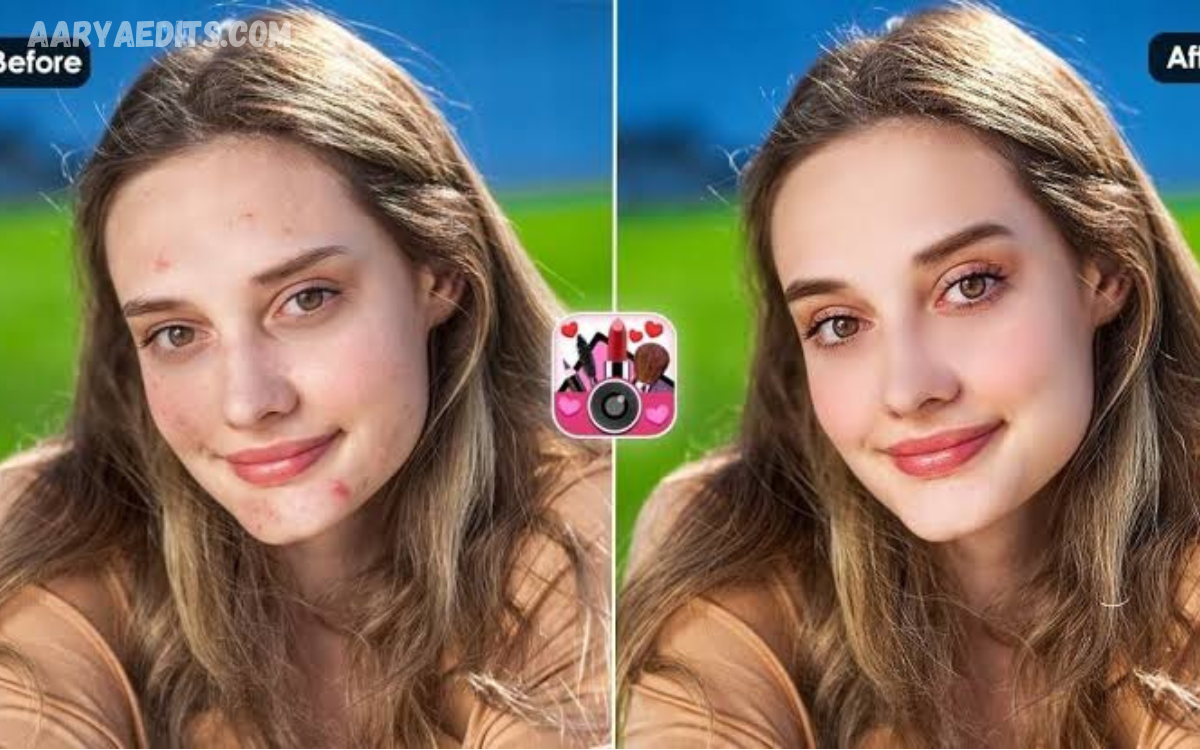
AI face retouching apps have changed the way people enhance portraits, selfies, professional headshots, and social media photos. Modern AI technology can automatically detect facial features, improve skin appearance, adjust lighting, remove minor imperfections, and create polished results within seconds.
The Best AI Face Retouching Apps for Professional Photo Enhancement combine intelligent automation with detailed editing controls. These apps help photographers, creators, influencers, businesses, and everyday users achieve professional-looking portraits without complicated editing software.
Why Is AI Face Retouching Popular?
Traditional portrait editing often requires multiple adjustments, including skin smoothing, blemish removal, exposure correction, sharpening, and color balancing. AI simplifies these tasks by recognizing facial areas and applying adjustments automatically while maintaining important details.
AI-powered retouching is also becoming popular because it saves time. Instead of manually editing every part of a portrait, users can make targeted improvements with a few adjustments. The best results usually come from subtle editing rather than excessive smoothing or unrealistic facial changes.
Features of Professional AI Face Retouching Apps
A professional AI face retouching app should offer tools to improve skin, eyes, teeth, facial lighting, and overall image quality. Automatic face detection lets the app identify key areas and apply appropriate enhancements without complex selection.
Advanced applications may also include background editing, portrait lighting, color correction, blemish removal, sharpening, and high-resolution enhancement. These features make AI retouching useful for professional photography and personal content creation.
FaceApp for AI Portrait Enhancement
FaceApp is widely recognized for its AI-based portrait editing capabilities and automated facial transformations. Its technology can modify different aspects of a portrait while offering users a simple interface for experimenting with photo enhancements.
For users who want quick portrait adjustments, FaceApp offers convenient editing options. However, professional users should keep edits subtle when creating realistic headshots or business portraits, because dramatic transformations may look unnatural.
Remini for AI Photo Enhancement
Remini focuses strongly on AI-powered photo enhancement and image restoration. It can improve the apparent clarity of portraits and help enhance older, lower-quality, or blurry photographs.
The app can help when a face needs more definition before additional retouching. Combining enhancement with careful color and skin adjustments can produce a cleaner portrait while preserving recognizable facial characteristics.
Facetune for Detailed Face Retouching
Facetune is designed around portrait and selfie editing, providing tools for detailed retouching. Users can make selective adjustments to skin, facial details, teeth, eyes, and other areas instead of applying the same effect across an entire photograph.
Its detailed approach suits users who want more control over their edits. Rather than relying entirely on automatic enhancement, creators can choose which facial areas need adjustment and how strong each effect should be.
Adobe Lightroom for Professional Portrait Editing
Adobe Lightroom provides a more photography-focused approach to portrait enhancement. Its editing workflow includes exposure, color, contrast, detail, masking, and other controls to refine professional portraits.
Lightroom is particularly useful when face retouching needs to remain natural and consistent across a collection of photographs. Photographers can combine AI-assisted selections with traditional editing controls to maintain a professional visual style.
Canva for Simple AI Photo Enhancement
Canva offers accessible photo editing features that can help creators, marketers, and social media users. Its simple interface allows users to combine portrait improvements with graphic design, layouts, text, and other visual elements.
Canva can be a practical option when a retouched portrait needs to become part of a social post, presentation, advertisement, profile graphic, or promotional design. Its broader design environment makes it useful beyond traditional face retouching.
YouCam Makeup for Beauty Retouching
YouCam Makeup focuses on beauty-oriented photo editing and offers tools to enhance facial appearance. Users can adjust skin, makeup, facial details, and other portrait elements through an easy-to-use interface.
The application can be useful for beauty creators and users experimenting with portrait styles. For professional results, controlled adjustments matter because excessive effects can reduce natural skin texture and make the photo look heavily edited.
AirBrush for Natural Portrait Editing
AirBrush is another popular option for quick portrait enhancement. It offers tools to improve selfies and portraits while letting users make selective adjustments to skin and facial features.
Its straightforward approach suits people who want fast improvements without learning advanced photo software. Users can achieve better results by applying small changes and checking the final image at full resolution.
Read Also: PicsArt Effects: A Professional Guide to Creative Photo Editing
How AI Face Retouching Improves Skin
AI skin retouching can identify areas such as blemishes, uneven tones, and temporary imperfections. Instead of manually editing every area, AI-assisted tools can apply targeted corrections while preserving important facial details.
Professional retouching should maintain natural texture. Completely removing pores, lines, or other normal characteristics can make a portrait look artificial. A balanced approach produces an image that appears cleaner while still resembling the original person.
AI Tools for Eye and Teeth Enhancement
Eyes and teeth are common areas of focus in portrait editing. AI-powered applications can help brighten eyes, improve contrast, and reduce minor distractions while maintaining the overall facial structure.
Automated editing tools can also perform teeth whitening. The most professional result is usually a moderate adjustment rather than an extremely bright appearance, because natural-looking color supports realistic portrait photography.
AI Face Retouching for Professional Headshots
Professional headshots require a different editing approach from heavily stylized social media photographs. The objective is usually to improve lighting, skin consistency, sharpness, and overall presentation without significantly changing the person’s natural appearance.
AI retouching can speed up this workflow by identifying facial areas and assisting with repetitive adjustments. Photographers can then manually refine the results to ensure that the final headshot remains authentic and suitable for professional use.
AI Retouching for Social Media Photos
Social media creators often need attractive images that can be prepared quickly. AI face retouching apps can simplify this process by combining automatic enhancement with filters, lighting adjustments, background effects, and other creative tools.
The ideal editing style depends on the platform and content type. A polished portrait can benefit from improved lighting and subtle skin correction, while excessive facial modification may reduce authenticity and consistency across a creator’s profile.
Choosing the Right AI Face Retouching App
The right app depends on the type of photos you edit and how much control you need. Someone creating occasional selfies may prefer a simple application, while a professional photographer may need detailed masking, color correction, batch editing, and high-resolution export.
Privacy should also be considered when selecting an AI editing application. Users should review an app’s permissions, privacy practices, storage policies, and how it handles uploaded photographs before processing personal or professional images.
Tips for Natural AI Face Retouching
Natural-looking retouching starts with small adjustments. Instead of maximizing every enhancement slider, users should gradually increase effects and compare the edited image with the original to determine whether the changes remain realistic.
Consider lighting and color before applying heavy skin effects. A properly balanced portrait often needs less retouching because good exposure, accurate color, and sharp focus already provide a strong foundation for professional enhancement.
AI Face Retouching for Photographers
Photographers can use AI tools to reduce repetitive editing tasks and improve workflow efficiency. Automated facial detection and enhancement can be particularly useful when processing large portrait collections or preparing images for clients.
Treat AI as an editing assistant, not a replacement for professional judgment. Photographers still need to evaluate skin texture, lighting, composition, color, and consistency to ensure that final images meet their intended quality standards.
Benefits of AI Face Retouching Apps
AI face retouching applications can significantly reduce editing time and make advanced enhancement techniques accessible to beginners. When used carefully, automated tools can also help users achieve consistent results across different photographs.
Another advantage is flexibility. Many applications combine facial retouching with broader photo-editing features, letting users improve portraits, adjust backgrounds, correct colors, and prepare images for different platforms in one workflow.
Common Mistakes to Avoid
One of the most common mistakes is excessive skin smoothing. When you remove too much texture, the face can look plastic or unrealistic. Professional retouching generally works best when natural details remain visible.
Another mistake is changing facial proportions too aggressively. AI applications may provide powerful transformation features, but professional photo enhancement usually benefits from preserving the person’s recognizable appearance and making only purposeful corrections.
Frequently Asked Questions
What is AI face retouching?
AI face retouching uses artificial intelligence to identify facial areas and automatically assist with improvements such as skin correction, lighting, blemish removal, eye enhancement, and other portrait adjustments.
Which app is best for professional face retouching?
The right app depends on your editing needs. Detailed tools such as Facetune and Lightroom can provide greater control, while simpler apps can be more convenient for quick portrait enhancements.
Can AI retouching make photos look natural?
Yes, AI retouching can produce natural results when you apply adjustments moderately. Maintaining skin texture and avoiding excessive facial changes are key to realistic portraits.
Is AI face retouching useful for professional headshots?
Yes. AI can help improve skin consistency, lighting, clarity, and minor imperfections in headshots. Professional users should review the automated result and make additional adjustments when necessary.
Can AI remove facial blemishes?
Many AI-powered photo editors can identify and reduce temporary blemishes and other minor imperfections. You can often control the amount of correction to preserve natural facial detail.
Can AI improve blurry face photos?
Some AI enhancement applications can improve the apparent clarity of low-quality portraits. Results depend on the original image because severe blur or missing image information cannot always be completely restored.
Is AI retouching suitable for social media?
Yes. AI retouching can help creators quickly prepare polished portraits. Subtle enhancements generally work better when the goal is to maintain a natural, authentic appearance.
Does AI retouching change facial features?
Some applications offer tools that can modify facial features or proportions. These effects are different from basic retouching and should be used carefully when a realistic portrait is required.
What should photographers consider before using AI editing apps?
Photographers should consider image quality, editing controls, export resolution, workflow compatibility, privacy practices, and how the application processes uploaded photographs.
How can I make AI retouched photos look realistic?
Use moderate adjustments, preserve natural skin texture, avoid excessive whitening or reshaping, and compare the edited photograph with the original before exporting the final image.
Conclusion
The Best AI Face Retouching Apps for Professional Photo Enhancement provide convenient tools for improving portraits, headshots, selfies, and creative photography. Applications such as FaceApp, Remini, Facetune, Lightroom, Canva, YouCam Makeup, and AirBrush offer different approaches to automated and controlled photo enhancement.
Professional results depend not only on the app but also on how you use the tools. Subtle corrections, preserved skin texture, balanced lighting, and natural facial details can create polished photographs without making them appear overly processed.
