

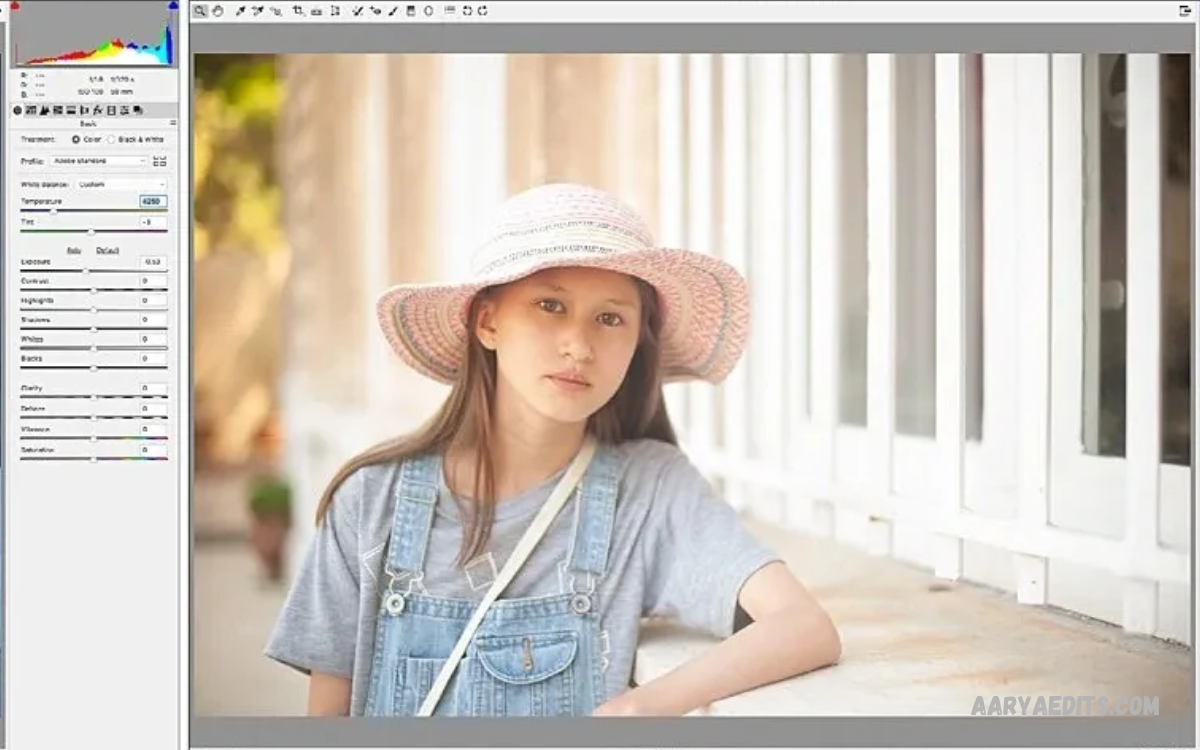
Photo editing transforms ordinary pictures into attractive, professional-looking images. Beginners can learn simple editing techniques to improve brightness, colors, contrast, sharpness, and overall image quality.
Photo Editing Tricks for Beginners help new editors understand essential tools without requiring advanced technical knowledge. With regular practice, anyone can develop creative skills and produce impressive photographs using a smartphone or computer.
Understanding the Basics of Photo Editing
Photo editing involves improving an image through different adjustments and creative techniques. Basic editing tools include brightness, contrast, exposure, saturation, highlights, shadows, temperature, and sharpness.
Beginners should understand these adjustments before exploring advanced effects. Learning how each tool changes an image makes editing easier and helps create balanced photographs without unnecessary modifications.
Choose the Right Photo Editing App
Selecting a suitable editing application is an important first step for beginners. A good application should offer simple controls, essential adjustment tools, useful filters, and an easy-to-understand interface.
Popular options include Snapseed, Lightroom Mobile, PicsArt, and Photoshop Express. Each app offers different features, letting beginners experiment with editing styles and find tools that match their creative interests.
Start with Basic Brightness Adjustments
Brightness controls a photograph’s overall light level. Increasing brightness can improve dark images, while reducing it can help manage overly bright areas and maintain visible details.
Beginners should make small adjustments instead of applying extreme changes. Balanced brightness creates natural-looking photographs and helps preserve important details throughout different areas of an image.
Improve Photo Contrast
Contrast controls the difference between light and dark areas in a photograph. Increasing contrast can make images look more defined, while reducing it creates a softer look.
A moderate contrast adjustment can improve photographs without making shadows excessively dark. Beginners should experiment with different settings until the subject remains clear and the overall image looks balanced.
Adjust Exposure for Better Results
Exposure determines how much light appears in a photograph. Correct exposure helps maintain visible details, making the subject easier to recognize and improving the overall appearance of an image.
Underexposed photographs may appear too dark, while overexposed images can lose important highlights. Beginners can use exposure controls to correct lighting problems and create more balanced results.
Use Saturation Carefully
Saturation controls the intensity of colors in a photograph. Increasing saturation makes colors stronger, while decreasing it produces a softer appearance with less intense color.
Excessive saturation can make photographs look unnatural, especially in portraits, landscapes, or food photos. Beginners should apply moderate adjustments to maintain realistic colors and attractive visual results.
Learn How to Adjust Highlights and Shadows
Highlights control the brightest areas of an image, while shadows affect its darker sections. These tools help recover detail and create better balance across different lighting conditions.
Reducing highlights can improve bright areas, while increasing shadows can reveal details in darker sections. Beginners should adjust both settings carefully to keep lighting natural and avoid flat-looking photos.
Improve White Balance and Color Temperature
White balance helps keep colors accurate under different lighting conditions. Incorrect white balance can make photos look unusually yellow, blue, or orange, changing their original appearance.
Color temperature adjustments help correct these unwanted tones. Beginners can experiment with warmer and cooler settings to create a natural appearance that matches the lighting and atmosphere of each photograph.
Use Filters Without Overediting
Filters provide quick ways to change the appearance of photographs. They can create vintage effects, cinematic colors, soft tones, black-and-white images, and other creative styles.
However, applying strong filters can hide important details and reduce image quality. Beginners should choose subtle filters and adjust their intensity to preserve the photograph’s original character.
Crop Photos for Better Composition
Cropping removes unwanted areas from a photograph and improves the arrangement of visual elements. It helps focus attention on the main subject while removing unnecessary distractions around the edges.
Beginners should experiment with different aspect ratios, including square, portrait, and landscape formats. Proper cropping creates cleaner compositions and makes photographs more suitable for social media, websites, and personal collections.
Straighten Crooked Photographs
A slightly tilted photograph can make an otherwise attractive image look poorly composed. Straightening tools help correct uneven horizons, tilted buildings, and other alignment problems.
Beginners should pay attention to horizontal and vertical lines when editing photographs. Correct alignment creates a cleaner look and helps viewers focus on the main subject without unnecessary distractions.
Apply the Rule of Thirds
The rule of thirds is a basic photography technique that divides an image into nine equal sections. Placing important subjects near the intersecting points can create more balanced and interesting compositions.
Many editing applications provide grid overlays that help beginners understand this technique. Experimenting with different subject positions can improve visual storytelling and make photographs more engaging.
Remove Unwanted Objects from Photos
Object removal tools help eliminate unwanted distractions from photographs. These features can remove small background objects, dust spots, or other minor elements that affect the overall composition.
Beginners should use object removal carefully and inspect the edited area after making changes. Complex backgrounds may require additional adjustments to prevent visible editing marks or unnatural textures.
Improve Photo Sharpness
Sharpness makes image details appear more defined. When applied correctly, it can improve the visibility of textures, edges, and important subject features.
Too much sharpening can introduce unwanted noise and create rough-looking edges. Beginners should use moderate settings and compare the edited image with the original to maintain natural image quality.
Reduce Noise in Low-Light Photos
Image noise appears as unwanted grain or color variations, especially in low-light photos. Noise reduction tools help create cleaner images while preserving important details.
Beginners should avoid applying excessive noise reduction because it can make photographs look soft. A balanced adjustment can improve image clarity without removing natural textures and fine details.
Use Selective Editing Tools
Selective editing allows users to adjust specific areas instead of changing the entire photograph. These tools are useful when one part of an image needs different brightness, contrast, or color settings.
For example, beginners can brighten a subject while keeping the background unchanged. Selective adjustments provide greater control and help create professional-looking results with simple editing techniques.
Experiment with Background Blur
Background blur creates visual separation between the main subject and surrounding elements. It can make portraits, product photos, and other images look more focused and visually appealing.
Some editing applications provide blur tools that simulate a shallow depth-of-field effect. Beginners should apply these effects gradually and check subject edges to avoid unnatural transitions between foreground and background.
Learn Basic Portrait Editing
Portrait editing focuses on improving photographs of people while maintaining their natural appearance. Basic adjustments include balanced exposure, accurate colors, gentle contrast, and appropriate background corrections.
Beginners should avoid excessive smoothing or unrealistic effects. Natural portrait editing preserves original details and creates clean, balanced, visually appealing photos.
Enhance Landscape Photography
Landscape editing improves photographs of mountains, beaches, forests, buildings, and outdoor environments. Adjusting contrast, highlights, shadows, and color temperature can make landscape images more visually expressive.
Beginners should focus on keeping environmental colors realistic. Moderate saturation and careful exposure adjustments can improve natural scenery without creating artificial-looking photographs.
Edit Food Photography
Food photography benefits from balanced lighting, accurate colors, and clear details. Small adjustments to exposure, white balance, contrast, and sharpness can make dishes appear more visually appealing.
Beginners should avoid excessive saturation because unrealistic food colors can reduce image quality. Natural editing helps preserve the original appearance of ingredients while improving the overall composition.
Create Attractive Social Media Photos
Social media photographs often benefit from consistent colors, clean compositions, and suitable dimensions. Beginners can develop a recognizable editing style by using similar brightness, contrast, and color settings across multiple images.
Different platforms support different image formats and display sizes. Before exporting, beginners should check the intended platform’s requirements to maintain proper framing and avoid unwanted cropping.
Understand Color Grading
Color grading involves adjusting colors to create a particular atmosphere or visual style. Warm tones can create a cozy appearance, while cooler tones may produce a calm or cinematic atmosphere.
Beginners can experiment with color grading tools such as hue, saturation, luminance, and color curves. Understanding these controls helps develop creative skills and makes it easier to produce consistent photographs.
Use Curves for Better Color Control
Curves provide advanced control over brightness and contrast across different tonal ranges. They let editors modify shadows, midtones, and highlights with more precision than basic adjustment sliders.
Beginners may find curves challenging initially, but simple experiments can make the tool easier to understand. Small adjustments are usually sufficient to improve contrast and create a balanced image.
Explore Presets for Faster Editing
Presets are saved editing settings you can apply to photographs quickly. They help beginners experiment with different visual styles without adjusting every setting manually.
However, one preset may not work equally well for every photograph. Lighting, camera settings, and original colors can affect the final result, so beginners should customize presets when necessary.
Learn the Importance of Image Resolution
Image resolution determines how much visual detail a photograph contains. Higher-resolution images generally provide more flexibility for cropping, printing, and displaying photographs at larger sizes.
Beginners should avoid repeatedly saving images at reduced quality. Keeping an original copy allows future editing and helps preserve important details during different stages of the editing process.
Choose the Correct Image Format
Image formats affect file size, compatibility, and image quality. JPEG works well for everyday photographs, while PNG is useful for graphics that require transparency or specific image-quality characteristics.
Some editing applications also support RAW files, which contain additional image information for advanced adjustments. Beginners can explore different formats as their photography and editing experience improves.
Read Also: PicsArt AI Editing Tutorial: Create Stunning Photos with AI Tools
Avoid Common Photo Editing Mistakes
A common beginner mistake is applying too much brightness, saturation, sharpening, or contrast. These adjustments can reduce natural appearance and make photographs look heavily processed.
Another mistake involves ignoring composition and lighting problems. Beginners should review the full image before exporting and make only the changes needed to improve its overall appearance.
Develop a Consistent Editing Style
A consistent editing style helps photographs maintain a recognizable appearance. Beginners can develop this style by experimenting with similar color tones, lighting adjustments, contrast levels, and compositions.
Consistency does not mean applying identical settings to every photograph. Instead, it involves using a familiar visual approach while adapting adjustments to the lighting and subject of each image.
Practice Editing with Different Types of Photos
Practicing with different photographs helps beginners understand how editing tools work under various conditions. Portraits, landscapes, architecture, food, and product images each require different adjustments.
Regular practice also improves decision-making and creative confidence. Beginners should experiment with multiple editing approaches and compare results to understand which techniques produce the most effective improvements.
Compare Edited Photos with Original Images
Comparing edited photographs with original versions helps you see whether adjustments improved the image. Many editing applications offer before-and-after previews to review changes.
Beginners should use this feature throughout the editing process. It prevents unnecessary changes and makes it easier to recognize when an image looks balanced and natural.
Save Original Photos Before Editing
Keeping original photographs is an important habit for every beginner. An untouched copy provides an opportunity to restart the editing process whenever adjustments become excessive or an alternative style is required.
Many applications support non-destructive editing, which stores changes separately from the original image. This approach provides greater flexibility and helps protect valuable photographs from unwanted permanent modifications.
Export Photos with the Right Settings
Export settings influence the final appearance and file size of edited photographs. Beginners should choose a suitable resolution, quality, and file format based on each image’s intended use.
For online sharing, JPEG is often suitable, while other formats may suit specific design requirements. Reviewing the exported photo helps you catch unwanted quality changes before sharing or publishing.
Build an Efficient Photo Editing Workflow
A simple editing workflow makes the process easier and reduces unnecessary adjustments. Beginners can start with cropping, exposure correction, white balance, contrast, and basic color improvements.
After completing these steps, they can apply selective edits, sharpening, and creative effects when needed. Following a consistent process saves time and helps maintain better results across different photographs.
Explore Advanced Editing Features Gradually
Once beginners understand basic adjustments, they can explore advanced features such as masking, curves, layers, healing tools, and selective color correction. These tools provide additional creative control over individual image elements.
Learning advanced features gradually prevents confusion and builds a stronger foundation. Beginners should focus on understanding one tool at a time before combining multiple techniques in a single editing project.
Photo Editing Tricks for Beginners on Smartphones
Smartphones provide convenient access to powerful editing applications and creative tools. Users can adjust lighting, improve colors, crop photographs, remove distractions, and apply filters directly from their mobile devices.
Beginners should explore the built-in editing features before installing additional applications. Understanding the available tools simplifies the editing process and makes everyday photography more enjoyable.
Photo Editing Tricks for Beginners on Computers
Computer-based editing offers a larger workspace and more control for detailed adjustments. Desktop applications often include advanced features for layers, masking, color grading, and professional image correction.
Beginners can start with simple editing programs before exploring more complex software. A comfortable workflow and clear understanding of basic tools matter more than using the most advanced application available.
How to Improve Photo Editing Skills
Improving editing skills requires patience, experimentation, and regular practice. Beginners can choose one photograph each day and experiment with brightness, contrast, cropping, colors, and other essential adjustments.
Studying original and edited photographs can also improve visual understanding. Over time, beginners get better at spotting lighting problems, correcting colors, and choosing the right techniques for different photography styles.
Frequently Asked Questions
What Are Photo Editing Tricks for Beginners?
Photo editing tricks for beginners are simple techniques that improve image quality and appearance. They include brightness correction, cropping, contrast adjustment, color enhancement, sharpening, and basic filters.
Which Photo Editing App Is Best for Beginners?
Snapseed, Lightroom Mobile, PicsArt, and Photoshop Express are popular beginner options. Each app offers useful editing features and an interface that supports learning different photography techniques.
How Can Beginners Make Photos Look Professional?
Beginners can improve photographs by correcting exposure, adjusting white balance, improving contrast, and removing unnecessary distractions. Natural adjustments and balanced compositions help create professional-looking results.
Is Photo Editing Difficult to Learn?
Photo editing is relatively easy to learn once you understand the basic tools. Regular practice and experimentation help beginners build skills and feel more comfortable with different applications.
How Can I Improve Photo Quality?
Improving photo quality involves correcting brightness, exposure, contrast, sharpness, and color balance. Using original high-resolution photographs also helps preserve important image details.
What Is the Difference Between Brightness and Exposure?
Brightness changes an image’s overall light appearance, while exposure relates to the amount of light captured during photography. Both controls can help correct lighting problems during editing.
How Can I Remove Unwanted Objects from Photos?
Many editing applications include healing, object removal, or cleanup tools. These features can remove small distractions and improve image composition when used carefully.
Should Beginners Use Photo Editing Filters?
Beginners can use filters to experiment with different photography styles. However, reducing filter intensity often produces more natural and visually balanced photographs.
How Can I Edit Photos Without Losing Quality?
Beginners should preserve original photographs, avoid unnecessary repeated compression, and select suitable export settings. Using high-quality source images also helps maintain important details.
How Long Does It Take to Learn Photo Editing?
Basic photo editing can be learned through regular practice and experimentation. Advanced techniques take more experience, but beginners can start creating attractive photos with simple adjustments.
Conclusion
Photo Editing Tricks for Beginners provide a practical starting point for anyone interested in improving photography. Understanding brightness, contrast, exposure, cropping, saturation, and white balance makes editing easier and more effective.
Beginners don’t need expensive equipment or complicated software to build creative skills. With the right apps, consistent practice, and natural adjustments, anyone can learn to create attractive photos and gradually improve their editing skills.
